Practical guides for office managers building better hybrid workplaces. Learn how to optimize space utilization, automate operations, and support distributed teams.
Oops! Something went wrong while submitting the form.
Visitor Management
Visitor Management System: What It Is and How It Works
A visitor management system replaces the paper sign-in sheet with a digital process that screens, logs, and tracks every guest who enters your office. It captures who's on-site, notifies the host, and creates a searchable record for security and compliance reviews. For growing offices, this single change closes a security gap most reception desks still carry today.
A visitor management system digitizes guest check-in, replacing paper logs with pre-registration, badge printing, host notifications, and a searchable visitor record.
✓
Visitor management software reduces front-desk workload while creating the audit trail organizations need for security screening and regulatory compliance.
✓
A standalone visitor tracking system solves check-in but leaves desk booking, room booking, and office data in separate tools, creating gaps in a company's overall presence picture.
✓
PULT combines visitor management with real-time presence, desk and room booking, and emergency response in one platform, so security teams see who's on-site, employees and visitors alike, from a single source of data.
What Is a Visitor Management System?
A visitor management system is software that replaces the manual guest sign-in process with a digital, trackable one. It records a visitor's details, their arrival and departure, and notifies the employee they're there to see, all without a paper logbook at the front desk.
Companies adopt one for three reasons: security, compliance with regulations like GDPR, and a faster, more professional check-in experience for guests.
Standalone check-in tools handle the front desk in isolation. Platform-based visitor management, like PULT's, feeds that same data into a company's broader presence and office management system, so security teams see visitors and employees in one place.
What Does a Visitor Management System Do?
A visitor management system replaces manual sign-in with a digital workflow that handles the entire guest experience, from pre-registration to check-out. It records a visitor's details, notifies the right host, can issue a badge, and stores visits in a searchable log. Visitor management software runs this process on a tablet, kiosk, or mobile phone instead of a clipboard.
Core Features of a Modern Visitor Management System
✓
Pre-registration and invites: hosts send a visitor a link before arrival, with the visit details and parking or building information included.
✓
Self-service check-in: guests confirm their name, host, and purpose at a kiosk or tablet in under a minute.
✓
Optional ID and watchlist screening: depending on the platform, the system can check visitor IDs or flag names against a security or denied-entry list before a badge is issued.
✓
Badge printing and QR codes: guests can receive a visible, time-stamped credential that identifies them for that day's visit.
✓
Host notifications: the employee being visited gets an instant alert by email, Slack, or Teams, with the guest's details and, if enabled, a photo.
✓
NDA and agreement signing: legal documents are signed digitally during check-in, with a copy stored automatically for compliance records.
✓
Visitor logs and reporting: every visit is timestamped, searchable, and exportable, so front-desk trends are easy to review monthly.
✓
Emergency roll-call export: the current visitor list can be pulled during an evacuation, showing who is recorded as still in the building.
Visitor Management Software vs. a Paper Logbook
Criterion
Paper Logbook
Visitor Management Software
Data accuracy
Illegible entries, missing fields
Structured, mandatory fields
Security screening
None
Watchlist and ID checks
Emergency roll call
Manual count from paper
Instant, exportable list
Compliance records
Hard to search or retire
Searchable, with retention rules
How Does the Visitor Journey Work, From Invite to Check-Out?
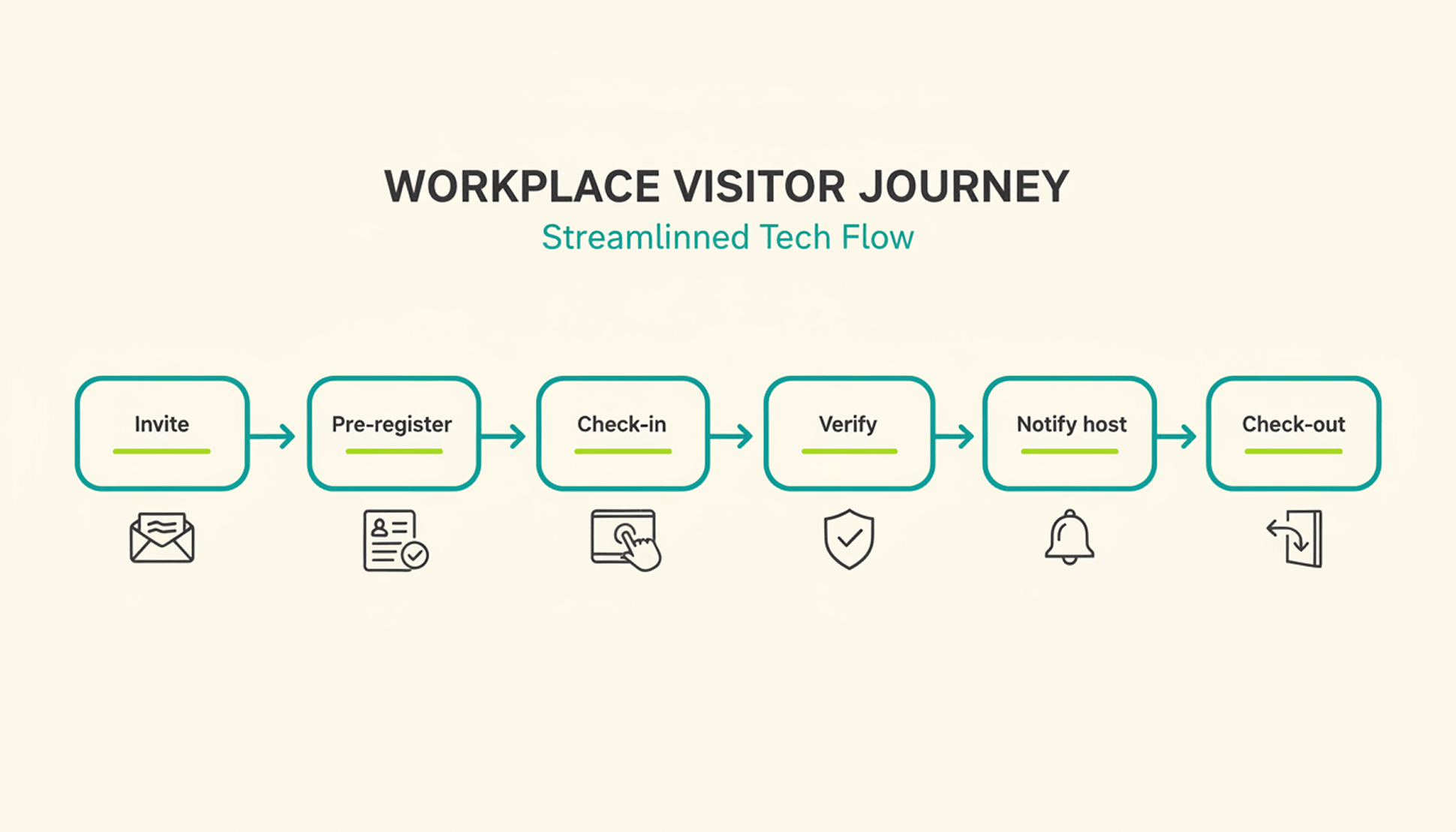
A typical visit runs through six steps. The host sends an invite, the visitor pre-registers, the visitor confirms their details on arrival, a badge can be issued, the host gets notified, and the system records check-out when the visitor leaves or at a configured time.
1
Pre-registration: the host schedules the visit and sends a link with arrival details, parking instructions, and building access notes.
2
Arrival and check-in: the visitor confirms their details at a kiosk or on a tablet or their own phone, usually in under a minute.
3
Optional identity and watchlist verification: depending on the platform and configuration, additional ID or security-list checks can be performed before building access is granted.
4
Badge issuance: a printed or digital badge identifies the visitor for the building and can be limited to that day's visit.
5
Host notification: the employee being visited receives an instant alert to come to reception, with the visitor's name and, if enabled, photo.
6
Check-out and logging: the visitor checks out on departure, or the system can close the visit automatically at a configured time, keeping the record administratively up to date.
What Are the Benefits of a Visitor Management System for the Office?
The clearest benefit is a complete, searchable record of who was on-site and when, something a paper log or verbal check-in can't provide.
Security and Compliance Benefits
A visitor management system can screen guests against a watchlist before they reach the office floor, depending on the platform and configuration. It can keep a timestamped log of visits for security and compliance reviews. Under GDPR, visitor data counts as personal data, so it needs a lawful basis for collection, an appropriate retention period or criteria for determining it, and safeguards against unauthorized access. A digital system can support these controls directly in the check-in process, reducing reliance on manual steps.
Visitor accountability also matters during an emergency. OSHA guidance notes that visitors need to be accounted for after an evacuation, and many employers use the sign-in list to run that headcount. A missing name on that list can delay an all-clear by several minutes, minutes that matter during a real evacuation.
Because PULT Presence tracks employees and visitors in one live view, a facilities team can pull an accurate roll call the moment an alarm sounds, not after searching through a paper binder.
Front-Desk Efficiency and Visitor Experience Benefits
Automated check-in cuts the time your team spends on manual sign-in, badge writing, and phone calls to announce a guest. A receptionist freed from clipboard duty can focus on greeting visitors and other front-desk work. Visitors move through reception faster, often in under a minute, and the first impression of your office improves the moment someone walks in the door. For client meetings or investor visits, that faster, more polished check-in becomes part of how your company presents itself.
How Do You Choose the Right Visitor Management Solution?
The right visitor management solution depends less on feature count and more on how well it fits your existing security setup, office size, and tool stack. A system built for a five-person startup office looks very different from one built for a 500-person campus with multiple buildings and a dedicated security team.
Calendar, HR, and communication tools your team already uses
Security and compliance
Data retention controls, audit logs, GDPR-aligned handling
Scalability
Pricing and setup across multiple locations
Price
Per-location vs. per-user pricing models
Ease of use
Kiosk setup time and how quickly staff can learn the system
Is a Standalone Visitor Management Platform Enough for a Modern Office?
A standalone visitor management platform solves the front-desk problem, but most offices also run desk booking, room booking, and parking through separate tools. Connecting these systems into one platform gives security and facilities teams a single, live view of who is on-site, employees and visitors together.
That connection matters most during a security incident or an office move, when facilities teams need one current view of occupancy rather than four separate logins to check. PULT pairs visitor management with desk booking software, room booking, and presence data, so a single dashboard shows recorded on-site employees and visitors. Office managers evaluating a broader workplace management software setup typically start here, since visitor data becomes far more useful once it's connected to the rest of the office.
{{onpage-cta}}
Turn Visitor Check-In Into a Security Advantage
A visitor management system turns a vulnerable front desk into a controlled entry point, giving you a searchable record of who checked in and when. The real payoff comes when it connects to the rest of your office, from desk booking to real-time presence data, giving you one live picture of recorded on-site users. For growing offices, that visibility is worth seeing in action.
✓
Visitor check-in, desk booking, room booking, and presence data live in one platform, so you manage all of it from a single login.
✓
A real-time view shows who is on-site, employees and visitors together, for faster emergency roll calls.
✓
Every visit is recorded in a searchable log, with records available for security and compliance reviews.
✓
Microsoft Teams and Slack support visitor notifications, while Personio and HiBob connect employee data through built-in integrations.
{{onpage-cta-2}}
Hybrid Work
This is mobile working | For companies
Mobile working offers flexibility and improves productivity and work life balance. Teams can work effectively from home, in a café or even abroad with the right setup.
Mobile working: Definition, differences to home office and legal issues
58% of all German companies now allow mobile working, whether from the office, in the home office, on the road or even abroad. In this article, you will find out how mobile working works today in legal, technical and practical terms.
{{hint-box}}
What is mobile working?
Mobile working is the ability to perform work from any location, usually with the help of a laptop, smartphone and internet connection. Mobile working can completely or partially replace presence in the company.
In contrast to traditional office work, there is not necessarily a fixed workplace in the company. In hybrid models, several employees often share a desk in the office at different times, as they otherwise work remotely.
As a rule, no specific work location is prescribed for mobile working. The only requirements are that there is a connection to the company, availability is ensured and the assigned tasks are completed.
What is the difference between home office and mobile working?
Mobile working is distinguished from the term home office in that home office generally refers to working from home. In fact, home office is a special case of teleworking.
In Germany, teleworking is formally defined (Section 2 (7) of the Workplace Ordinance) as a workstation permanently set up by the employer in the employee's private area. For this purpose, a fixed work location (usually the employee's own home) is contractually agreed and equipped with office furniture and technology by the employer.
Teleworking/home office is subject to the strict requirements of the Workplace Ordinance and occupational health and safety regulations; for example, ergonomic furniture must be provided and a risk assessment of the home workplace must be carried out.
Mobile working, on the other hand, is not regulated by the Workplace Ordinance. It mainly takes place outside fixed workspaces, in changing locations, and there is no legal definition for it.
In short: home office (teleworking) means working at a clearly defined location (the home office) with appropriate equipment provided by the employer, whereas mobile working offers a free choice of location.
Important: Even if no fixed office regulations apply to the workplace for mobile working, the general labour laws remain fully applicable. These include, for example, the Working Hours Act (ArbZG) with maximum working hours, rest breaks and the ban on working on Sundays. The Occupational Health and Safety Act also applies, i.e. the employer has a duty of care and must also protect the health of its employees during mobile working.
What legal regulations apply to mobile working?
There is currently no legal entitlement to mobile working (or home office) in Germany. This means that employees can express the wish to work from home or from other locations, but the employer decides voluntarily whether to allow this.
The employer may also informally reject a request for mobile working without giving reasons. In practice, however, many companies allow home office arrangements and mobile working in order to be more attractive to skilled workers and increase employee satisfaction.
Mobile working in the coalition agreement
In the coalition agreement of the last German government (20th legislative period, 2021-2025), it was agreed to introduce a "discussion entitlement" for mobile working. According to this, employees in suitable jobs should be entitled to negotiate home office/mobile working.
The employer would then only be allowed to refuse a request if there are operational reasons to the contrary and arbitrary refusals would be inadmissible. However, as of July 2025, there is still no specific law on this.
The following therefore still applies: Anything that is not regulated by a collective agreement, works agreement or employment contract remains a matter for negotiation between employer and employee. Employers are not obliged to allow their employees to work from home, nor can employees unilaterally insist on this. Conversely, the following also applies: employers cannot simply force their employees to work from home without a corresponding agreement. Both sides must agree.
What working hours apply to mobile working?
The statutory working hours must be observed for mobile working. The following applies:
A maximum of 8 hours per working day (up to 10 hours in exceptional cases)
At least 11 hours of rest between two working days
Overtime and work on Sundays and public holidays are only permitted within narrow limits
The employer may not demand constant availability outside of working hours
In practice, time recording in particular poses a challenge: Employers are obliged to provide a reliable system for recording working hours that also works for mobile working. As a rule, time recording software or trust-based working time with independent recording is used here. It is important that overtime and breaks are documented in a traceable manner, also for health and safety reasons.
Accident and insurance cover for mobile working
Since the Company Reform Act 2021, extended accident insurance cover has been in place for mobile working and working from home. Accidents at work in the home office or while travelling as part of mobile working are now insured in the same way as at work.
This means that if someone is injured while working at home or on the direct route to nursery school to drop off their child before starting work, statutory accident insurance covers them in the same way as if they were in the office.
However, purely private activities during working hours (e.g. an accident while cleaning during a break) are not covered. Overall, the new regulation has significantly improved cover for working from home.
Occupational health and safety for mobile working
The health and safety regulations also apply at home and at other workplaces. Although the Workplace Ordinance does not apply to mobile working, employers must assess hazards and instruct their employees on ergonomic and healthy working practices, even when working from home.
In fact, this is often done by means of questionnaires and voluntary commitments by employees, as employers are not allowed to inspect private homes without further ado and this would not be practical.
Who is responsible for data protection when working remotely?
Employers remain responsible for data protection and IT security in the case of mobile working. Companies must therefore ensure that no unauthorised third parties can access company data when working remotely.
This is achieved by using secure passwords, encrypted connections (VPN) and devices with fingerprint sensors or facial recognition. Employees must be trained accordingly, as the daily responsibility for compliance with data protection lies with the employees.
What applies to mobile working in the public sector?
There are special regulations in favour of mobile working in the public sector. According to § 16 para. 1 sentence 2 of the Federal Equal Opportunities Act (BGleiG), departments must enable employees with family or caring responsibilities to work from home, insofar as this is possible for official reasons.
This means that civil servants and employees in the public sector who are caring for children or relatives, for example, have a preferential right to home office/mobile working, provided there are no compelling official reasons not to do so.
In general, many public authorities are catching up on this topic: Numerous service agreements in federal and state authorities now regulate home office options. For example, some authorities allow mobile working for up to 4 days a week as long as the work processes allow it (there are differences depending on the authority).
What equipment do you need for mobile working?
The basic requirement for mobile working is a functioning mobile office, which usually consists of a laptop/computer, internet access and telephone (or smartphone). Headsets and possibly a portable WLAN router are also used, depending on where you are working from.
Who provides the equipment for mobile working?
Employers are generally responsible for providing the necessary work equipment. In traditional home office agreements, many companies therefore equip their employees with a laptop, screen, keyboard/mouse and sometimes an office chair. In the case of mobile working, the employer should at least provide the IT equipment or make financial contributions.
Some companies rely on the "Bring Your Own Device (BYOD)" principle, where employees use their private devices. However, appropriate compensation is required here (e.g. reimbursement of costs) and special security precautions must be taken (e.g. separate business profiles on the private device) so that data protection and company data remain protected.
Internet connection and software access
A fast and stable internet connection is one of the most important prerequisites for mobile working in order to be able to reliably handle video calls and cloud access to data and software.
Many employers support their employees here, for example by covering part of the internet costs or providing company data cards. There are no standardised legal regulations on this, so it is advisable to set out such issues in a company or remote working agreement.
On the software side, mobile employees should have access to all important applications. Cloud services and software for communication and collaboration (e.g. Teams, Slack, VPN access to the company network) are typical tools for working together from anywhere.
Tip: To ensure that those returning to the office from mobile working can reliably find a free desk, they should book this in advance using software.
Does the home office flat rate also apply to mobile working?
The home office allowance only applies to days on which you have worked predominantly in your home, i.e. for real home office days.
Since the 2023 tax year, you can claim €6 per day, up to a maximum of 210 days per year (max. €1,260), for tax purposes - if you mainly work from home.
The lump sum only applies to days on which the business activity is predominantly carried out in the home office, not if you are mainly travelling.
This is not deductible: Days on which you work on the road (e.g. in a café, customer visits, mobile work without a home office) do not count towards the home office allowance and are therefore not tax deductible.
Mobile working abroad and workation
A special case of mobile working is working from abroad, either for a longer period of time or as part of a so-called workation. Workation is made up of work and vacation. This means that employees work temporarily from a holiday location or from abroad without taking holiday days.
Example of mobile working abroad: An employee spends two weeks on holiday in Mallorca and then stays on site for another week to continue working normally from there before returning.
What is the maximum number of days German employees are allowed to work abroad on a mobile basis?
For tax purposes, there is a clearly defined limit for mobile working abroad: anyone who spends more than 183 days within a given year in another country and works there may be liable to pay tax there under the relevant double taxation agreement. This limit is internationally recognised and represents a legally binding threshold.
Caution is also required with regard to social security: The so-called A1 certificate applies within the EU. It ensures that employees remain in the German social security system during a temporary posting (maximum 24 months). Employers must apply for this certificate and ensure compliance.
National regulations also apply outside the EU: Among other things, work visas or residence permits may be required here if employees want to work locally for a longer period of time. Many companies therefore limit workation periods to a maximum of 30 to 90 days per year in order to avoid tax, labour law and insurance problems as far as possible.
In which industries and professions does mobile working occur?
Mobile working is particularly common in professions in which work can be organised in a knowledge-based, digital or location-independent manner. Typical sectors for mobile working:
IT and software development
Media, graphics and design
Marketing and communication
Advice and consulting
Finance and banking sector
Administrative office work
Research and education (e.g. e-learning, universities)
Customer service (e.g. via chat, email, telephone)
Sales and field service
These areas often only require a computer with an internet connection, which is why the place of work is of secondary importance.
Conclusion: Using mobile working correctly
Mobile working has developed from an exception to an integral part of modern work. It offers enormous advantages for employees: they can choose and organise their own working hours and location, achieve a better work-life balance and save time and commuting costs.
The advantages are higher productivity and satisfaction when employees can work at times and places of their own choosing. At the same time, however, mobile working also requires a great deal of self-discipline and demarcation in order to avoid slipping into permanent work or being distracted at home.
There are also opportunities for employers: motivated, well-balanced employees, less absenteeism due to commuting stress and savings on office space. Companies can also access a larger talent pool if they offer location-independent working, and skilled workers from more distant regions in particular can be considered as employees.
Companies can now use software to make the coordination of mobile working easier. This makes it possible to see which colleague is working from where. As mobile working and working from home reduce the workload in the office, the figures for office utilisation are also coming under scrutiny: if people are increasingly working from home, will significantly fewer desks be needed in the office?
With PULT, you gain insights into your office utilisation and team behaviour. The software records exactly how much the office is used and how many workstations you need to keep available at peak times. Your employees don't even have to log in: All they need to do is connect one of their devices to the company WLAN. You can find out more about this in PULT Presence.
{{cta}}
Office Insights
Clean Desk: Order, data protection & well-being
A tidy desk means a clearer mind, better focus, and safer data. With simple routines and smart storage, you can boost productivity and make desk sharing effortless. Discover the benefits in our guide!
Clean desk in the office: definition, advantages and implementation
Nobody likes to sit down at a desk with coffee stains from the previous person. And no customer should see a printout with internal figures lying on a table during their visit. Both can be avoided with the clean desk principle. In this article, you will find out what Clean Desk means, what advantages it offers and why it is finding its way into many companies.
What does the clean desk principle mean?
The clean desk principle, also often referred to as the "white desk principle", emphasises a tidy, almost empty desk without unnecessary documents or personal items.
Essentially, the idea is that every employee leaves their desk empty, organised and therefore safe at the end of the day. This principle is borrowed from the Japanese 5S method for workplace organisation. According to this method, a tidy desk minimises distractions and therefore makes it easier to concentrate. The principle is backed up by studies that show that a tidy environment actually has a positive effect on productivity.
Data protection also plays a key role in Clean Desk: by regularly tidying up, confidential documents are not left out in the open, which helps to comply with GDPR regulations. Although the clean desk principle itself is not a legal requirement, those who follow this method fulfil the data protection requirements.
Clean Desk Policy: guidelines within the company
A clean desk policy is an internal company guideline that obliges employees to leave their workplace clean, tidy and free of confidential information at the end of the working day. The policy creates clear rules for tidiness, data protection and security, which is particularly relevant in open office concepts and desk sharing.
In security-critical industries (such as banking, insurance and healthcare), the implementation of a clean desk policy is often even a contractual requirement. Although neither the GDPR nor other laws explicitly require a clean desk policy, it supports compliance with data protection standards and ISO 27001 on information security. Last but not least, such a policy raises staff awareness of security and order in the workplace.
What should be included in a clean desk policy?
Specifically, the clean desk policy stipulates that all confidential papers must be locked away at the end of the working day, all digital devices must be logged off and all personal items must be stowed away. This ensures that no unauthorised person gains access to important documents. A good policy should include the following points:Objective and scope: to whom do the rules apply, in which areas?
Storage obligations: What needs to be locked away daily (e.g. files, notes)?
Digital security: Log off devices, activate screen locks.
Private items: Personal items must be removed after work and stored safely.
Hygiene and cleanliness: Free and clean surfaces.
Responsibilities: Who controls, who supports?
Dealing with violations: (Optional) Information on consequences in the event of repeated non-compliance.
How do you introduce a clean desk policy?
Prepare employees for it: In workshops and feedback sessions so that participation is possible and the rules are clear to everyone.
Formulate in a practical way: Clear instructions in a manageable number. The policy should fit on one A4 page.
Communication: The Clean Desk Policy should be displayed several times in the office
Start gently: A transition phase with friendly reminders is better than immediate strict control. Employees need time to internalise the requirements.
After-work check: the clean desk at the end of the working day
To implement the clean desk principle in everyday life, it is advisable to have a fixed tidying routine at the end of the working day. Employees should carry out the following steps before leaving the office:
Secure documents: Remove all confidential documents from the desk and store them in lockable cabinets or drawers. Nothing containing personal or customer data should be left lying around.
Lock computers and technology: Close all applications on the PC and shut down or lock the computer so that a login is required. Otherwise, disconnect the laptop and take it with you or lock it up.
Tidy away work utensils: Tidy away office materials (pens, notebooks, business cards, USB sticks, etc.) so that the desk surface is clear. Nothing should be flying around.
Take personal items with you: Remove personal items such as photos, notes, mugs or decorations from the workplace. Personal items belong in the locker or are taken home.
Ensure cleanliness: Take away plates and coffee cups. If necessary, briefly wipe the table surface so that no crumbs or stains remain.
Clear whiteboards and blackboards: If whiteboards, pinboards or flipcharts have been used in the office, make sure that no notes are left on them.
This closing routine ensures that everyone has a tidy desk the next morning. Some companies work with checklists or reminders to make tidying up in the evening a habit. It is important that the routine is shared by everyone. Visual reminders (e.g. notice posters) also help to raise awareness of the clean desk.
Advantages of the clean desk principle
A consistently implemented clean desk offers numerous advantages for both employers and employees:
Ability to concentrate: a tidy desk reduces visual distractions. Employees can concentrate better as they only have what they need in front of them. Important documents are immediately to hand without having to search through piles of paper.
Time savings through organisation: A standardised filing system or digital working means that time-consuming rummaging for documents is a thing of the past. Routine processes are faster if the workplace is organised in a standardised way.
Self-organisation: The Clean Desk method works towards a structured way of working. Employees develop habits of tidiness and improve their self-organisation.
Data protection, security: A huge advantage is the higher level of data security. Files lying around are always a security risk. However, if they are consistently locked away, the risk of data protection breaches is significantly reduced. This is particularly important in open-plan offices with public traffic.
Impression on the customer: A tidy workplace radiates professionalism and seriousness. No customer wants to conduct important business in an office with a mess of paper. In addition, a consistently clean counter or desk leaves a consistently good impression, regardless of which employee is currently working there.
Teamwork: Clean Desk creates the basis for working models in which employees take turns using the available workstations, also depending on the day's work (desk sharing). If everyone works according to the same organisation system, each workstation can be used by different people.
Disadvantages and challenges of Clean Desk
The clean desk principle has many advantages, especially under modern working models such as desk sharing. Nevertheless, there are occasional concerns in everyday working life. The good news is that there are pragmatic solutions for each of these issues.
Desire for individuality: An empty desk does not mean that there is no room for personal items. Lockers or mobile pedestals allow employees to safely store family photos, notes or their favourite mug and still have them to hand at all times. It is quick and easy to place a few favourite items on the desk when starting work.
Creativity needs space: Especially in creative professions, there may still be work-in-progress zones, with whiteboards, printouts, visuals, material samples, prototypes, etc. These zones can then only be shared with the employees involved. In this way, spontaneously generated ideas remain visible without abandoning the principle of order or undermining data protection.
Everyday effort: Employees sometimes complain about the increased effort involved in having to return the desk to its original state every day at the end of work. However, a structured end-of-work check takes barely a few minutes. With fixed routines and visual reminders, daily tidying up soon becomes a matter of course.
Worry about control: Clean Desk does not work through strict monitoring, but through trust, good communication and leading by example by managers. If the "why" is clear, motivation comes naturally.
Conclusion: Clean Desk and the associated policy are not a restriction, but an asset if both are well thought out and implemented in a human way.
Clean desk policy for desk sharing
The working model of many employees now consists of home office and office days, which makes the clean desk principle even more important. Desk sharing and hot desking, i.e. the sharing of workstations, are hardly conceivable without a clean desk.
With these sharing models, the number of available desks is reduced as the previously assigned desks are no longer utilised due to the proportion of people working from home. Based on the attendance figures, the appropriate number of desks is allocated and shared on a rotating basis.
So if employees use a different desk every day, everyone has to leave the desk as they found it: clean and free of personal items so that the next person can use it immediately. The white desk principle is one of the golden rules of desk sharing.
Tips for striking a balance between tidiness and well-being under Clean Desk
How can the clean desk principle be implemented without affecting employee motivation? By offering personal storage solutions, communicating tidiness in a positive way, actively involving employees and setting clear standards that are suitable for everyday use.
Offer personal storage space: Employers should create alternatives so that private items don't get lost. The provision of lockers or mobile roller containers for each team member has become established. Personal items, documents or a favourite coffee cup can be safely stored there overnight.
Involve employees: The introduction of a clean desk policy should not be done top-down. It is better to involve the workforce, for example through workshops or team meetings in which the new rules are discussed. Employees know their day-to-day work best and can provide valuable information on where the concept should be adapted.
Leave room for creative chaos: Completely sterile desks are not productive in every case. It can be helpful to define zones or times where controlled chaos is okay, such as a whiteboard area where brainstorm-like notes can be posted, or project islands that are allowed to show "work in progress" during intensive phases.
Furniture and equipment for the clean desk
The right office equipment makes it much easier for the team to comply with the Clean Desk Policy. The following furniture, tools and structures support the principle:
Standardised workstations: Equipping all workstations in the same way facilitates desk sharing and also the clean desk. If every desk has the same technical infrastructure (monitors, docking station, light, WLAN reception), there are no favourite workstations and no loyalty to them. Standardised ergonomics (height-adjustable desks, adjustable chairs) ensure that the change of workstation really does work smoothly.
Digital tools: The switch to paperless working supports the clean desk enormously. Document management systems and digital filing systems replace the piles of paper and files on the desk. Employees should be encouraged to save information electronically instead of as printouts. Project management tools and to-do apps also help to reduce post-its and sticky notes. At the same time, sufficient IT infrastructure should be available (e.g. two monitors per workstation) so that digital documents can be used conveniently.
Aids for daily organisation: Labeled storage compartments, letter trays and pen holders ensure that things have a fixed place even when used daily. Cable management (cable ducts, wireless devices) keeps the appearance tidy. Visual reminders are also useful: for example, "Clean Desk" signs can be hung at the exit or on the office door.
Cleaning and safety concept: An often overlooked aspect: the employer is obliged to ensure adequate cleaning and hygiene. A professional office cleaning service that regularly wipes and disinfects desks complements the efforts of employees. Clean work surfaces are more conducive to keeping them tidy. Security measures should also be considered: e.g. locking systems for mobile pedestals, access authorisations for cabinets or automatic screen locks that take effect after a few minutes of inactivity.
Tip: A way of reserving workstations that is suitable for day-to-day use ensures that the interaction is organised and fair. As soon as employees realise that they can reliably access the desired workstations with the help of booking software, there is less emotional attachment to a particular workstation.
In the PULT booking software, all workstations are available to your teams and can be booked on a binding basis. With PULT, every employee can be sure that they will actually find the desired seat free after travelling to work. The most important functions at a glance:
Desk booking with site plan, from smartphone, laptop, PC
Filter by equipment
Room reservation for meetings, workshops or focus work
Visitor management incl. check-in and attendance overview
Team find function to see who is in the office and when
Modern office concepts: Possibilities and a guide to implementation
If you want to redesign your office or come up with a new, modern office concept, the possibilities are endless. In this article, you'll find out how to find an office concept that will increase the well-being and performance of your employees.
Why are modern office concepts important?
Within a modern office concept, you use data to plan space and its utilisation more intelligently. The concepts take the issue of sustainability into account during the planning stage and develop new types of space that adapt to everyday working life in the company.
Data utilisation in modern office concepts
Many offices today are still rigidly planned; desks, furniture and cabinets are permanently installed. However, utilisation often changes faster than the floor plans allow. With sensors, you can see this in black and white: Which rooms are occupied and how often? Where is concentrated work taking place, where is collaborative work?
Siemens has shown the way. At its Munich site, the company uses occupancy sensors (= presence sensors) to measure how the spaces are actually used. The result: fewer unused spaces and more room for dialogue. Office space was reduced by 30 per cent, while collaboration increased by 20 per cent.
The data from such presence sensors can also be used to control the air conditioning and heating system. This in turn can be linked to ventilation systems that use room air sensors to provide fresh air. The sensor data helps to ensure a very pleasant atmosphere during use and to save energy and operating costs when the building is not in use.
Expected tripling of the market for presence sensors from 2025 (around 3 billion dollars) to well over 9 billion in 2035 Roots Analysis
Sustainability in modern office concepts
Sustainability in the office starts with the choice of materials, deconstructability and the expected life cycles of the interior.
The German Sustainable Building Council (DGNB) has developed its own circularity score that evaluates precisely this: How much of an office can be reused, recycled or modularly adapted? If you do this cleverly, you not only save CO₂, but also money.
Furniture manufacturer Ahrend is a good example of this. There, furniture is taken back, reworked and reused. According to the company, this saves up to 54 kilograms of CO₂ per workplace per year.
FAAS protects Ahrend's future material supply chain and offers customers more flexibility." Ellen Macarthur Foundation
Two office types that are gaining ground in modern office concepts
We are currently seeing two basic ideas of how modern offices are being built:
1. the clubhouse office:
Fewer workstations, but more quality of stay
Lounge areas, break zones, open spaces, lots of wood and plants
The idea: People who come to the office should feel welcome and want to stay.
Clubhouse office dedicated to cosiness. inspire.modh
2. the Corporate Campus:
Large, modular offices that are constantly evolving.
Steelcase's LINC Campus in Munich shows what this can look like. Here, things are regularly measured, adapted and remodelled:
Both approaches are justified. Which one suits you best depends on your corporate culture and processes. The important thing is that the office must make work easier and do justice to human nature.
Guide: How to develop a modern office concept, step by step
Many companies only start with the office concept once a move or refurbishment has already been finalised. However, it is always worth taking a much earlier and systematic approach to creating an office concept. Here are four steps to help you set up your office for the future.
1. analyse existing space
Before you start brainstorming, take a look at how your office is currently being used. Are there any space bottlenecks? Vacancies? Overbookings? In particular, record the utilisation of the office.
Tip: In PULT Presence, you can precisely record employee attendance and therefore office utilisation without your team having to do anything.
2. involve employees
A modern office is not (only) created in the planning software. Get feedback from the workforce at a very early stage, for example via short surveys or workshops. Providers such as Leesman offer good benchmarks to make the user experience in the office tangible.
The better you understand how your teams work and what they want, the better you can set the cornerstones for the new and modern office concept.
3. think about sustainability
Use the refurbishment or redesign to introduce circular principles: modular furniture, recyclable materials, a predictable life cycle. The DGNB criteria can help as a framework.
4. think spaces as a system
Modern offices are constantly evolving. So don't think of your concept as a "finished plan", but as a starting point. Start with a pilot, measure utilisation and adjust at intervals.
Key figures for modern office concepts
As soon as you are planning a modern office concept, you will not only need inspiration for the redesign, but above all a reliable data basis. After all, the wishes and perceptions of your employees are one thing, but their actual behaviour is sometimes something else.
These values help you to assess the current situation and to evaluate the development and changes based on figures at a later date:
Space utilisation (%): How often are workstations or meeting rooms actually used?
Ratio of concentration areas to areas for collaboration: Do supply and demand match?
eNPS (Employee Net Promoter Score): Would employees recommend the office to others?
Booking rate per room type: Which zones are popular, which are not?
Proportion of voluntary office use: How often do employees come to the office without being required to do so?
Tip: During the ongoing operation of your new office, you can analyse the usage data in suitable software and identify which areas and workstations are actually used frequently over time.
From this, you can deduce what works well and what is needed more. You can compare the collected data with the opinion of the workforce again and again in order to draw conclusions for further development.
Integrating neuroarchitecture & well-being into the modern office concept
Our brain constantly reacts to its surroundings, even in the office. Light, sense of space, sounds and materials have a direct effect on attention, mood and social openness. If you utilise these mechanisms in a targeted way, you can make a big impact with small design decisions
Neuroarchitecture in the office
Emotions & stress levels Rooms with natural light, suitable acoustics and visual clarity have a direct effect on the limbic system, i.e. the human emotional centre. Studies show: When light, plants and calming materials harmonise, cortisol (stress hormone) drops and mood remains stable.
Increase cognitive performance Offices with natural elements, i.e. plants, daylight and bioforms, improve working memory and concentration. In experiments on neuroarchitecture, performance increased by around 15 % in test subjects who worked in environments with green spaces.
More mental safety & creativity The research shows: Employees' brainwaves synchronise more when they work together in person as opposed to virtually. An open, pleasant environment strengthens mental safety.
Design principles of neuroarchitecture in the modern office concept
Element: Daylight Effect on the brain: Regulates biorhythm, reduces stress Solution idea for your office: Large windows, light guidance, switchable blinds
Element: Plants / biophilia Effect on the brain: Strengthening emotional stability, better sleep quality Solution idea for your office: Green walls, plants in zones, images of nature
Element: Acoustics Effect on the brain: Quiet increases focus; noise leads to errors Solution idea for your office: Acoustic ceilings, reflective surfaces, quiet areas
Element: Room proportions & clarity Effect on the brain: Avoids excessive demands or constriction in the brain Solution idea for your office: Clear room structure, clarity, zoning
Selected studies & findings on neuroarchitecture in the office
VR & EEG study (2023/2024): Different lighting measurably influences the activation of certain EEG bands for concentration/relaxation. Conclusion: Not only the amount of light, but also the light spectrum is important.
ComFeel study (2021): Improvements to room comfort (light/air/gas quality) reduce errors by 25 % and increase the feeling of productivity by 35 %.
Acoustic analysis: As many simultaneous conversations have an irritating effect, consciously reducing noise has a direct impact on comfort and is therefore a clear design argument. thenbs.com, hsmsearch.com
Implementing neuroarchitecture in your office concept
Create zones with focus & clarity Provide quiet and cosy niches with daylight and plants and separate areas for collaboration and discussions.
Use natural materials Wood, stone, visible structure: "tangible" with the eyes and mentally relieving.
Consciously design acoustics Use sound-absorbing materials and furnishings, keep sources of noise away from the work area, switch off electrical devices with constant humming noises or high-frequency noise emissions.
Diverse lighting design Optimise the office for daylight, if possible with windows, otherwise with daylight lamps, supported by artificial light with a changing spectrum (light temperature in Kelvin).
Evaluate feedback Measure via EEG/survey/feedback rounds, what works well, but what is missing? Check continuously.
Modern office concepts are a response to a way of working that has changed fundamentally.
Conclusion: Modern office concepts in 2025
The following questions arise for modern office concepts: How do we design spaces that people like to use naturally? How does the office and its furnishings support employees' work? And how can health, well-being and corporate culture be considered together?
The answers lie in the combination of:
Data: showing which spaces and workplaces are really needed.
Different types of space: The right mix of focus and exchange.
Circular thinking: Planning for sustainability from the outset.
Neuroarchitecture: Designing spaces that are good for people.
Those who plan modern office concepts think in terms of functions, behaviour and impact rather than furniture or colours. A good office can then make a tangible contribution to how well we work together.
Your first step on the way to a modern office concept: measure the current utilisation of your office and find out what the actual ratio between presence and home office is.
In PULT Presence, the presence of employees is recorded as soon as one of their devices (laptop, smartphone) connects to your company WLAN. You can use your existing network structure for this, without any changes. Your employees also do not have to take any action and the recording is GDPR-compliant, as no conclusions can be drawn about the behaviour of individual employees.
{{cta}}
Hybrid Work
Flex Desk simply explained, with advantages & implementation
Unlock smarter offices: Flex Desks cut costs, ignite collaboration, and give teams the freedom to choose their perfect spot daily.
When colleagues spend several days working from home and many desks in the office are permanently empty, it not only looks bleak, but also raises the question of cost-effectiveness. In this article, you will find out what a flex desk is and what advantages it offers to counteract these trends.
What is a flex desk?
A flex desk is a workstation without a fixed assignment that you can book daily as required or spontaneously occupy as soon as you arrive at the office. In everyday working life, this means
No permanently assigned desk: every working day can take place at a new desk. Depending on which one suits you best or is free.
Booking via app or spontaneous search: You can find a free desk in the morning, either by making a reservation in advance or simply by arriving and choosing.
Flex desking therefore refers to the workplace model without fixed allocation. This approach is a perfect fit for hybrid working models, i.e. working hours where you are in the office on some days and working from home on others.
Advantages of Flex Desk
An ongoing flex desk model saves space and changes how you use your office. Here are the key benefits for your business:
1. lower costs or more flexibility
If everyone no longer needs their own desk, you can reduce the number of workstations. This means you can get rid of some of the rented space or move to a smaller property. This reduces overall rent, cleaning and energy costs.
If you stay in the (large) space, areas are freed up for other uses. What was previously occupied by permanently assigned desks can now be converted into quiet zones, project areas or meeting rooms.
2. better utilisation of office space and growth
Instead of workstations standing empty because many employees are working from home, (fewer) desks are utilised as required. However, if your team is growing rapidly, you can use the flex desk concept to ensure high capacity utilisation and make sure that every employee has a reliable desk. The basis for this is desk booking software.
3. greater flexibility in the event of changes
Is your team growing or shrinking, perhaps periodically or with the season? Are you relocating? With a flexible workplace concept (Flex Desk), you don't have to reorganise every time. You simply adjust the booking capacities in the software and can therefore precisely control which areas and workstations are released and which are blocked or declared as a zone used for other purposes.
5. new impetus for collaboration
Changing seat neighbours creates conversations that would never happen in a traditional individual office or departmental office. This promotes dialogue, networking and sometimes even new ideas.
6 Freer and happier employees
With a flex desk concept, your employees can choose the space that suits their task or mood. They can use the booking software to choose a quiet workstation for concentrated work, or sit in the middle of the team on other days and get input. In this respect, introverts and extroverts (and hybrids) are also better able to find a suitable workplace.
How to deal with reservations about flex desks
Taking away the usual workstations can initially cause frustration among the workforce. It is important that you talk to your team and clearly explain the benefits. Typical problems are
Loss of familiarity: Without a fixed place, some people lack a personal connection. No plants, no photos, no "my desk". This can feel impersonal. Important: Create a balance, e.g. via team zones, personal lockers, team building, high quality and equipment of the office space.
Stress due to daily search for space: If there is no good booking system or there are always too few (good) spaces available, the start of the office day becomes frustrating. If these problems remain unresolved, employees are more likely to be driven to work from home instead of moving into the office. Clear booking rules and reliable software can help here.
Hygiene and clean desk obligation: Shared workspaces mean: At the end of the day, everything has to be tidied up and cleaned. This only works if everyone pulls together and if cleaning and equipment are designed accordingly.
Limited sense of belonging: If you have to constantly reorientate yourself, you lose your sense of belonging to the team more quickly. You can compensate for this by reserving certain days or zones for teamwork.
Technical hurdles: Does the WLAN work everywhere? Are there enough power connections? What about monitors or docking stations?
How to implement Flex Desk successfully?
A flex desk model only works if you set it up well: technically, organisationally and culturally. Here are the most important levers:
1. clear rules (policy) Everyone needs to know how the system works: Booking deadlines, working hours, clean desk rules, behaviour in the shared space. A short, comprehensible flex-desk policy helps enormously. Everyone can refer to it.
2. good booking system You can't do without software. A good tool shows you in real time which spaces are free, is easy to use and ideally integrates with existing calendars (Outlook, Google, etc.).
3. equipment and infrastructure Functioning Wi-Fi everywhere, sufficient power sockets, work zones that can be used in different ways, places to retreat, team areas: You need all of this in addition to desks, because the technology and room design must match the flexibility you have gained.
4 Transparency through data Keep an eye on how your office is being utilised. The PULT booking software gives you an insight into utilisation and peak times. You can use the analysis to find popular and less popular areas and fine-tune space utilisation as you go.
Legal & health within the Flex Desk concept
The legal framework conditions remain valid even when workstations are used alternately. Here is an overview of what you as a company should keep in mind:
1 Workplace Ordinance (ArbStättV)
The basic rule: Every workplace, including a flex desk, must be ergonomic and safe. This means:
Good lighting, ventilation, temperature
Sufficient space to work
VDU workstations with suitable chairs and tables
2. data protection
When employees reserve their seats via a booking tool, personal data is collected. Pay attention to this:
Only collect data that is really necessary (e.g. name, booking time)
GDPR-compliant storage and clear deletion periods
Communicate transparently who can see which data
3. works council and co-determination
In larger companies, the works council must be involved, especially when
Introduction of booking systems
Clean desk guidelines
Conversions or changes to the room structure
4. health and hygiene
A shared environment must also be hygienically usable. This means
Cleaning according to clear plans (e.g. daily after use)
Equipment with disinfectant, paper towels, etc.
Employees must know: I leave the workplace as I would like to find it.
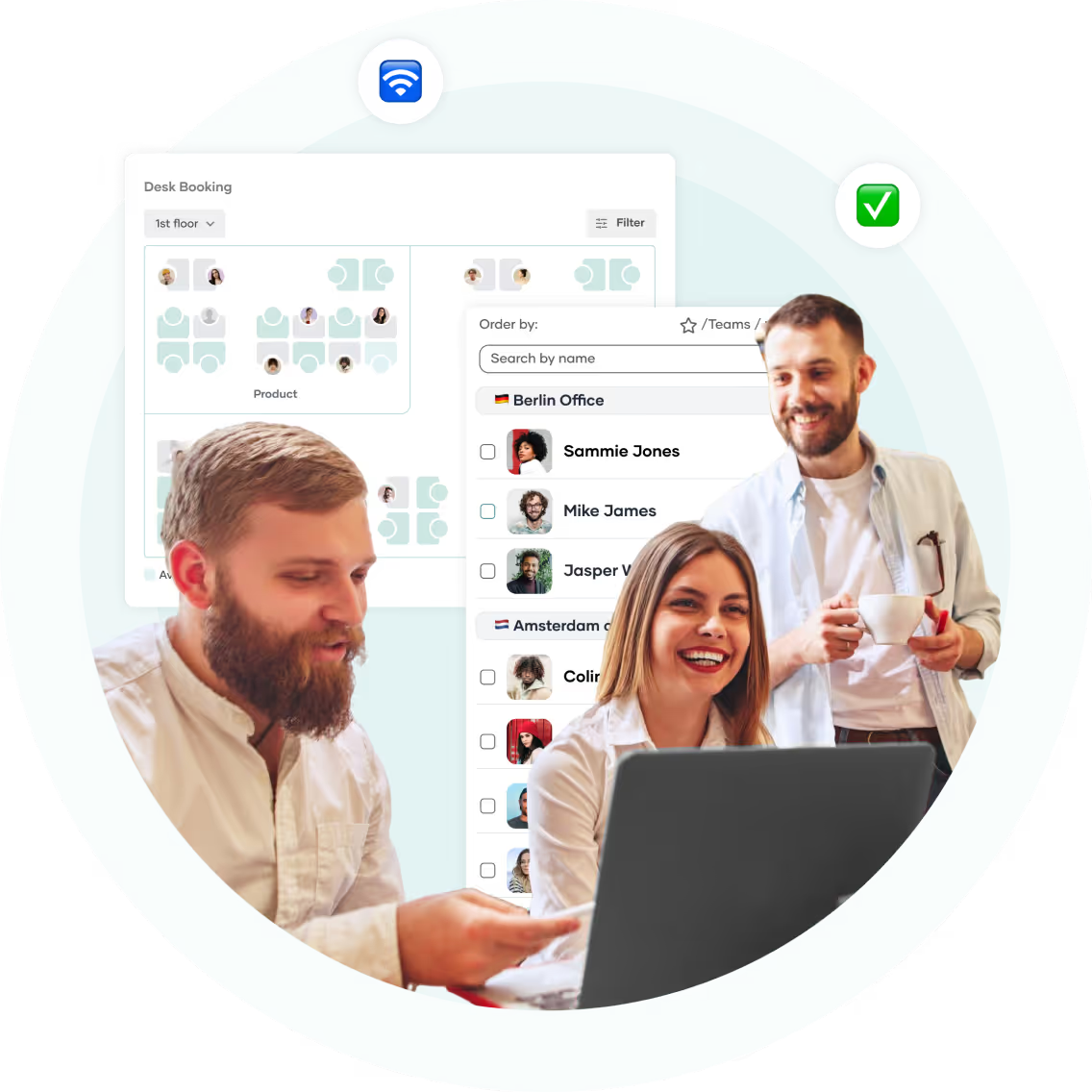
In the PULT booking software, you can see the floor plan of the office on your computer, smartphone or tablet. The free spaces are displayed there in real time, along with their technical equipment (height-adjustable table, two monitors, etc.).
The office plan uses portraits to show where colleagues are sitting. This makes it easy to book a seat right next to them. The booking is made with one click and the seat is reserved for you personally for the selected period.
In PULT you can also:
Check in without a click: Thanks to WiFi Desk Booking, your employees are checked in automatically.
Synchronise the booking: with Slack, Teams, Outlook and Google Calendar. Appointments and work location are displayed automatically.
Set booking policies: Only grant access to individual tables or rooms to certain people or teams. You can even do this on a daily basis.
Book meeting rooms, zones and car parks.
Office analysis: Which spaces, rooms, zones and floors are popular for booking? How high is the capacity utilisation? What does it look like at peak times?

.png)
.png)