Practical guides for office managers building better hybrid workplaces. Learn how to optimize space utilization, automate operations, and support distributed teams.
Oops! Something went wrong while submitting the form.
Visitor Management
Visitor Management System: What It Is and How It Works
A visitor management system replaces the paper sign-in sheet with a digital process that screens, logs, and tracks every guest who enters your office. It captures who's on-site, notifies the host, and creates a searchable record for security and compliance reviews. For growing offices, this single change closes a security gap most reception desks still carry today.
A visitor management system digitizes guest check-in, replacing paper logs with pre-registration, badge printing, host notifications, and a searchable visitor record.
✓
Visitor management software reduces front-desk workload while creating the audit trail organizations need for security screening and regulatory compliance.
✓
A standalone visitor tracking system solves check-in but leaves desk booking, room booking, and office data in separate tools, creating gaps in a company's overall presence picture.
✓
PULT combines visitor management with real-time presence, desk and room booking, and emergency response in one platform, so security teams see who's on-site, employees and visitors alike, from a single source of data.
What Is a Visitor Management System?
A visitor management system is software that replaces the manual guest sign-in process with a digital, trackable one. It records a visitor's details, their arrival and departure, and notifies the employee they're there to see, all without a paper logbook at the front desk.
Companies adopt one for three reasons: security, compliance with regulations like GDPR, and a faster, more professional check-in experience for guests.
Standalone check-in tools handle the front desk in isolation. Platform-based visitor management, like PULT's, feeds that same data into a company's broader presence and office management system, so security teams see visitors and employees in one place.
What Does a Visitor Management System Do?
A visitor management system replaces manual sign-in with a digital workflow that handles the entire guest experience, from pre-registration to check-out. It records a visitor's details, notifies the right host, can issue a badge, and stores visits in a searchable log. Visitor management software runs this process on a tablet, kiosk, or mobile phone instead of a clipboard.
Core Features of a Modern Visitor Management System
✓
Pre-registration and invites: hosts send a visitor a link before arrival, with the visit details and parking or building information included.
✓
Self-service check-in: guests confirm their name, host, and purpose at a kiosk or tablet in under a minute.
✓
Optional ID and watchlist screening: depending on the platform, the system can check visitor IDs or flag names against a security or denied-entry list before a badge is issued.
✓
Badge printing and QR codes: guests can receive a visible, time-stamped credential that identifies them for that day's visit.
✓
Host notifications: the employee being visited gets an instant alert by email, Slack, or Teams, with the guest's details and, if enabled, a photo.
✓
NDA and agreement signing: legal documents are signed digitally during check-in, with a copy stored automatically for compliance records.
✓
Visitor logs and reporting: every visit is timestamped, searchable, and exportable, so front-desk trends are easy to review monthly.
✓
Emergency roll-call export: the current visitor list can be pulled during an evacuation, showing who is recorded as still in the building.
Visitor Management Software vs. a Paper Logbook
Criterion
Paper Logbook
Visitor Management Software
Data accuracy
Illegible entries, missing fields
Structured, mandatory fields
Security screening
None
Watchlist and ID checks
Emergency roll call
Manual count from paper
Instant, exportable list
Compliance records
Hard to search or retire
Searchable, with retention rules
How Does the Visitor Journey Work, From Invite to Check-Out?
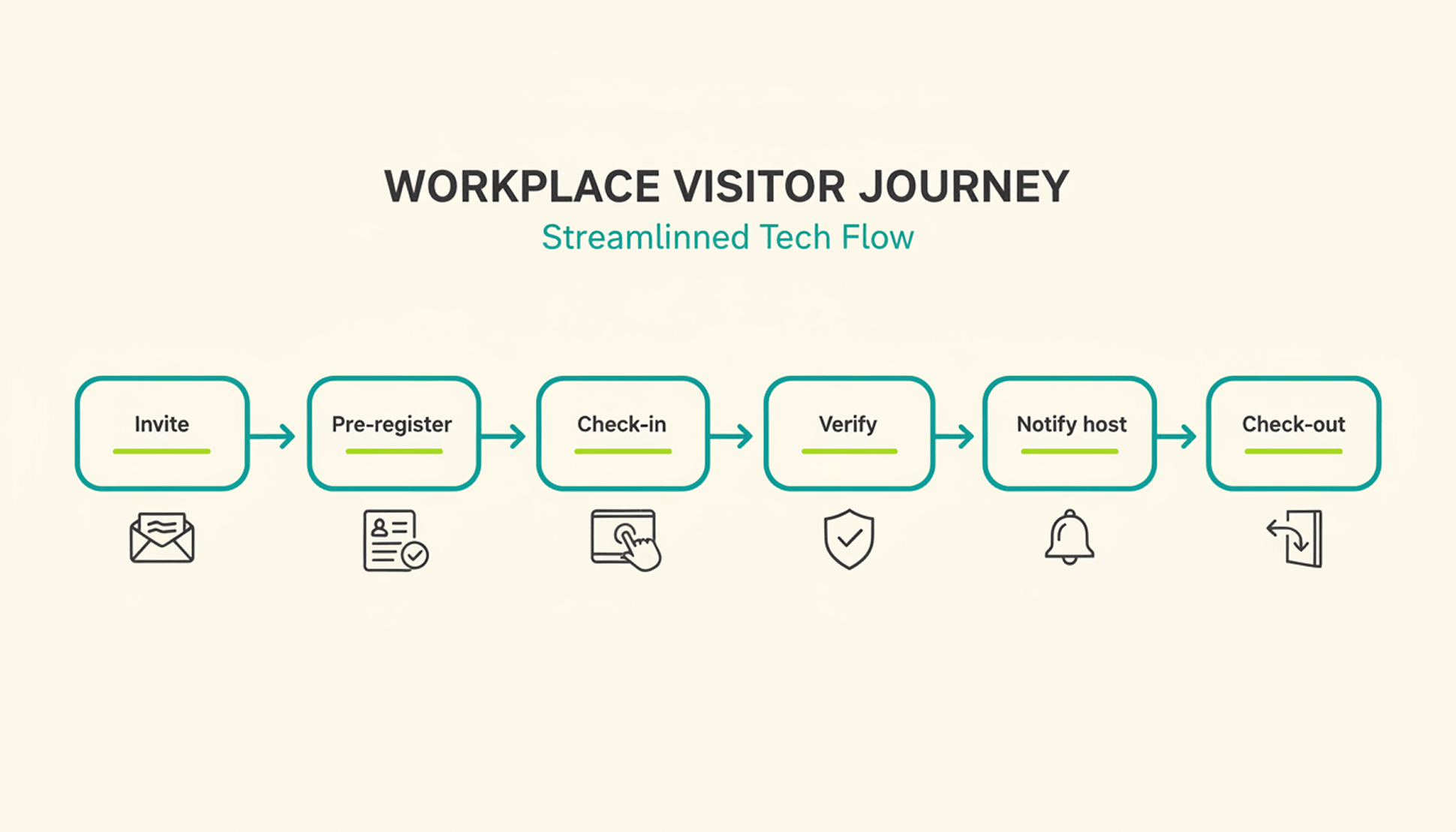
A typical visit runs through six steps. The host sends an invite, the visitor pre-registers, the visitor confirms their details on arrival, a badge can be issued, the host gets notified, and the system records check-out when the visitor leaves or at a configured time.
1
Pre-registration: the host schedules the visit and sends a link with arrival details, parking instructions, and building access notes.
2
Arrival and check-in: the visitor confirms their details at a kiosk or on a tablet or their own phone, usually in under a minute.
3
Optional identity and watchlist verification: depending on the platform and configuration, additional ID or security-list checks can be performed before building access is granted.
4
Badge issuance: a printed or digital badge identifies the visitor for the building and can be limited to that day's visit.
5
Host notification: the employee being visited receives an instant alert to come to reception, with the visitor's name and, if enabled, photo.
6
Check-out and logging: the visitor checks out on departure, or the system can close the visit automatically at a configured time, keeping the record administratively up to date.
What Are the Benefits of a Visitor Management System for the Office?
The clearest benefit is a complete, searchable record of who was on-site and when, something a paper log or verbal check-in can't provide.
Security and Compliance Benefits
A visitor management system can screen guests against a watchlist before they reach the office floor, depending on the platform and configuration. It can keep a timestamped log of visits for security and compliance reviews. Under GDPR, visitor data counts as personal data, so it needs a lawful basis for collection, an appropriate retention period or criteria for determining it, and safeguards against unauthorized access. A digital system can support these controls directly in the check-in process, reducing reliance on manual steps.
Visitor accountability also matters during an emergency. OSHA guidance notes that visitors need to be accounted for after an evacuation, and many employers use the sign-in list to run that headcount. A missing name on that list can delay an all-clear by several minutes, minutes that matter during a real evacuation.
Because PULT Presence tracks employees and visitors in one live view, a facilities team can pull an accurate roll call the moment an alarm sounds, not after searching through a paper binder.
Front-Desk Efficiency and Visitor Experience Benefits
Automated check-in cuts the time your team spends on manual sign-in, badge writing, and phone calls to announce a guest. A receptionist freed from clipboard duty can focus on greeting visitors and other front-desk work. Visitors move through reception faster, often in under a minute, and the first impression of your office improves the moment someone walks in the door. For client meetings or investor visits, that faster, more polished check-in becomes part of how your company presents itself.
How Do You Choose the Right Visitor Management Solution?
The right visitor management solution depends less on feature count and more on how well it fits your existing security setup, office size, and tool stack. A system built for a five-person startup office looks very different from one built for a 500-person campus with multiple buildings and a dedicated security team.
Calendar, HR, and communication tools your team already uses
Security and compliance
Data retention controls, audit logs, GDPR-aligned handling
Scalability
Pricing and setup across multiple locations
Price
Per-location vs. per-user pricing models
Ease of use
Kiosk setup time and how quickly staff can learn the system
Is a Standalone Visitor Management Platform Enough for a Modern Office?
A standalone visitor management platform solves the front-desk problem, but most offices also run desk booking, room booking, and parking through separate tools. Connecting these systems into one platform gives security and facilities teams a single, live view of who is on-site, employees and visitors together.
That connection matters most during a security incident or an office move, when facilities teams need one current view of occupancy rather than four separate logins to check. PULT pairs visitor management with desk booking software, room booking, and presence data, so a single dashboard shows recorded on-site employees and visitors. Office managers evaluating a broader workplace management software setup typically start here, since visitor data becomes far more useful once it's connected to the rest of the office.
{{onpage-cta}}
Turn Visitor Check-In Into a Security Advantage
A visitor management system turns a vulnerable front desk into a controlled entry point, giving you a searchable record of who checked in and when. The real payoff comes when it connects to the rest of your office, from desk booking to real-time presence data, giving you one live picture of recorded on-site users. For growing offices, that visibility is worth seeing in action.
✓
Visitor check-in, desk booking, room booking, and presence data live in one platform, so you manage all of it from a single login.
✓
A real-time view shows who is on-site, employees and visitors together, for faster emergency roll calls.
✓
Every visit is recorded in a searchable log, with records available for security and compliance reviews.
✓
Microsoft Teams and Slack support visitor notifications, while Personio and HiBob connect employee data through built-in integrations.
Shared workspace: What are the advantages over having your own office?
Offices are no longer fully utilised. According to the Federal Statistical Office, 23.5% of all employees now work from home at least occasionally, almost twice as many as before the pandemic (2019: 12.8%). Shared workspaces are a pragmatic response to this changed working reality. The concept is simple: several users share workspaces and the associated infrastructure. In this article, you will find out what a shared workspace is, what different forms there are and how they differ from other workplace concepts.
What is a shared workspace?
A shared workspace is a workspace that is shared by several users and companies, either simultaneously or at different times. In contrast to traditional offices, where one company is the sole tenant of an enclosed space, workspaces, rooms or entire zones can be used alternately as required. The users share the infrastructure: Wi-Fi, printers, meeting rooms, kitchen and often also services such as reception or cleaning.
The user structure is diverse: self-employed people, small companies, project teams or employees of larger organisations who temporarily need a fixed place to work. Teams that only meet physically on certain days also use shared workspaces for selective organisation without having to provide permanent space.
Differentiation: shared workspace vs. coworking vs. own office
The term "shared workspace" is often mistakenly equated with coworking. In fact, there are clear differences:
Coworking focuses on an open, network-orientated work culture. The exchange between different industries and people takes centre stage. Coworking spaces are usually open-plan, offer events and deliberately promote community building. There are rarely fixed workstations.
Shared workspaces are designed to be more functional: workspaces with a structure that can be booked, shared and scaled, but without an explicit community focus. This is primarily about the cost-efficient, shared use of office infrastructure, not networking.
Own offices offer maximum control and privacy, but require long-term leases and high fixed costs. According to CBRE Germany, the average rental costs for office space in German A-cities are at least 15-25 euros per square metre per month - plus ancillary costs, furnishings and administrative expenses.
Shared Workspace
Flexibility: High (bookable by the day / month)
Community focus: Low
Predictability: Medium
Costs: €200 – €600 per seat per month
Equipment: Fully inclusive
Coworking
Flexibility: Very high (bookable by the hour)
Community focus: High
Predictability: Low
Costs: €20 – €50 per day
Equipment: Fully inclusive
Own Office
Flexibility: Low (mostly annual contracts)
Community focus: None
Predictability: High
Costs: €800 – €1,500 per seat per month
Equipment: Must be procured by yourself
What types of shared workspace are there?
Shared workspace is not a standardised concept, but a collective term for four main types: Coworking-style areas (open workspaces without fixed places), business centres (enclosed office spaces with shared services), office sharing (office communities through subletting) and hybrid solutions (mixed forms). The various models are aimed at different target groups and needs.
Coworking-style areas
Open workspaces in which different people and companies work side by side without a fixed allocation of space. The atmosphere is informal and dialogue is encouraged, but not mandatory. In addition to workstations, there are usually common rooms, telephone booths and sometimes events. Typical users: Self-employed people, start-ups, mainly mobile teams, individuals with a need for professional infrastructure.
Business centre
Closed office spaces of very different sizes that are shared by several companies or teams. The rooms are clearly demarcated and the meeting room, reception and kitchen are shared. Often with additional services such as mail reception, telephone service or secretarial services. Suitable for: established companies that require representation, teams with confidentiality requirements, consultancies.
Office sharing
Traditional shared offices where a main tenant sublets vacant space to other companies. Often arise when companies have space left over after downsizing, mergers or an increased proportion of home offices. The costs are usually divided up via a simple allocation of ancillary costs. Particularly common in large cities where office space is scarce and therefore expensive.
Hybrid approaches
Mixed forms that combine elements of different models. For example, business centres with optional coworking areas or office-sharing communities with additional space for growing teams. These models often emerge organically when providers and landlords respond to customer needs.
However, the boundaries are becoming increasingly blurred as providers adapt their concepts to local demand.
Advantages and disadvantages of shared workspace
Shared workspaces cost less than dedicated offices, but require a premium for flexibility. They are usually cheaper for short-term use (less than 2 years) or fluctuating team sizes. However, if you need the same space consistently over the long term, you are better off with your own rental agreement.
Costs of a shared workspace
Shared workspaces significantly reduce office costs. Office rental prices in major German cities are around 24-29 euros per square metre per month: Berlin at 29 euros/m², followed by Munich at 24.70 euros/m² and Frankfurt (24.30 euros/m²). With an average of 10-15 square metres per workspace, basic rental costs range from 240 to 435 euros per month, plus ancillary costs, furnishings and administration. In contrast, shared workspaces often offer a more favourable complete solution without additional investment.
The disadvantage of a shared workspace is that the greater flexibility comes at an additional cost. Shared workspace providers factor in vacancy, service and profit margin. With long-term, constant use, your own office can become cheaper.
Balancing act between the flexibility and predictability of a shared workspace
Shared workspaces allow for quick adaptation in the event of fluctuating team sizes or project phases. Teams can book additional workspaces as required or reduce the number of workspaces during quieter phases. This is a clear advantage, especially for project-based companies or start-ups with unpredictable growth.
At the same time, uncertainties arise: Popular spaces or rooms are not always available. In high-demand locations, users report booking problems, especially on Mondays and after school holidays. Some providers solve this problem with waiting lists or premium memberships with guaranteed spaces.
Tip: In the booking software PULT, users of the shared workspace can book their workspace in advance, directly from their smartphone.
Distraction and productivity in a shared workspace
Open shared workspaces can impair concentration. Conference calls, conversations with other users and changing workstations can be distracting. Users report more frequent interruptions than in their own offices.
On the other hand, many users report increased motivation due to the professional working atmosphere compared to working from home or in the same office.
Organisation and administration of shared workspaces
The shared use of workspaces brings with it administrative challenges that do not exist with private offices. Providers have to coordinate bookings, monitor utilisation and avoid conflicts between users.
Without systematic organisation, problems quickly arise: Double bookings, unclear availability and disputes over coveted spaces.
A survey conducted by the Federal Association of Coworking Spaces Germany in 2023 showed that 34% of users have already experienced situations in which booked workspaces were already occupied or meeting rooms were double-booked. This leads to planning uncertainty and frustration, especially in highly sought-after locations.
Most professional providers therefore rely on digital booking systems. This software enables real-time availability checks, prevents double bookings and provides clarity about the actual free capacities. Users can check in advance and make binding reservations, while providers receive detailed utilisation data to optimise their space.
Modern booking and management tools such as the PULT software integrate desk booking, room management and visitor management in a standardised platform. PULT runs entirely in the browser and therefore works on any device, from smartphones and laptops to desktop PCs.
Providers of shared workspaces receive detailed usage statistics and can see in real time which areas are in high demand and where capacity is still available. This data helps with decisions about expanding or reorganising space. Users benefit from a particularly simple booking experience without phone calls or emails: from individual workspaces to conference rooms, all in one application.
{{cta}}
Desk Booking
Calculate Your Desk Sharing Ratio
Calculate your Desk Sharing Ratio—formula, free calculator, industry benchmarks, cost savings, and pitfalls to avoid.
You pay thousands of euros in rent every month for office space, yet half the desks sit empty each day while your team complains about too few meeting rooms, missing quiet zones or insufficient collaboration areas. The solution lies in correctly calculating the Desk Sharing Ratio—a simple key figure that shows how to repurpose existing space intelligently. In this article you’ll learn how to calculate the ratio for your industry, which benchmarks other companies use and what insights and measures you can derive.
What Is the Desk Sharing Ratio?
The Desk Sharing Ratio expresses the relationship between available workstations and your total number of employees.
Example: You have 100 employees and 70 desks. Your Desk Sharing Ratio is 0.7.
That means 1.43 employees share each workstation, or put differently: not everyone can be in the office at the same time.
Desk Sharing Ratio Below 1.0: Fewer desks than employees (true desk sharing)
Desk Sharing Ratio Exactly 1.0: Traditional model, one desk per employee
Desk Sharing Ratio Above 1.0: More desks than employees (oversupply—e.g., with coworking or guest desks)
The ratio helps you make three essential decisions: you see whether your current office space is optimally used, you can calculate how much space you really need when expanding or relocating, and you gain an objective basis for discussions with management about space costs.
Difference: Desk Sharing Ratio vs. Utilisation Rate
Do not confuse the Desk Sharing Ratio with the utilisation rate, which measures how often the available desks are actually used. The Desk Sharing Ratio is a planning value; the utilisation rate is a measurement value.
Application of the Desk Sharing Ratio
Space planning and cost control: With the ratio you calculate exactly how much office space you need when changing buildings. Example: An IT company with 200 employees moves offices and reduces its ratio from 1.0 to 0.7. The new space can therefore be 30 % smaller.
Repurposing space: Identify unused desks and convert them into meeting rooms, quiet zones or creative areas. Instead of 20 empty desks you could create an extra meeting room and a lounge for your team.
Growth planning: When your company grows you do not need to rent proportionally more space. With a ratio of 0.8 you can accommodate 25 % more employees without moving.
Decision basis: The ratio replaces gut feeling with facts—especially helpful in negotiations with management, the works council or during budgeting.
{{hint-box}}
The basic formula gives you a figure that shows the bare facts. For planning office space or restructurings it is extended to show the number of required desks.
{{hint-box-2}}
Step 1: Determine Employee Count
Count all employees who could in principle need a workstation, including full-time and part-time staff, working students and external consultants who regularly work on-site. For interns you can use a lump sum value.
Step 2: Analyse Attendance Patterns
Find out how often your employees are actually in the office. A meaningful survey requires a longer period that balances cyclical differences—mainly weekday effects and monthly rhythm. Ideally, carry it out outside holiday periods and seasonal peaks. In general: the longer the observation period, the more reliable the numbers.
Typical reasons for absence:
Home office (usually 2–3 days per week)
Vacation (around 25–30 days per year)
Sickness (about 15 days per year)
Business travel and client appointments
Training and conferences
Example: Your employees are on-site 60 % of the time on average. With 100 employees you theoretically need 60 desks.
Step 3: Add a Safety Buffer
Without a buffer the office can quickly become crowded. We recommend 10–15 % extra desks for:
Team days or all-hands meetings
Fluctuations during the year
Onboarding new employees
Example continued: 100 employees × 60 % = 60 desks. With a 15 % buffer: 60 × 1.15 = 69 desks. Your Desk Sharing Ratio is then 0.69.
Practical Calculation Examples
IT start-up With 50 employees who are on-site 60 % of the time (≈ three home-office days per week) and a 15 % safety buffer, the company needs 35 desks, giving a Desk Sharing Ratio of 0.70.
Consulting firm A workforce of 100 employees, an on-site rate of 40 % because of intensive client work and a 10 % buffer means 44 desks are required, resulting in a ratio of 0.44.
Financial services For 80 employees with an on-site rate of 85 % (little home-office) and a 10 % buffer, 75 desks are needed, which equates to a ratio of 0.94.
Desk Sharing Ratios by Industry
IT & Tech Companies
Recommended ratio: 0.6 – 0.8
Tech firms are pioneers of flexible work. Developers often focus at home but come to the office for sprints and pair programming. A software company with 120 developers manages with a ratio of 0.65; staff are on-site only 2.5 days per week on average.
Financial Services
Recommended ratio: 0.8 – 0.9
Banks and insurers are more cautious. Compliance requirements, confidential customer data and a more traditional culture keep home-office rates lower. Example: A regional bank starts at 0.85 and lowers to 0.78 after one year. Certain workstations require special IT security; customer advisory work is mainly on-site; regulators sometimes require everyone in the office at short notice.
Consulting & Professional Services
Recommended ratio: 0.4 – 0.7
Consultants work mainly at client sites. Example: An international consultancy has 200 consultants but only 90 desks, giving a ratio of 0.45—possible because 70 % of time is spent at clients. There are extreme fluctuations; in holiday season the office can be empty, before proposal deadlines every desk is occupied. Only a booking system ensures that a desk is available after travelling to the office.
Marketing & Creative Agencies
Recommended ratio: 0.6 – 0.8
Creatives need inspiration from others but also like focused solo work. A digital agency with 60 employees runs a ratio of 0.7, providing enough space for spontaneous brainstorming yet flexibility for home-office. Creative rooms and presentation areas are additionally needed; freelancer attendance varies greatly.
Guide: Applying the Desk Sharing Ratio Company-Wide
Phase 1: Analysis and Data Collection
Count all usable desks and document their equipment (e.g., dual monitors, laptop dock).
Measure attendance for at least a month using an Excel sheet, time-tracking system or badge data—ensure no individual behaviours can be identified later.
Survey employees anonymously (5–6 questions) on home-office frequency, client appointments and desk preferences.
Phase 2: Calculate Ratios and Develop Scenarios
Use your data and the formulas. Typical reference scenarios:
Provide identical equipment at every desk; introduce a booking system if > 20 employees.
Phase 5: Roll-out and Optimisation (8–12 weeks)
Expand gradually—allocate 2–3 weeks per department.
Continuously optimise based on data: which desks are never booked, where are bottlenecks, which teams need closer proximity?
Adjust the ratio after three months—the initial phase often shows you can plan more boldly or conservatively than expected.
Common Mistakes in Handling the Desk Sharing Ratio
The six most frequent mistakes when dealing with the Desk Sharing Ratio are overly aggressive ratios, physical separation of teams, inconsistent IT equipment, lack of communication, static ratios without adjustment, and ignored legal aspects.
Mistake 1: An Overly Aggressive Ratio from the Start
You think: “If 0.7 is good, 0.5 must be even better.” The outcome: employees have to reserve a workstation far in advance to secure one. Trust in desk availability decreases, and fewer people choose to work on-site. This solves the scarcity problem but unnecessarily pushes staff into home office and creates a feeling of not being welcome.
Solution: Start conservatively at 0.8 and reduce gradually. Better to have a little too much space for six months than two weeks of overcrowding.
Mistake 2: Teams Are Physically Torn Apart
Desk sharing does not mean everyone has to sit randomly. If the marketing team is spread over three floors, collaboration suffers.
Solution: Define team areas. Reserve a fixed zone for each department with 70–80 % of the theoretically required desks. Teams can sit together without everyone needing a fixed seat. Also plan regular team days when all members are on-site.
Mistake 3: Insufficient Technical Preparation
If employees arrive at their booked desk and find the wrong equipment, they are understandably frustrated and cannot start working.
Solution: Rigorously standardise equipment. Every workstation needs identical technology: same monitors, keyboards and docking stations. Invest in a robust cloud infrastructure. Employees must be able to access all required systems from any desk.
Mistake 4: Lack of Communication and Change Management
You announce the new system via email and are surprised by the pushback. Employees fear losing their familiar spot, fail to see the benefits or feel bypassed.
Solution: Communicate early, openly and continuously. Explain not just the “what” but especially the “why.” Hold workshops, answer questions, gather feedback.
Mistake 5: Static Ratio without Monitoring
You calculate the ratio once and leave it unchanged for three years. Meanwhile, everyone works more from home, yet you still have too many workstations.
Solution: Review the ratio quarterly. Examine utilisation data, survey employees, analyse booking patterns.
Mistake 6: Neglecting Legal Aspects
You ignore company agreements, forget the works council or overlook workplace regulations. This can bring the entire project to a halt.
Solution: Inform the works council from the outset and involve it in planning. Check existing company agreements for rules on fixed desks. Ensure all ergonomic and safety standards are met—especially those in the workplace ordinance.
Software for Implementing the Desk Sharing Ratio
Desk sharing requires three capabilities: capturing actual attendance, booking desks after introduction and continuous monitoring of booking behaviour. PULT covers all three.
Automatic Attendance Detection for the Planning Phase
PULT Presence logs attendance automatically: as soon as an employee’s smartphone or laptop connects to the corporate Wi-Fi, they are marked present—no manual action, no forgetting. Zero-click works with your existing WLAN infrastructure (HPE Aruba, Cisco, Ubiquiti, etc.). After two to four weeks you know exact utilisation and can calculate your ratio reliably.
Desk Booking without Re-Learning
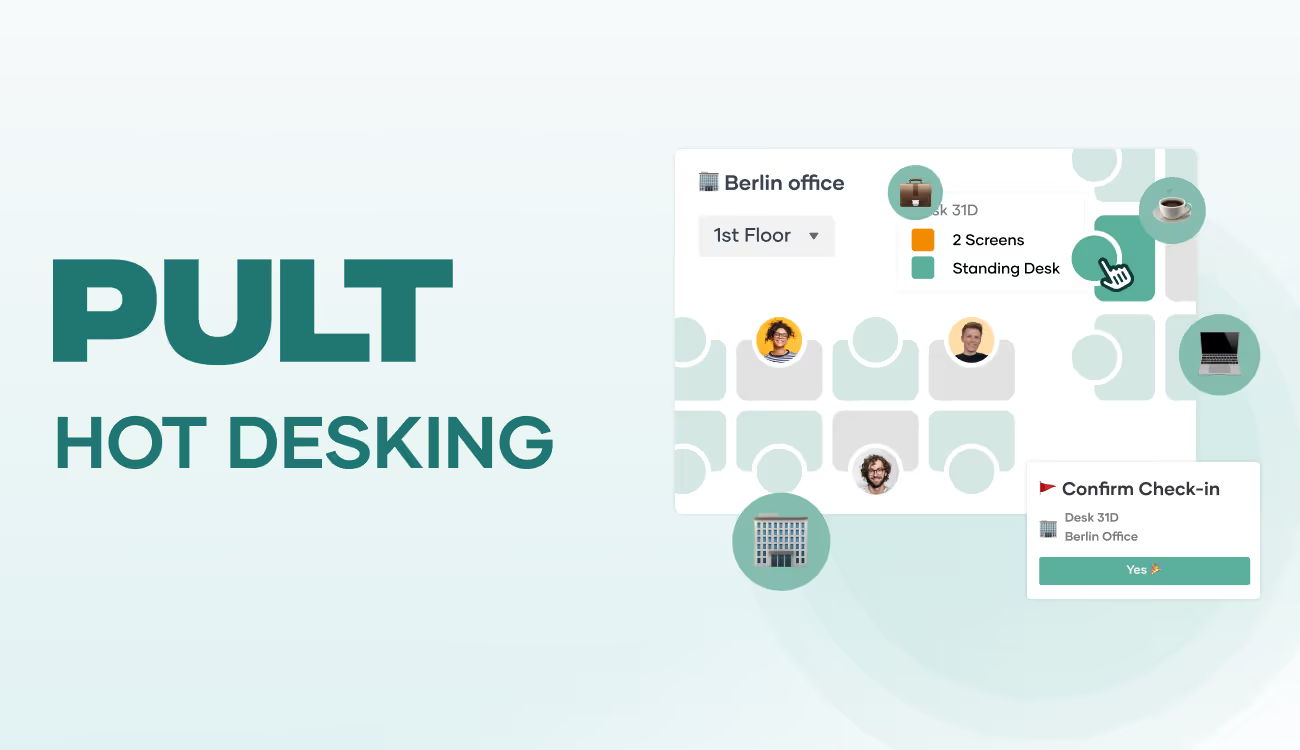
PULT integrates directly into Slack, Teams and Outlook. Employees book a desk with one click in the tools they already use—no extra app, no new passwords. The booking plan mirrors your office and shows all available desks with features (standing desk, dual monitors, next to a favourite colleague). Filters help find the right spot fast.
Continuous Optimisation of the Desk Sharing Ratio
PULT Analytics displays average utilisation of desks, zones and rooms per day and week, popular and unpopular desks, and booking behaviour by team. With booking and attendance data you always see your ratio. If overcapacity persists you can either
gradually remove desks and repurpose freed space (quiet zones, gym, etc.), or
intensify your back-to-office strategy to bring more employees from home office to the office.
{{cta}}
Hybrid Work
Understanding hybrid working and implementing it with your team
Hybrid working sounds like more freedom, but it also brings new challenges for teams, leadership, and organization. This article reveals what the concept really entails, what rules and software you need, and how companies are successfully implementing hybrid working.
Understanding hybrid working and implementing it with your team
The mix of remote and in-person work is now a reality for many teams, but it also raises new questions: Who is in the office and when? Who is working from home? And how do you ensure that collaboration, communication and culture don't fall by the wayside? In this article, you'll learn what hybrid working is, what it entails and what new structures it requires.
Meaning: What is hybrid working? (Definition)
Hybrid working, often referred to as hybrid work or hybrid working model, is a combination of on-site and remote work. Colleagues work partly in the office and partly in other locations such as their home office, a co-working space or on the road. How exactly this is organised varies greatly:
The most suitable option depends largely on the type of work, the coordination required within the team and the company structure. Creative project work, for example, often benefits from regular presence, while focused individual work is often better done remotely.
Fixed office days (e.g. Monday & Wednesday in the office)
Free choice depending on position, project phase or personal agreement
Central control or team-based agreements
The office as a place of work or a meeting place with a focus on meetings and collaboration
Hybrid working is not a rigid state, but a framework for organisation. The model can vary greatly depending on the industry, company size and team structure. One thing is clear: without binding rules and the right equipment, friction can quickly arise.
{{hint-box}}
Hybrid working from different perspectives
For employees
More freedom also means more self-organisation. If you are free to choose where you work, you need your own routines: How do you remain available to colleagues? How do you separate work and private life? How do you get information when you are not in the office? Many appreciate the newfound autonomy, but also report problems with setting boundaries or feeling like they ‘don't belong’.
For managers
Leadership in a hybrid context is no longer about physical presence, but about trust, communication and clear goal orientation. Visibility does not come from sitting at your desk, but from commitment and feedback. At the same time, the challenge remains: how do you get everyone on board without constantly checking up on them or breathing down their necks?
For HR and organisation
Recruiting, onboarding, personnel development: you have to rethink all of this. Processes that used to run automatically in the office now have to be planned and designed more consciously. Onboarding requires new formats in hybrid teams: digital welcome sessions, accompanying induction plans with on-site and remote contact persons, and hybrid feedback meetings in the initial phase.
The corporate culture is also being put to the test: How do you create a sense of belonging and cohesion when teams see each other less often in person? And how do you organise the flow of information when not everyone is working in the same place at the same time?
For IT and office management
The demands on IT security, network technology and devices are increasing significantly. Added to this is the question: Who is in the office and when? Are there enough workstations? How can the use of meeting rooms be coordinated?
Typical problems with hybrid working
Hybrid working brings noticeable advantages, but also specific pitfalls. Some of the typical problem areas are:
Communication gaps: If you are not in the office, you may not receive certain information. Without clear tools and structures, different levels of knowledge arise.
Team imbalance: Those who are on site more often are heard more quickly. Remote employees run the risk of being less involved.
Spontaneity vs. space: Without planning, rooms or spaces may not be available – or the team may be in the office for a meeting, but no one else is there.
Too many tools: When everyone uses a different system, collaboration becomes tedious. Integration is crucial.
Lack of rules: It is often unclear who is working where and when. This causes frustration and organisational effort.
Problems from the employee's perspective
Blurred boundaries between work and leisure time: Some employees find it difficult to switch off after work when they have already spent the entire day at home working. The flexibility of working from home often leads to a blurring of the boundaries between work and private life, which can result in stress and exhaustion.
Feelings of guilt when not working to capacity: Some feel guilty when they are less busy in their home office, even though they are fulfilling their tasks. These feelings of guilt can lead to excessive work and ultimately to burnout.
Social isolation and lack of team dynamics: The lack of personal interaction in the office can lead to a feeling of isolation. Spontaneous conversations and informal interactions that contribute to team dynamics are missing in the home office.
Inadequate working environment at home: Not everyone has a suitable place to work at home. Noise, a lack of ergonomic furniture or inadequate technology can impair productivity and affect your mood.
To address these issues, hybrid work requires a functioning organisation. Just as constant attendance can be oppressive, the perceived freedom of working from home can also have a negative effect. A well-structured, hybrid way of working can offer your team the right amount of variety.
What do you need for hybrid working?
A hybrid model only works if certain conditions are met:
Trust-based leadership: No micromanagement of individual activities, but clearly stated expectations and regular coordination. This also includes trust and role modelling.
Rules for collaboration: Who works when and where? How do you stay in touch? What software do you use?
Clear planning: Who is on site and when? What spaces and rooms do you need? Are there enough workstations available when attendance is high?
Technical equipment: Laptops, VPN, secure connection, functioning video technology, cloud-based software for collaboration (e.g. for project management or documentation), central cloud storage for location-independent access, professional video conferencing software with a stable connection and functions for group work, software for desk booking and attendance overview, both in the office and remotely.
Cultural maintenance: Regular anchor points, feedback rounds, established team formats to prevent a sense of belonging from being lost.
Examples of hybrid working
Example 1: Medium-sized company with fixed office days
A software company has introduced two fixed office days per week, with each team deciding for itself how to organise the rest of the week. Workstations are booked via software, as are meeting rooms. Permanently assigned desks are replaced by workstations that are used on a rotating basis. This frees up space for quiet areas and break rooms, which make working on site more attractive.
Example 2: Remote-first with optional office
A start-up relies on voluntary office days. Those who come book themselves in digitally. Access, workspaces and meeting rooms are booked and allocated as required. The reception is not permanently staffed, but is digitally controlled via a central platform. Employees appreciate the flexibility and see the office as a welcome change of scenery.
Example 3: Administration with a hybrid shift model
A government agency uses hybrid models for administrative staff. Teams share rooms, with weekly planning in advance. A room and access booking system has been introduced to ensure planning reliability. The most important effect: greater predictability with the same level of availability.
{{cta}}
Implementing hybrid working in your company
If you want to establish hybrid working, it's not just about more freedom in choosing where to work or the advantages of working from home. It's about creating structures in which the flexibility gained does not lead to chaos, but to greater satisfaction, productivity and clarity.
To achieve this, colleagues' attendance and absence should be transparent for everyone. You also need to be able to plan the use of workstations and meeting rooms and have a technical infrastructure that grows with you instead of slowing you down.
Implemented correctly, hybrid working can improve many things: you relieve the strain on your office, reduce vacancy rates and create spaces that can be used for completely new ideas. You strengthen personal responsibility within the team without losing sight of collaboration.
How PULT makes hybrid working easier for your team:
Attendance overview: You can see at a glance who is in the office today, across teams, per location, in real time.
Workplace booking: Employees can reserve their own space in the office, including capacity overview and according to individual preferences.
Room planning and booking: Meeting rooms can be booked and thus reserved. Specify who has access to which rooms.
Cross-location control: Everything can be managed centrally – regardless of how many offices or user groups are involved.
The better hybrid working is organised, the better it will be accepted by the team. The respective disadvantages of on-site and remote working are also partly eliminated or significantly mitigated.
Hybrid Work
This Is Hot Desking: Concept, Advantages and Implementation in Companies
Die Bürokosten steigen, aber die Hälfte der Arbeitsplätze steht leer. Die Mitarbeiter wechseln zwischen Homeoffice und Büro und im Unternehmen kommt die Frage auf, ob sich der ungenutzte Platz nicht besser nutzen ließe. Hot Desking verspricht eine Lösung: Arbeitsplätze teilen, statt leer stehen lassen. In diesem Artikel erfährst du, was Hot Desking ist, ob es für dein Unternehmen funktioniert und wie du typische Einführungsfehler vermeidest.
What is hot desking? An overview of the definition
Hot desking is a workplace concept in which employees do not have a permanently assigned desk. Instead, they use a different free workstation each day.
The name is self-explanatory: if a workstation is used by several people in succession, it remains ‘warm’ or ‘hot’.
Typical hot desking scenarios:
Field teams: Sales employees are often on the road and only need an office workstation occasionally
Hybrid teams: Employees work from home 2-3 days a week and only come into the office occasionally.
Project-based work: Teams that require different ways of working depending on the project.
The advantages of hot desking
Cost savings: Fewer workstations means smaller office space and lower rental costs. This is the case when a new office space is planned with a hot desking concept.
Optimised office utilisation: Instead of empty desks, there are spaces and zones for collaboration, quiet areas or modern break areas. This is the case when existing large spaces are converted to hot desking.
Improved collaboration: Changing seats breaks down departmental boundaries. Employees get to talk to colleagues from other areas.
Attractiveness as an employer: Hot desking is a sign of a modern, well-thought-out office concept. The change usually goes hand in hand with a complete upgrade of the office equipment: high-quality, ergonomic furniture, modern technology, professionally designed quiet zones, inviting break areas and a well-equipped kitchen for coffee breaks together. For skilled workers, this signals that the company is investing in the well-being of its employees and offers a contemporary work culture.
Challenges and possible disadvantages of hot desking
The loss of workplace identity is the biggest problem for employees when switching to hot desking. Many employees value ‘their’ desk with personal items, photos and individual furnishings. This emotional aspect should not be underestimated.
Organisational effort: Hot desking requires clear rules and booking software. Without good organisation, it tends to become chaotic and harbours potential for conflict.
Technical challenges: All workstations must be identically equipped and adaptable for different users. This requires investment in height-adjustable furniture and multiple sets of equivalent IT equipment.
Hygiene and cleanliness: Shared workstations must be cleaned regularly. Employees must also pay more attention to cleanliness and leave their workstations in such a condition that they can be used by a colleague immediately.
{{hint-box}}
From an organisational perspective, data protection and workplace organisation are new challenges for hot desking: Shared workstations require a ‘clean desk policy’, which means that all documents, notes and personal items must be cleared away at the end of each working day.
This is not primarily a matter of cleanliness, but of data protection: confidential information must not be accessible to the next user of the workstation. Computers must be locked and laptops locked away.
Is hot desking right for our company?
Before you decide for or against hot desking, you should honestly consider whether it fits your company's reality.
Features that indicate hot desking is a good fit:
High proportion of home office workers: More than 40% of your employees regularly work remotely
Flexible working hours: Employees in the team have different attendance times
Project-based work: Teams work in changing constellations
Growth planned: You expect to hire more staff but do not want to rent more office space immediately
Open-minded culture: Your team is generally open to change
Indicators that hot desking is not suitable:
Document-heavy work: Employees need daily access to physical files
Special equipment: Workstations with very specific technical equipment, for example for video editing, graphic design, CAD workstations, technical equipment such as measuring systems, analysis devices, etc.
Fixed teams: Departments that need to work closely together throughout the day
Resistance within the team: Employees are very conservative in their approach to daily work and processes.
Implementation: Step by step to hot desking
Successfully introducing hot desking requires a well-thought-out approach in six key areas: Team involvement with employee surveys and a pilot group, technical preparation with standardised IT equipment and a booking system, room design with different work zones and storage solutions, clear rules for data protection and workplace use, a controlled test run with one department, and gradual expansion to the entire company.
1. Involve and convince the team
Conduct an employee survey
Before making any decisions, ask your team: What are their concerns? What are their expectations? Where do employees see advantages or problems? What structures (lockers, coffee kitchens, quiet areas, break zones) would they like to see?
Workshops and information events
Explain transparently why hot desking is being introduced. Highlight specific benefits, not only for the company, but also for employees (modern equipment, flexible working environment).
Identify a pilot group
Start with an open-minded department or volunteer participants who can act as multipliers.
2. Plan the technology and infrastructure for hot desking
Evaluate the IT infrastructure
Are all workstations equipped with the same technology?
Does the Wi-Fi work reliably everywhere?
Can employees log in to any PC without any problems?
Select a booking system
Important criteria: Can be used from any device (PC, laptop, smartphone, terminal), connection to existing systems (calendar), room booking, office evaluation and statistics (GDPR-compliant). {{cta}}
Standardise furniture and equipment
All workstations must be identically equipped: height-adjustable desks, ergonomic chairs, lighting.
3. Redesign rooms and zones for hot desking
Plan zoning
Quiet areas for concentrated work
Zones for teamwork with rollable tables and partition walls
Upgrade break areas and kitchens
Telephone areas for conversations
Create storage solutions
Lockers, mobile roll containers or lockable cabinets for personal items, documents and private belongings.
4. Develop rules and guidelines for hot desking
Define a clean desk policy
Clear rules for handling documents and digital devices at the end of the working day (data protection).
Establish booking guidelines
How far in advance can bookings be made?
Are there minimum or maximum booking times?
What happens in the event of no-shows?
Create a code of conduct
Rules for noise levels, phone calls, eating at the workplace and respectful use of shared resources.
5. Start a trial run for hot desking
Start with one department
Introduce hot desking in a limited area first to gain experience and iron out any teething problems.
Collect feedback systematically
Hold regular discussions with the test participants: What is working well? Where are there problems? What should be adjusted?
Make adjustments
Be prepared to change rules or adapt technical solutions if problems arise.
{{cta}}
6. Expand hot desking step by step
Gradual introduction
After a successful trial run, expand hot desking to other departments. This will allow you to learn from experience and optimise each expansion.
Continuous monitoring
Even after full implementation: Collect feedback regularly and adapt the system to changing needs.
Make success measurable
Track key figures such as workplace utilisation, employee satisfaction and cost savings to document your success.
The most common mistakes when introducing hot desking
The team hears it through the grapevine: If employees only find out about the introduction of hot desking through the office grapevine, resistance is inevitable and fears and reservations build up that are very difficult to resolve later on. Talk openly about the reasons: cost savings, flexibility or growth plans. People are more likely to accept change if they understand the reasoning behind it.
From zero to one hundred: Completely transforming an office all at once overwhelms everyone involved. If you transform the entire company while it is still running, you risk chaos and frustrated employees. Start with one department, gather experience and make improvements before continuing.
First- and second-class workstations: Nothing creates a bad atmosphere faster than workstations with different equipment. If one desk has two monitors and another only has one, employees will fight over the better spots every morning. Invest in standardised equipment; it will pay off in the long run.
Lack of rules: Without clear rules, hot desking will be chaotic. Define how workstations are booked, what happens to documents and how employees should behave. Everyone must know and follow these rules, from interns to managing directors.
Successfully implement hot desking with booking software
Hot desking stands and falls with the right implementation. Many typical problems, such as conflicts over popular workstations, unnoticed unpopular desks or disputes over meeting rooms, can be avoided from the outset with the right software.
The use of suitable hot desking software solves these problems and ensures that workstations can be booked fairly and reliably. With PULT, every employee can be sure that they will actually find the desired space free after their commute to work. The most important features at a glance:
Desk booking with floor plan, from smartphone, laptop or PC
Filter by equipment and book next to your favourite colleague
Room reservation for meetings, workshops or focused work
Visitor management including check-in and attendance overview
Team find function to see who is in the office and when
Data-driven evaluations of space and workstation usage
Integration into existing tools such as Microsoft Teams or Slack

.png)
.png)