Workplace Analytics: A Practical Guide to Office Space Utilization
Workplace analytics turns data about desks, rooms, and attendance into decisions about how much office space your company actually needs. A growing share of the field centers on office space utilization: which floors, desks, and rooms your team uses, and when.
Workplace analytics: combines desk, room, and attendance data to show how a company actually uses its office space.
✓
Office space utilization: the share of available desk and room capacity used during a given period, is one of the most common workplace analytics metrics.
✓
Workplace analytics vs. workforce analytics: they measure different things — workplace analytics tracks physical space and presence, while workforce analytics tracks headcount, turnover, and other HR metrics.
✓
PULT Workplace Insights: turns presence and booking data into office space utilization reports, with Workplace Insights focused on team- and zone-level reporting.
What Is Workplace Analytics?
Workplace analytics is the practice of collecting and analyzing data on how employees use physical office space and resources, including desks, meeting rooms, and common areas, to guide real estate and facilities decisions. Companies use it to size their office footprint, plan desk-sharing ratios, and back space changes with real usage numbers.
Workplace Analytics vs. Workforce Analytics: What's the Difference?
The two terms sound alike, but they track different data. In office management, workplace analytics often measures the physical workplace, covering desk usage, room bookings, and attendance patterns. Workforce analytics measures the workforce itself, covering headcount, turnover, time-to-hire, and productivity metrics pulled from HR systems.
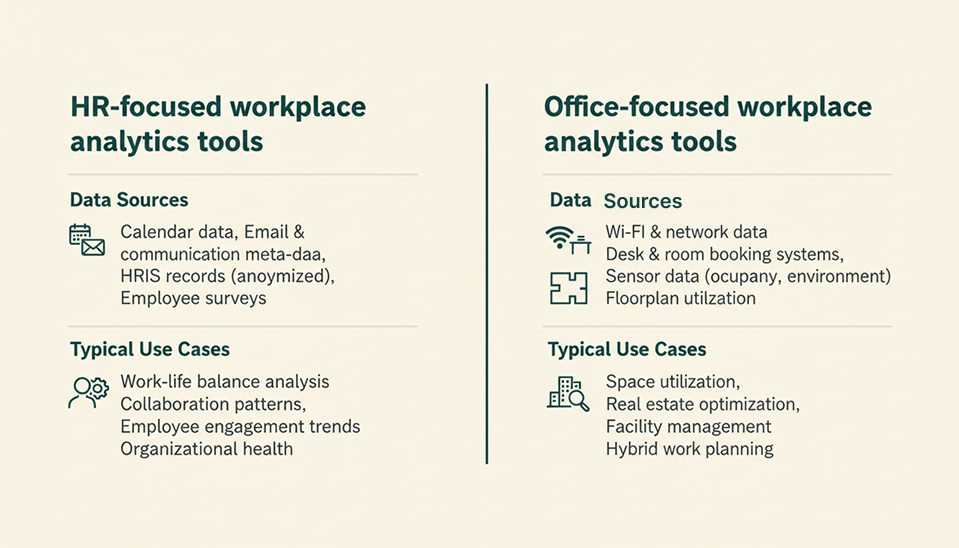
Some workplace analytics tools build their numbers from calendar and email activity, while workforce analytics tools typically draw on HR and employee data. Office-focused workplace analytics tools, including PULT Workplace Insights, track desk and room usage directly instead, based on presence data rather than calendar entries.
What Is Office Space Utilization?
Office space utilization measures how much available desk, room, or floor capacity is actually used over a set period, compared with the total capacity available. If 200 desks are available and only 90 are occupied on average during the measured period, desk utilization is roughly 45 percent, a gap companies may uncover when measuring real presence rather than reservations.
Why Does Office Space Utilization Matter?
Office space utilization gives facilities and finance teams a concrete number for decisions that otherwise rest on impressions, such as whether to renew a lease, reduce desk count, or redesign a floor. Utilization is one input among several, not the full picture. A complete workplace analytics setup also tracks attendance patterns, no-show rates, and room-level demand alongside office utilization, since lease and renovation decisions need more than one weekly percentage to act on.
Which Workplace Analytics Metrics Should You Track?
Most workplace analytics programs track a small set of metrics repeatedly rather than a long list once. The two categories below cover the majority of practical use cases.
Metric
What it shows
Typical data source
Attendance rate
Share of employees on-site on a given day
Wi-Fi presence detection, badge access
Desk utilization
Share of desks occupied vs. available
Presence data matched to booking system
Room utilization
Meeting room occupancy vs. capacity
Room booking and check-in data
No-show rate
Bookings never actually used
Booking system compared with presence data
Attendance and Presence Data
Office attendance figures typically come from the same presence signal as utilization data, Wi-Fi connections or badge scans, but get reported on their own because HR and facilities teams often ask for them separately.
Space and Desk Utilization Metrics
Desk and room utilization data, sometimes called workplace occupancy analytics, works best when it combines booking records with real presence data. Booking data alone can overstate usage because of no-shows.
How Do You Keep Workplace Analytics Data Privacy-Compliant?
Workplace analytics raises greater privacy considerations when it identifies individual employees rather than reporting only aggregated groups. Companies using workplace analytics must ensure that presence and utilization processing complies with GDPR and similar privacy rules, whether data is aggregated or linked to identifiable individuals.
A Wi-Fi-based presence system can reduce privacy risks when reporting is aggregated, but device identifiers and presence records may still be personal data if they can be linked to individual employees.
Choosing the Right Workplace Analytics Software
Workplace analytics software splits into two broad groups. HR-focused platforms analyze calendar, email, and meeting patterns and usually add a separate license on top of existing HR or productivity subscriptions. Office-focused platforms, including PULT Workplace Insights, analyze desk, room, and floor usage and may use existing Wi-Fi infrastructure, booking data, access systems, or sensors, depending on the setup.
Three questions narrow the choice quickly:
1
Does the software need calendar and email access, or does it work from Wi-Fi and booking data alone?
2
Does the reporting operate at the individual level or the aggregated group level?
3
Does the workplace analytics license sit on top of an existing subscription, or does it stand alone?
Turn Office Data Into Space Decisions You Can Defend
Workplace analytics gives office and facilities teams a factual basis for decisions that used to rest on guesswork, including how many desks to keep, which rooms to reconfigure, and where to cut costs while protecting the employee experience. Office space utilization is the metric most teams start with, but attendance and no-show data round out the picture.
✓
Data sources: office space utilization figures can come from passively tracked presence data, booking data, access systems, or sensors.
✓
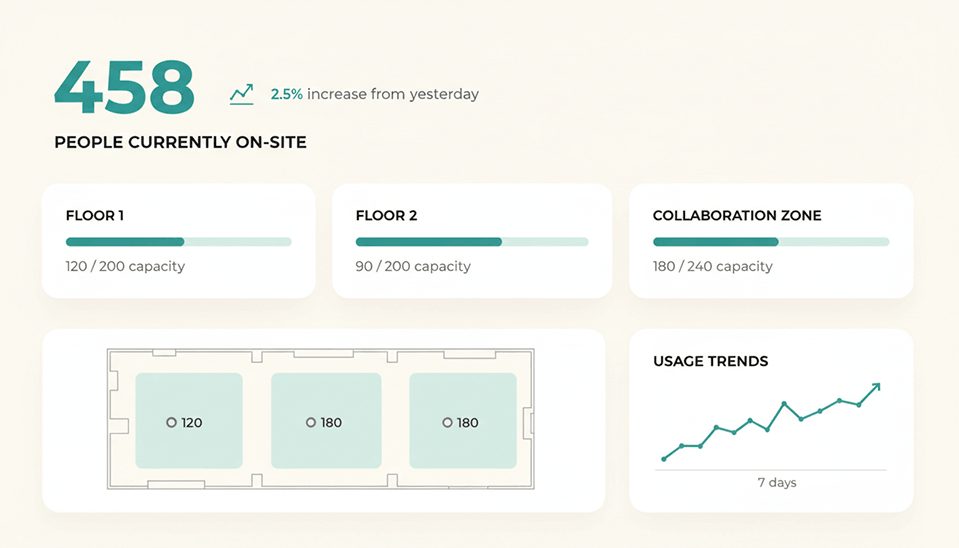
One dashboard: desk, room, and floor usage show up together in a single dashboard.
✓
Aggregation: Workplace Insights reporting can stay aggregated at team or zone level, while connected presence systems may process user-level attendance data.
✓
No new hardware: you connect your existing Wi-Fi infrastructure directly, with no new hardware to install.
Is workplace analytics the same as employee monitoring?
Nicht zwangsläufig. Workplace Analytics wertet häufig die Nutzung von Büroflächen und Ressourcen in aggregierter Form aus. Werden Daten namentlich einzelnen Personen zugeordnet, kann sich der Anwendungsbereich jedoch mit Mitarbeiterüberwachung überschneiden.
What data sources feed into workplace analytics?
Typische Quellen sind WLAN-basierte Präsenzerfassung, Badge-Zutrittssysteme, Desk- und Room-Booking-Plattformen sowie Gebäudesensoren. Viele Setups kombinieren mehrere Datenquellen, um Buchungsdaten mit tatsächlicher Anwesenheit abzugleichen.
Does workplace analytics require sensors?
Nein. Einige Systeme erkennen Anwesenheit über die WLAN-Verbindungen von Mitarbeitergeräten und kommen ohne zusätzliche Hardware aus. Andere verwenden Präsenzsensoren, Badge Reader oder ausschließlich Buchungsdaten.
How is office space utilization different from occupancy?
Die Büroflächenauslastung setzt die tatsächliche Nutzung über einen Zeitraum ins Verhältnis zur insgesamt verfügbaren Kapazität. Die Belegung beschreibt dagegen häufig, wie voll ein bestimmter Bereich zu einem konkreten Zeitpunkt ist. Beide Kennzahlen basieren auf ähnlichen Daten, beantworten aber unterschiedliche Fragen.
Can workplace analytics work with our existing HR software?
Ja. Büroorientierte Plattformen wie PULT können mit HR-Systemen wie Personio, HiBob oder Workday verbunden werden, um beispielsweise Abwesenheiten und Headcount zu synchronisieren. Berichte zu Flächen und Anwesenheit können dabei getrennt von den eigentlichen HR-Daten geführt werden.
What does workplace analytics software typically cost?
Die Preise unterscheiden sich je nach Anbieter und danach, ob eine Lösung auf HR- oder Büroprozesse ausgerichtet ist. Häufig wird pro Mitarbeiter und Monat abgerechnet. Veröffentlichte Preise findest du auf den Preisseiten der Anbieter. Einige Unternehmen erstellen Preise ausschließlich auf Anfrage.
At PULT we're designing the future of the hybrid workplace for companies and their employees. Focused on SME and mid market customers in Eruope, I'm working on everything from Customer Discovery to Onboarding. I'm very passionate about new work and moved to Hamburg in 2024 even though I'm originally from France.
Resources
Learn how to run better workplace operations
Office Insights
How do I choose the best desk booking software?
Desk booking software typically combines the booking of desks, meeting rooms, zones and other office resources in a single platform. Most providers also offer integrations with calendar and chat tools such as Microsoft Teams, Slack or Google Workspace.
The best desk booking software for your team depends on how you work and which processes you need to support. The criteria below can help you evaluate your options. Each one notes when it matters most, since not every point will be equally relevant to every team.
✓
Desk and room booking: Relevant if desks, meeting rooms and zones need to be used flexibly and you require binding, real-time reservations.
✓
Floor plans and a visual office overview: Important if employees want to choose specific seats, or if you operate across multiple floors or locations.
✓
Automation and check-in (no-show handling): Useful if booked-but-unused space is a recurring problem. Automatic release after a set time and check-in methods that don't rely on employees remembering to tap a button help ensure resources aren't blocked unnecessarily.
✓
Calendar synchronization (Outlook / Google Calendar): Important if meetings and office attendance should be managed in the same calendar. Two-way sync keeps bookings consistent between the booking tool and your calendar.
✓
Integrations with Microsoft 365, MS Teams, Slack and similar tools: Especially relevant if your team already collaborates in Teams, Outlook, Slack or Google Workspace.
✓
Team and attendance overview (hybrid planner): Useful for hybrid teams coordinating in-office days. Seeing who's in the office on which day makes planning much easier.
✓
Parking and additional resource booking: Relevant if you also need to book parking spaces, visitor spots, or additional equipment such as monitors or other office technology.
✓
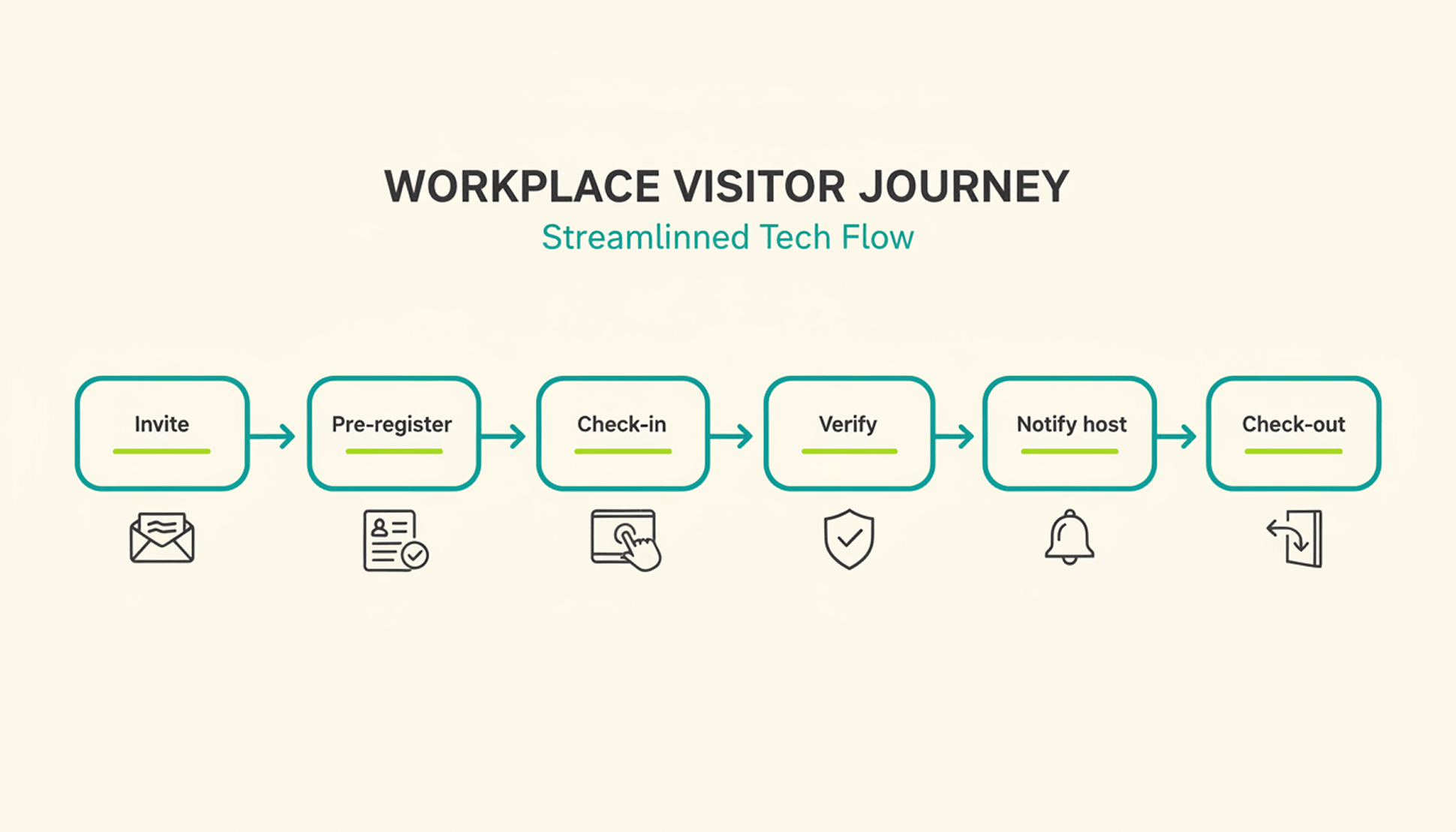
Visitor management: Important if you regularly host guests, candidates or service providers. Digital pre-registration, check-in, host notifications and visitor logs streamline the front-desk process.
✓
Analytics and occupancy reports: Especially relevant if you want to optimize your office footprint. Dashboards on occupancy, booking frequency, peak times and no-shows reveal which spaces are actually being used.
✓
Security certifications, hosting location and data privacy (e.g. GDPR, ISO 27001): Important if your organization has strict security or compliance requirements, for example, if you're in a regulated industry, have offices or customers in the EU, or need specific certifications to pass procurement and security reviews.
A note on this comparison: The information on features, pricing and services below is based on publicly available sources from the providers (as of August 2026). It is intended for general orientation only. Providers may change their offerings at any time, and no guarantee can be given for completeness or accuracy.
This article includes a presentation of PULT as part of a broader market overview. It is based on careful research, but it is not an objective test report. It is an editorial comparison that includes some promotional elements.
All mentioned brands are the property of their respective owners and are listed for comparison purposes only. PULT has no business relationship with the providers referenced here.
The 7 Best Desk Booking Software Platforms (2026)
#1 PULT
PULT is a cloud-based desk booking software developed in Germany. It combines all major features needed to organize modern office spaces. The platform supports the booking of desks and meeting rooms and also includes visitor management, attendance overviews, parking, hybrid team planning and detailed analytics on office utilization. The software integrates with Microsoft Outlook, Microsoft 365, Google Calendar, MS Teams and Slack. Booked but unused rooms and desks are automatically released again. In addition, PULT provides insights into actual usage and booking behavior, making it easier to plan and optimize rooms, spaces and workstations.
✓
Desk booking: Booking desks through interactive floor plans with tags, equipment filters, QR check-in and automatic check-in via WiFi.
✓
Room booking: Booking meeting rooms with two-way calendar sync for Outlook and Google, resource management, invitation options and optional catering.
✓
Hybrid team planning: Clear overview of who is in the office, remote or unavailable on each day. Options include favorites, recurring days, anonymous bookings and calendar synchronization.
✓
Visitor management: Digital visitor registration, custom sign-in flows, documents and NDAs, iPad reception mode, host notifications and badge printing.
✓
Office analytics: Utilization reports, occupancy statistics, heatmaps and export functions to analyze how space is used.
✓
PULT Presence: Automatic attendance detection through company WiFi, with configurable rules, logs and reports for RTO and compliance.
✓
Parking and additional resources: Booking and administration of parking spaces and other office resources.
✓
Integrations: Connections with Microsoft 365, Google Workspace, Slack, MS Teams, Okta, HRIS systems and WiFi- or network-based systems.
✓
Security and hosting: Developed and hosted in Germany with GDPR-compliant data processing and ISO 27001–certified infrastructure.
Pricing for PULT: You can use PULT for free with up to 20 users and one location. Advanced features start at $3.40 per user per month, including the AI assistant, integrations and Single Sign-On (SSO). Find out more on the pricing page.
Robin is a workplace platform from Boston, Massachusetts, focused on hybrid office coordination for mid-market and enterprise teams. Alongside desk and room booking, the platform includes AI-assisted scheduling and workplace analytics, and is used by organizations such as HubSpot, Peloton and Riot Games.
✓
Desk booking: Hot desking, desk hoteling and assigned desks through interactive floor maps, with recurring bookings and team neighborhoods/zones.
✓
Room booking: Meeting room scheduling alongside desk booking, with real-time office maps and “who's in the office” visibility for the whole team.
✓
Automation and check-in: Multiple check-in methods with automatic release of desks and rooms after a missed check-in; booking rules and quotas are configurable.
✓
AI features: An Analytics AI Assistant for natural-language queries on space usage, automatic desk suggestions based on past behavior, and an AI Scheduling Agent (early access).
✓
Add-on modules: Visitor management, advanced analytics, meeting-room displays/digital signage and advanced authentication, available on top of the core booking platform.
✓
Integrations: Microsoft 365, Teams, Outlook, Google Workspace, Slack, Zoom, SSO, and a public API on higher tiers.
✓
Security and hosting: SOC 2 and ISO 27001 certified, GDPR compliant, hosted on AWS with a choice of US or EU data centers.
Pricing for Robin: Robin’s prices are not published on the official website and are available on request. A free demo can be booked.
#3 Envoy
Envoy is a workplace platform from San Francisco, California, best known for its visitor management product, which it has expanded into a broader suite covering desk and room booking, deliveries, digital signage and emergency response. It's used across roughly 13,000–14,000 locations worldwide, including by companies such as Slack, Pinterest and Warby Parker.
✓
Desk and room booking: Hot desking, hoteling and permanent/assigned desks, plus meeting room and parking booking, with hourly and multi-day scheduling.
✓
Real-time availability: Live maps showing available desks and rooms, mobile booking, desk amenities and a desk-reservation log.
✓
Automation and check-in: Automatic release for missed check-ins, plus reminders and admin alerts.
✓
AI features: “AI for Envoy,” a Model Context Protocol (MCP) server that lets AI agents interact with the platform, and an AI layer inside Envoy Response for threat detection and prioritization.
✓
Add-on modules: Visitor management, Deliveries/mailroom, Screens (digital signage) and Response (emergency notifications/threat detection) — each billed separately on top of a base platform fee.
✓
Integrations: Microsoft 365, Teams, Outlook, Google Workspace, Slack, Zoom, Okta, access-control and Wi-Fi integrations on higher tiers, SAML SSO, SCIM, webhooks and API.
✓
Security and hosting: SOC 2 Type 2, GDPR and CCPA/CPRA compliant, HIPAA supported via a signed BAA, hosted on AWS.
Pricing for Envoy: Envoy offers a free version with limited functionality. The Premium package costs $362 per month per location when paid annually. Prices for all Enterprise features are available on request.
#4 OfficeSpace Software
OfficeSpace Software is an enterprise workplace platform from Atlanta, Georgia, backed by Vista Equity Partners. Beyond desk and room booking, it focuses heavily on space planning, move management and AI-driven layout generation, and is used by companies such as Shopify, Dropbox and Mailchimp.
✓
Desk and room booking: Booking through interactive floor plans, plus employee directory search and wayfinding.
✓
Space and move management: Scenario planning, block-and-stack planning, move management (MACs) and portfolio management — going well beyond basic booking.
✓
Analytics: Occupancy and utilization analytics across multiple locations, with 30+ advanced reports available on higher tiers.
✓
AI features: “AI Canvas,” a native AI space-planning tool that auto-generates office layouts and stack plans, built on the company's acquired Dojo AI technology.
✓
Add-on modules: Facility requests, visitor management, asset tracking, maintenance workflows and badge/Wi-Fi/IoT connectors, organized across Lite, Essentials and Pro tiers.
✓
Integrations: Microsoft, Google, Slack and Zoom out of the box, plus 20+ third-party tools across calendar, identity and access control; SSO and a public API are available.
✓
Security and hosting: Maintains a SOC 2 report; infrastructure is hosted with SOC 2/ISO 27001–compliant providers.
Pricing for OfficeSpace Software: OfficeSpace’s prices are not published on the official website and are available on request.
#5 Tactic
Tactic is a hybrid workplace platform from Lehi, Utah, positioned as an affordable, Microsoft-friendly alternative to larger enterprise platforms. It's used by organizations including Red Bull, HPE and the United Nations.
✓
Desk booking: Real-time availability through interactive maps, with multi-day and recurring bookings and desk check-in/out.
✓
Room booking: Meeting room scheduling alongside desk booking, with push, email and Slack reminders.
✓
AI features: “Tessa,” a conversational AI assistant available in Slack, Teams, web and mobile for natural-language booking, plus admin analytics and predictions.
✓
Add-on modules: Visitor management, workplace/facility requests, SSO and directory sync, and event/multi-room booking on the Pro plan; advanced security, API access and custom analytics on Enterprise.
✓
Analytics: Office insights and usage analytics included from the entry-level Core plan upward.
✓
Integrations: Microsoft Teams, Outlook, Slack, Google Workspace, Google Calendar, Zoom and Okta, with SSO/directory sync and API access on higher tiers.
✓
Security and hosting: SOC 2 Type II certified, with SAML SSO via Okta/Azure AD and SCIM support; GDPR and HIPAA readiness (not certified).
Pricing for Tactic: Prices for Tactic are based on the number of modules booked, such as Desk Booking, Visitor Management and so on. AI, SSO and integrations are also included as separate items. Exact prices are available on request.
#6 Appspace
Appspace is a workplace experience platform from Dallas, Texas, that combines desk and room booking with digital signage, an employee app and an intranet in a single system. It's used by more than 160 Fortune 500 companies.
✓
Desk and room booking: Hot desking, hoteling, team neighborhoods, recurring bookings and interactive floor maps, with real-time “who's in” visibility.
✓
Visitor management and check-in: Digital visitor registration with QR check-ins, alongside desk and room booking.
✓
AI features: Appspace AI/Intelligence, including generative content creation, conversational natural-language room booking and people search, and insight-driven analytics; supports bring-your-own-model setups (e.g. Azure OpenAI, Gemini).
✓
Add-on modules: Digital signage, a branded employee app, a modern intranet, wayfinding kiosks and content creation/publishing tools, all inside the same platform as space booking.
✓
IoT integrations: Connections to room panels, kiosks, desk pucks and other hardware for check-in and space status.
✓
Integrations: Microsoft 365, Teams, Google Workspace, Slack, Outlook, Zoom, SSO and IoT/sensor integrations.
✓
Security and hosting: SOC 2 Type 2, ISO 27001 and ISO 27017 certified, CSA STAR Level 1, GDPR compliant (via the EU-US Data Privacy Framework), hosted on Google Cloud.
Pricing for Appspace: Prices for Appspace are based on the number of users and devices managed by the software. The higher-tier pricing plans include more data storage and bandwidth per month. You can try the software for free.
#7 Eden Workplace
Eden Workplace is a workplace management platform from San Francisco, California, aimed at small and mid-sized hybrid offices that want simple, modular, per-resource pricing.
✓
Desk booking: Hourly and full-day reservations, permanent desk assignments, hoteling, team neighborhoods and amenity-based filters, with Slack-based check-in.
✓
Room booking: Available as a separate module, with a free Starter tier and paid Accelerate/Enterprise plans.
✓
Team visibility: Colleagues can see who has booked which desk, supporting simple hybrid-team coordination.
✓
Add-on modules (à la carte): Visitor management, internal ticketing, deliveries and team safety — each priced and added separately to the core desk-booking module.
✓
Integrations: Slack, Microsoft Teams, Google Workspace, Okta, Kisi and Brivo, with 25+ supported SSO identity providers and SCIM auto-provisioning via Workday, BambooHR, Rippling, HiBob and Gusto.
✓
Security and hosting: SOC 2 Type 1 certified (with Type 2 in progress), hosted on AWS with TLS 1.2+ encryption.
Pricing for Eden Workplace: Eden Workplace is available from $2.25 per month per seat. These are always bundled in packages of 25 seats.
What makes PULT a popular desk booking software?
In PULT you see both booking data and the real occupancy of desks, rooms, zones and parking spaces.
With PULT Presence, the actual presence of your employees is recorded as soon as their laptop or smartphone connects to the company WiFi. Check-in happens automatically and does not depend on any sensors. Your WiFi is all that's required.
{{onpage-cta}}
Office Insights
Open-Concept Office: Pros and cons, design, and modern concepts
An open-concept office is an open workspace where many employees work together without partition walls. Noise, a lack of private spaces, and constant interruptions are considered the biggest drawbacks of open-concept offices. However, you can solve these very problems through zoning, well-designed soundproofing, and skillful space planning.
Open-concept Office: The Most Important Points at a Glance
✓
An open-concept office refers to an open workspace for multiple teams without fixed partitions and is one of the most common office concepts in companies that adopt a hybrid work model.
✓
The biggest drawback of open-concept offices is the noise level: noise and acoustic distractions are among the most commonly cited causes of loss of concentration and declining productivity in open-concept offices.
✓
Zoning, acoustic partitions, and sound-absorbing materials solve the core problems in open-concept offices because they physically separate areas for concentration, communication, and relaxation.
✓
PULT makes it possible to plan open-concept offices: Through Desk Booking and Office Insights, the software shows which zones are actually being used and provides occupancy data for space planning tailored to actual needs.
What is an open-concept office?
An open-concept office (or open-plan office) is a contiguous office area in which more than ten employees work in an open space without floor-to-ceiling walls. It differs from a cubicle office in its open structure and from purely open-space areas in that it has clearly defined functional zones.
How does an open-concept office differ from a traditional office?
Office types can be classified based on how the space is divided. From cubicle offices with individual rooms to combination offices and open-concept offices, the openness of the space increases gradually.
A modern open-concept office combines open workspaces with activity zones—areas each designed for a specific task. It is precisely this zoning that distinguishes this well-thought-out concept from a simple desk arrangement.
For hybrid teams, an open floor plan makes particular sense. When part of your workforce is working from home, shared workspaces allow for much more efficient use of space than permanently assigned individual offices.
What are the pros and cons of open-concept offices?
Open-concept offices offer short lines of communication and high space efficiency, but their main drawbacks are noise and a lack of private spaces. The balance between these two factors determines whether the space is productive or stressful.
What are the advantages of an open-concept office?
The advantages of an open-concept office lie in collaboration and cost savings. Teams can easily coordinate with one another; these discussions take place without the need to schedule appointments, and new employees are able to integrate more quickly.
Added to this is the financial benefit. An open-concept office with shared workstations significantly reduces per-capita office costs, especially in companies where a high percentage of employees work from home.
✓
Short lines of communication: Teams coordinate with one another without organizational hurdles.
✓
Greater space efficiency: Shared workstations reduce costs per employee.
✓
Greater transparency and visibility: You can immediately see who is present and what people are working on.
✓
Faster onboarding: New colleagues learn the processes by working closely with the team.
What are the disadvantages of an open-concept office?
The biggest drawback of open-concept offices is the noise level. Conversations, phone calls, and keyboard clicks all blend together, and it is precisely this acoustic distraction that is one of the most common reasons why concentration suffers in an open-concept office.
In a controlled laboratory experiment, a research team at Bond University demonstrated that typical open-concept office noise increases negative mood by 25% and the physical stress response by 34%—as measured by heart rate and skin conductance—after just eight minutes of noise exposure. In real-world office settings, where employees are exposed to these noise levels for hours on end, these effects are correspondingly more pronounced. (Sander et al., Journal of Management & Organization, 2021)
Open-concept office layouts also significantly reduce face-to-face communication. In two field studies conducted with Fortune 500 companies, the volume of face-to-face interaction dropped by about 70% after the transition to an open-concept layout, while email and instant messaging traffic increased sharply. People who are constantly visible to everyone tend to withdraw inwardly and turn to digital channels. (Bernstein & Turban, Philosophical Transactions of the Royal Society B, Harvard Business School, 2018). The availability of private spaces is therefore an important factor in well-being.
How do I design a modern open-concept office?
A productive and employee-friendly open-concept office is created through spatial zoning based on activity, effective soundproofing, and space planning based on actual usage data. However, furniture and rules alone are not enough if the basic layout of the space does not suit the way people work.
How does zoning work in an open-concept office?
Zoning divides the open space into areas for different activities. This principle stems from the activity-based working concept, in which each type of work is assigned its own appropriate space:
✓
Quiet areas for concentration and quiet, independent work.
✓
Opportunities for collaboration.
✓
Customizable project areas for teamwork and time-bound projects.
✓
Quiet, secluded areas for breaks and relaxation.
This allows employees to choose a workspace that suits their current task and ensures they have the best possible conditions there.
What type of soundproofing is suitable for an open-concept office?
Effective soundproofing in an open-concept office is achieved through sound-absorbing materials and physical barriers. The combination of elements on the ceiling, on the floor, as well as room dividers and large plants reduces the noise level.
✓
Acoustic partitions between workstations block sound directly at the source.
✓
Large plants with lush foliage also act as natural sound barriers.
✓
Upholstered furniture and upholstered room dividers absorb sound.
✓
Floor-to-ceiling partitions in an open-concept office separate zones from one another both acoustically and visually.
Acoustic panels on the ceiling and walls, sound-absorbing carpeting and rugs, and enclosed phone booths for video calls significantly reduce noise levels.
In cases where noise levels remain high despite these measures, the cause usually lies in the use of the space itself.
How does Desk Booking help optimize space in an open-concept office?
Desk Booking provides the data needed to plan an open-concept office according to actual needs. Rather than relying on assumptions, booking and occupancy data show which areas are regularly in use and which, by contrast, remain empty.
This leads to specific ways to adapt the space that allow for the redistribution and management of its use. For example, if the area designated for quiet work is consistently overbooked while spaces for collaboration remain empty, this is a measurable indicator that the layout needs to be redesigned.
PULT provides the necessary occupancy data: This allows you to analyze the use of your office space, and employees can reserve their seats in the appropriate zone.
How to Turn Your Open-Concept Office Into a Productive Workplace
An open-concept office becomes productive through zoning based on activity, effective soundproofing, and space planning based on actual usage data. The open space is preserved, and its weaknesses are eliminated through the right structure.
✓
With PULT Office Insights, you can see which areas of your space are actually being used and plan renovations based on real data.
✓
Your employees can reserve a workspace in the appropriate zone and see where their colleagues are already seated.
✓
You manage capacity and attendance all in one place.
{{onpage-cta}}
Office Insights
Workplace Automation: What does it really mean for your office?
Workplace automation refers to the automation of daily, recurring office tasks, from desk reservations to visitor registration. For companies with a hybrid work model, the question arises as to which processes can be automated and how this can be done in compliance with the GDPR.
Workplace Automation automates recurring office processes—such as room and desk reservations, attendance tracking, and visitor management—based on rules, without requiring employees to manually initiate each step.
✓
You can identify office processes that are ready for automation by three characteristics: clearly definable rules, a high frequency of repetition, and a measurable susceptibility to errors when processed manually.
✓
SMEs must ensure compliance with three requirements before launching: GDPR-compliant data storage, involvement of the works council (Section 87 of the Works Constitution Act), and adherence to EU hosting standards to avoid issues related to the Cloud Act.
✓
PULT is an all-in-one office management platform that automates desk booking, room reservations, office analytics, and visitor management, and integrates fully with MS Teams, Personio, and Slack so your office runs without any manual intervention.
What is workplace automation
Workplace automation encompasses all software-driven office processes in which a defined rule or algorithm determines the next step.
This ranges from automatic booking confirmations to rescheduling meeting rooms when the number of participants does not match the room size. In this way, workplace automation goes beyond mere digitization measures. Digitization converts paper forms into machine-readable data. Automation handles the resulting tasks on its own.
Which office processes can be automated?
Processes that occur daily and always follow the same or a similar pattern are ready for automation.
Area
Manual Process
Automated version
Space & Workplace
Booking meeting rooms, spaces, and workstations by arrangement, via a list, or by email.
Self-booking with automatic confirmation
Space & Workplace
Identifying and Resolving Duplicate Bookings
Automatic detection and rebooking in the event of capacity conflicts
Space & Workplace
Send a reminder for your own desk reservation
Automatic push notification to the user
Space & Workplace
Coordinate Parking Assignments Using a Spreadsheet
Automatic assignment of parking spaces based on predefined booking rules
Visitor Management
Visitor Registration at the Front Desk
Paperless Self-Registration with GDPR-Compliant Data Collection
Visitor Management
Notify the host by phone when visitors are arriving
Automatic notifications via MS Teams or Slack
Office Evaluation
Track Office Utilization Using Handouts
Real-Time Analysis of Office Usage
Office Evaluation
Compile capacity utilization reports yourself
Automatically generated reports based on occupancy data
Human Resources Management
Manage Leave Requests via Email
Automated approval process with status notifications
Human Resources Management
Create and Send Onboarding Checklists
Automated task assignment and access granting upon admission
Attendance & Planning
Who is in the office and when? Check with them to find out.
Real-Time Automatic Attendance Overview
Attendance & Planning
Coordinate office days with the team via chat
Rule-Based Scheduling with Attendance Thresholds
IT & Access
Manually Set Up Access for New Employees
Automatic Assignment of Permissions via SSO and HR Integration
IT & Access
Access Control by Reception Staff
Automated access control via app or badge
Buildings & Facilities
Cleaning schedules based on a fixed weekly plan
Cleaning Based on Actual Room Usage
Compliance & Security
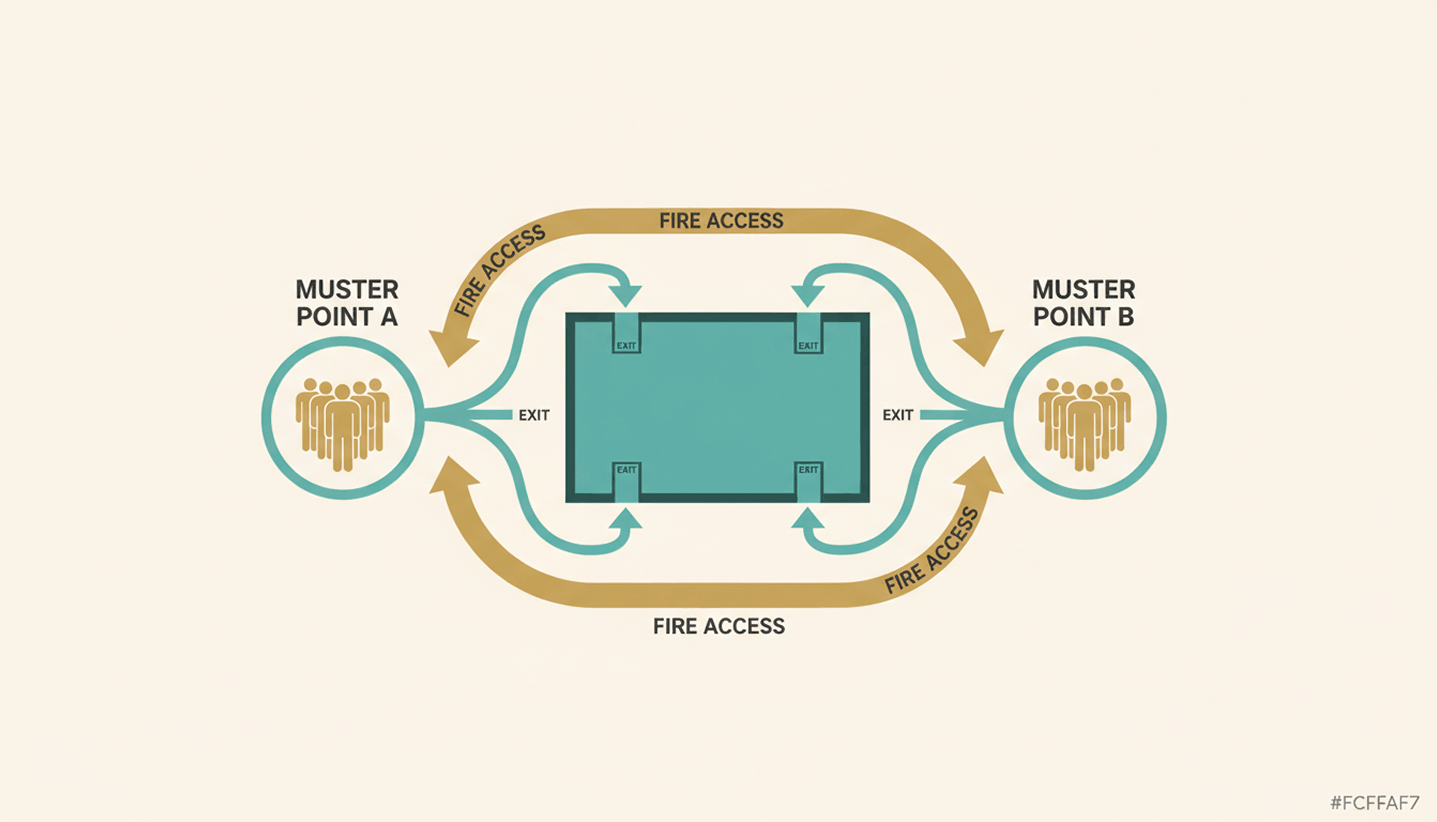
Manually Maintain Attendance Lists for Fire Safety
Real-time occupancy data as the basis for evacuation plans
How does automated room and desk booking work?
For example, an automated meeting room management system detects when two people book a conference room that is actually designed to accommodate 20 people. The system identifies the discrepancy and automatically rebooks the reservation into a smaller, suitable room.
This reduces the number of conflicts over available spaces and frees up time for office managers that was previously spent on manual adjustments. Workplace automation via Wi-Fi check-in takes this a step further: As soon as you log in to the office with your device, the system automatically reserves your desk without a single click.
What compliance considerations must a company keep in mind when implementing workplace automation?
Automating office processes always involves processing data. Therefore, three points must be clarified:
✓
GDPR Compliance: What data does the tool collect, how long is it stored, and who has access to it? Booking data and attendance records are considered personal data.
Hosting: EU hosting with a German or European data center circumvents the Cloud Act issues that arise with U.S. providers without an EU branch.
How do I get started with Workplace Automation?
To automate your workplace, start by identifying all the processes that, although they follow a very consistent pattern, are repeatedly carried out manually by employees. Review these processes and provide your team with software to automate them. The more processes a single software solution can handle, the fewer new tools you'll need to burden your team with.
1
Identify processes: Which processes take more than 30 minutes each day or regularly produce errors? These are the first candidates.
2
Examine the process: Is the current process already the best option? Or could it be streamlined?
3
Select a tool based on its integration capabilities: EU hosting and integration with existing systems are important selection criteria.
4
Roll out the changes gradually: Start with one feature—such as automatic room booking—and then expand to other areas after receiving positive feedback.
5
Review KPIs after 4 weeks: How many booking conflicts remained? How much administrative time was saved? How has office utilization changed?
Here's how PULT puts your office management on autopilot
Your workplace automations work best when they're bundled into a single software solution rather than spread across multiple tools. You can bundle workstation and room reservations, presence detection, occupancy analysis, visitor management, and parking management into PULT:
✓
Desk booking, room booking, and office analytics are all handled in a single tool, without any integration issues between individual systems.
✓
Automatic presence detection via your existing Wi-Fi system.
✓
Office Insights provide data and analyses on office utilization.
✓
Full integration with MS Teams, Slack, Personio, and HiBob.