What Is Envoy? A Quick Overview
Envoy is a workplace platform originally built around visitor management and reception. Over time, the company expanded into desk booking, room booking, and parking under the Envoy Workplace product line, alongside its original visitor and delivery management tools.
Envoy's Core Features
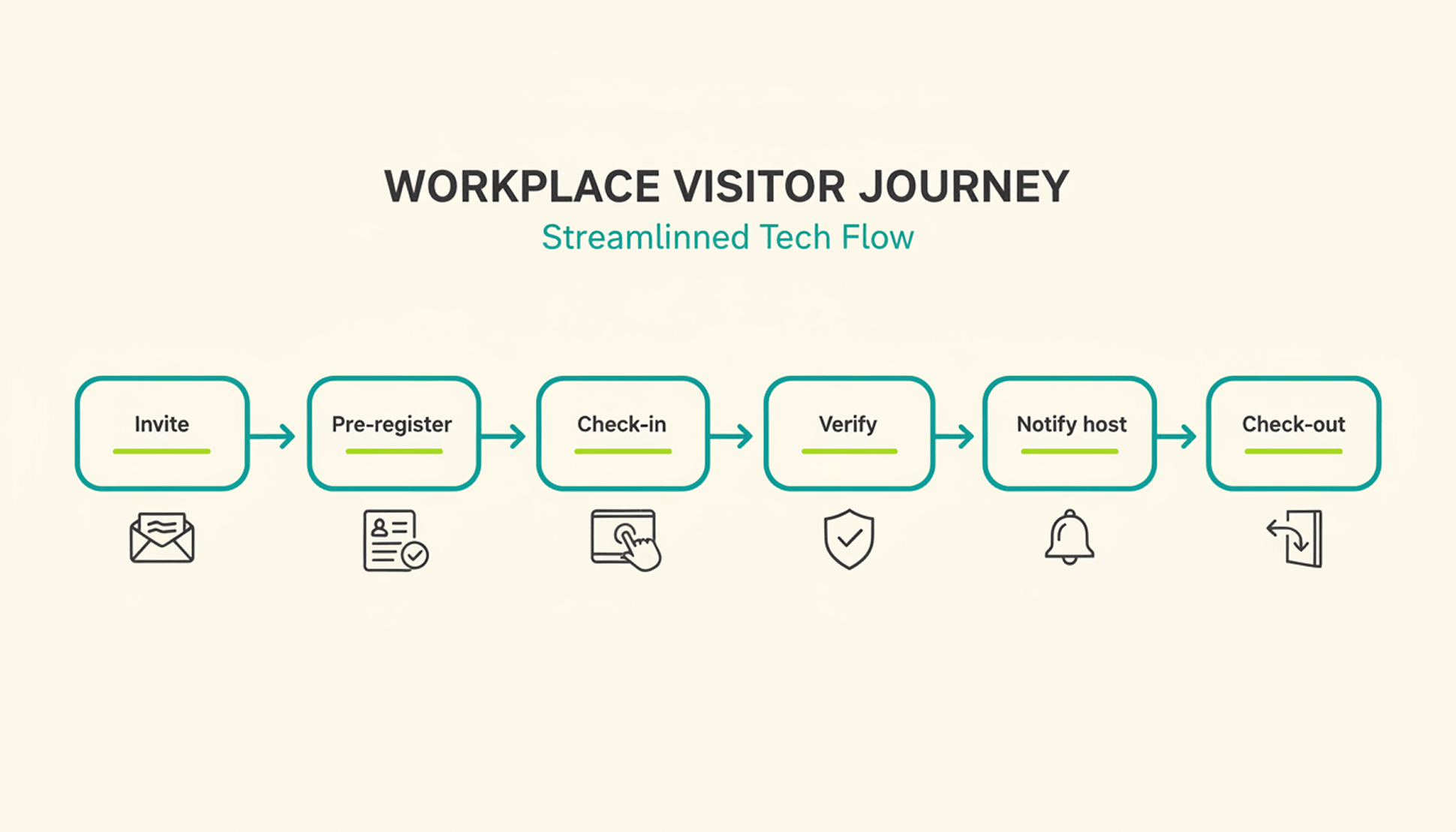
Envoy's visitor check-in runs on iPad kiosks paired with a supported Brother printer for badges. The platform handles ID scanning, digital NDAs, health screenings, and delivery tracking, and it integrates with Slack, Microsoft Teams, Okta, and several badge-entry systems.
Envoy Pricing
Envoy recently moved away from per-active-user billing for new contracts and now prices in tiers by location and by workplace module, with Visitors, Response, Reservations, Screens, and Deliveries licensed and billed separately. For the Visitors product:
✓Basic: free, with limited features (100 entries per month).
✓Premium: $362 per location per month, billed annually.
✓Enterprise: custom pricing for organizations with more complex security and compliance needs.
What Makes a Good Envoy Alternative?
Core Selection Criteria
A genuine Envoy alternative covers more than one office function. Look for desk booking, room booking, and visitor management under a single login, transparent pricing that doesn't require a sales call for a ballpark number, and integrations with the calendar and chat tools your team already uses. Multi-location support matters once you operate more than one office, since per-location fees add up fast.
Quick Checklist: What to Look For
✓Visitor management available, with pricing clearly disclosed.
✓Published pricing (per user, per space, or per resource).
✓Native Microsoft Teams, Slack, or Google Workspace integration.
✓Office insights and occupancy analytics on standard plans.
✓Support for parking and multi-location rollouts.
7 Envoy Alternatives for Desk Booking, Visitor Management & More in 2026
Note: The features, prices, and capabilities shown in the following comparison are based on publicly available information from each provider (as of August 2026) and are intended solely for neutral orientation. Providers may change these details at any time, and no guarantee is given for their accuracy or completeness. All brand names belong to their respective owners and are used for comparison purposes only. PULT has no business relationship with the other brands listed. The order below does not represent a ranking.
#1 PULT
Origin & Concept: PULT is an all-in-one office management platform built for hybrid teams, combining desk, room, visitor, and parking management in a single system.
Technology: PULT runs as a cloud-based platform with native integrations into calendar, chat, and HR tools, and includes WiFi-based desk booking that detects desk usage automatically over the existing office network.
Target Audience: The platform is aimed at SMEs and enterprise companies with roughly 50 to 2,000 employees running a hybrid work model, often across more than one office location.
Strengths
✓Platform breadth: Desk, room, visitor, and parking management run in one system instead of separate tools for each function.
✓WiFi Desk Booking: Desk usage is detected automatically over the existing office WiFi without requiring employees to check in manually.
✓Integration depth: Native connections to Microsoft Teams, Slack, Personio, and HiBob.
Plans & Pricing
(as of August 2026, source: PULT):
PULT Workplace (desk booking, meeting rooms, parking, and analytics):
✓Starter: free, for up to 20 users and 1 location.
✓Growth: from $3.40 per user/month.
✓Business: from $4.60 per user/month.
✓Enterprise: custom pricing, with white labeling and API access.
Visitor Management is priced as a separate product:
✓Business: from $114 per location/month.
✓Enterprise: custom pricing.
Additional costs may apply, for example:
✓Presence AI: WiFi-based automatic attendance and desk-occupancy tracking is a separate product, starting at $119/month on the Business plan.
#2 Deskbird
Origin & Concept: Deskbird is a workplace app built around hybrid work scheduling, letting employees plan office days and book desks, rooms, and parking from one interface.
Technology: SaaS platform with web, mobile, Slack, and Microsoft Teams apps. Business, Professional, and Enterprise include unlimited desks, users, admins, locations, and parking spots; pricing is based on active users.
Target Audience: According to the provider, deskbird is used by hybrid companies of various sizes, from small teams to global enterprises.
Strengths
✓Published entry pricing: The Business tier price is listed publicly, unlike several competitors on this list that require a sales quote.
✓Unlimited scope on every tier: Users, admins, locations, desks, and parking spots are unlimited even on the entry plan.
✓Chat-tool integration: Desks, rooms, and parking can be booked directly from Microsoft Teams or Slack.
Plans & Pricing (as of August 2026, source: deskbird):
✓Business: €2.75 per active user/month; covers desk, room, and parking booking, native mobile apps, and MS Teams integration.
✓Professional: custom pricing; adds advanced booking rules, AI-powered floor plan design, automated check-in, workplace ticketing, and public API access.
✓Enterprise: custom pricing; adds workplace surveys, custom analytics and reporting, advanced SLAs, and a dedicated Senior CSM.
Additional costs may apply, for example:
✓Add-ons: Visitors Plus (reception kiosk and pre-visit registration), Rooms Plus (meeting-room signage and catering requests), and User & Data Management Plus (SAML, SCIM, HRIS sync) are priced separately from the core plan.
#3 Robin (Robin Powered)
Origin & Concept: Robin is a workplace management platform covering desk, room, parking, and locker booking, space management, meeting management, and visitor management, positioned as a single unified platform for larger organizations.
Technology: The platform syncs natively with Microsoft Outlook, Google Calendar, Microsoft Teams, Slack, Microsoft Entra, and Okta. According to the provider, point solutions such as standalone room-display software are a better fit for smaller, single-purpose needs.
Target Audience: According to the provider, Robin fits organizations with more than 150 hybrid employees using an office, and works best for companies managing multiple floors, offices, or buildings.
Strengths
✓Platform breadth: Resource booking, space management, meeting management, workplace analytics, visitor management, and employee experience tools sit under one platform.
✓Calendar depth: Native sync with Microsoft Outlook, Google Calendar, Teams, and Slack.
✓Multi-site design: Built for organizations coordinating several offices or buildings at once.
Plans & Pricing (as of August 2026, source: Robin): Robin does not publish per-user or per-resource pricing. According to the provider, pricing is tailored per organization and requires a call with the sales team, with all subscriptions billed annually. Room displays and other hardware may come at an extra cost.
#4 Skedda
Origin & Concept: Skedda is a space-booking platform for desks, rooms, and other bookable areas, built around a configurable rules engine and an Organization Hub for managing multiple offices from one dashboard.
Technology: The platform is priced per space rather than per user, includes native Microsoft Teams and Slack apps, mobile apps for iOS and Android, and supports SSO via SAML 2.0.
Target Audience: According to the provider, Skedda serves organizations of all sizes, including universities, coworking spaces, and corporations with strict compliance needs.
Strengths
✓Unlimited users and bookings: Every plan includes unlimited users and bookings because pricing scales with spaces, not headcount.
✓Visitor management available: Visitor management is available alongside the existing space-booking tools as a separate add-on.
✓Multi-office dashboard: The Organization Hub lets admins manage several offices from one place.
Plans & Pricing (as of August 2026, source: Skedda):
✓Starter: from $99/month, priced per space, includes 15 spaces, a basic rules and roles engine, and a limited insights dashboard.
✓Plus: from $149/month, priced per space, includes 20 spaces, a limited rules and roles engine, and a full insights dashboard.
✓Premier: from $199/month, priced per space, includes 25 spaces, a full rules and roles engine, and a full insights dashboard.
✓AllBooked (for sports, studios, coworking, and community booking): custom pricing.
An Administrators add-on is available on every plan for $99/month.
#5 Archie
Origin & Concept: Archie is a modular workspace platform covering desk booking, room scheduling, visitor management, and coworking software as separately priced products.
Technology: The platform requires no proprietary hardware and works with existing tablets and screens, with native integrations into Microsoft 365, Slack, and access-control systems such as Kisi and Brivo.
Target Audience: According to the provider, Archie is used by more than 1,000 organizations, spanning small and mid-sized businesses on the Starter plan to large, multi-location companies on Pro and Enterprise.
Strengths
✓No proprietary hardware: Existing tablets and screens can be used instead of a fixed device.
✓Transparent, published pricing: Rates per desk, room, and visitor product are listed publicly rather than hidden behind a sales call.
✓Free trial after demo: According to the provider, a 14-day test environment is available following a product demo.
Plans & Pricing (as of August 2026, source: Archie):
✓Desk Booking Starter: $2.80 per desk/month, minimum $159/month, covers 1 location with floor plans, QR check-ins, and occupancy analytics.
✓Desk Booking Pro: $3.50 per desk/month, minimum $249/month, adds multiple locations, booking from Teams and Outlook, Slack integration, SSO, and SCIM.
✓Desk Booking Enterprise: custom pricing, adds security and compliance support, custom data residency, and white-glove onboarding.
✓Room Booking: from approximately $8 to $12 per room/month.
✓Visitor Management: from approximately $109 per location/month, priced as a separate module.
Room displays and other add-on hardware may come at an extra cost.
#6 YAROOMS
Origin & Concept: YAROOMS is a workplace management platform combining hybrid work scheduling, desk and room booking, and visitor management under one system, with a dedicated Enterprise tier for large organizations.
Technology: The platform includes interactive office maps, an AI assistant called Yarvis, Microsoft Teams integration, and Single Sign-On on the Business tier, with API access and custom cloud deployment (Azure, AWS, or on-prem) available on Enterprise.
Target Audience: According to the provider, YAROOMS fits small offices on the Starter plan, growing businesses on the Business plan, and large, multi-location teams of up to 1,000+ users on Enterprise.
Strengths
✓Published tiered pricing: Plans and per-year rates are listed publicly rather than hidden behind a sales call.
✓AI assistant included: Yarvis is included from the Business plan rather than sold as a separate add-on.
✓Multi-location scaling: Higher tiers add more locations and unlimited workplace analytics.
Plans & Pricing (as of August 2026, source: YAROOMS):
✓Starter: from $99/month for 10 users, covers 1 location, 2 floors with an interactive office map, hybrid work scheduling, and desk and room booking.
✓Business: from $399/month for 50 users, covers 2 locations, 90 days of workplace analytics, the Microsoft Teams app, Yarvis AI, and Single Sign-On.
✓Enterprise: from $899/month for 300 users, covers 5 locations plus add-ons, unlimited analytics, API access, and custom integrations.
#7 Joan
Origin & Concept: Joan is an all-inclusive workplace platform covering meeting room booking, visitor management, desk and parking booking, digital signage, and analytics, with pricing based on active usage rather than which features are turned on.
Technology: The platform combines a base subscription with per-user and per-device add-on pricing, covering both the Joan app and registered screens or tablets.
Target Audience: According to the provider, Joan is used by organizations across tech, education, and hospitality, from small offices to global enterprises.
Strengths
✓Pay-for-what-you-use model: Solutions you don't activate don't add to the cost.
✓Free tier to start: A free plan is available before moving to a paid subscription.
✓Full feature access on every plan: According to the provider, all solutions are available from the start rather than gated behind higher tiers.
Plans & Pricing (as of August 2026, source: Joan): Plans start at €49 per month as a base subscription with included users and devices.
✓Additional users: €0.99 per user/month.
✓Additional device licenses: €9.99 per device/month.
Custom quotes are available for larger setups.
How to Choose Your Envoy Alternative
Once you've narrowed the list by features and price, three factors can help assess how well a platform holds up as your office grows.
Scalability & Multi-Location Support
If you operate more than one office, check whether pricing adds a flat fee per location or scales with total users or spaces across all sites. That difference determines whether a second or third office meaningfully changes your bill.
Flexibility & Integrations
Your team already works inside Microsoft Teams, Slack, or Google Workspace. A platform that books directly inside those tools sees far higher adoption than one that requires a separate app nobody opens.
Security & Data Privacy
Visitor and badge data may qualify as personal data when it relates to an identified or identifiable person. Confirm how long visitor logs are retained, whether data stays in your required region, and whether the vendor supports SSO for admin access.
{{onpage-cta}}

.jpeg)














.png)
.png)
.png)
.png)
.png)