Toxic workplace: examples, test, and first steps for those affected

A toxic workplace causes lasting stress and has a negative impact on work performance and personal health. A toxic environment can be recognized, and there are ways out.

Toxic workplace: The most important facts in brief

  • A workplace is considered toxic when negative behavior patterns persist and do not improve despite warnings.
  • Typical characteristics of a toxic workplace include micromanagement, derogatory communication, withholding of information, overload, unequal treatment, and fear of repercussions.
  • The consequences of a toxic workplace include declining performance, ongoing stress, and long-term health risks.
  • Important countermeasures include documenting toxic situations in writing, setting boundaries, documentation, communication within the team, and, if necessary, involving the human resources department or works council.
  • Termination is appropriate when boundaries are consistently crossed and change is not achievable.
  • For a fresh start, platforms such as LinkedIn, Indeed, and local job portals offer a good overview of suitable positions.
  • Objective reviews on kununu or Glassdoor can warn others without incurring legal risks.

What is a toxic workplace? 

In a toxic workplace, recurring situations or behaviors noticeably impair the quality of work, personal well-being, or performance. 

A typical characteristic of a toxic workplace is that problems occur regularly, become entrenched, and are almost impossible to avoid in everyday working life. It becomes toxic when negative patterns persist and are difficult to improve. This does not refer to individual conflicts or high levels of stress.

Toxic work environment vs. stressful job

A stressful job is caused by a heavy workload or tight deadlines. Despite the pressure, cooperation usually remains predictable: agreements work, information is available, and criticism is possible. A toxic environment, on the other hand, is characterized by:

  • Constant uncertainty. You never know how the day will turn out.
  • Unreliable or contradictory communication.
  • Behavior that undermines respect or trust.
  • Problems that recur repeatedly, even after warnings or discussions.

Real examples of toxic workplaces from Reddit

Reddit is a major internet forum that functions as a social network for sharing text posts, images, and videos. Users generally engage in very open and honest discussions there, so you can also find authentic descriptions of toxic workplaces.

*Quotes translated from german originals

„ People gossip about everything and everyone, but face to face we're a team and we all laugh together. Yeah, suuuuure" 

An apprentice describes a culture in which colleagues are constantly talked about behind their backs, while harmony is maintained in public. Toxic patterns: double standards, mistrust, toxic team dynamics. Source
"...a person who complains to the boss about every little thing, which has already led to people being threatened with dismissal."

A training cohort experiences internal complaints being escalated immediately and threats of dismissal hanging in the air. Toxic patterns: climate of fear, denunciation, lack of conflict resolution. Source
"One missing smile... one wrong look and I'm afraid I'll be fired." 

One employee describes constant fear of being fired during the probationary period for minor reasons. Toxic patterns: insecurity, psychological pressure, unclear expectations. Source
"You need help from colleagues and you're not getting it." 

One user describes an environment in which support is systematically lacking, even though it is necessary for the work. Toxic patterns: passive resistance, isolation, "every man for himself." Source
"Be nice and polite to those who are subservient... and put down the rest..." 

Here, toxic boss behavior is described as a pattern: flattery toward followers, belittling others. Toxic patterns: favoritism, power games, humiliation. Source

12 characteristics and warning signs: How can I recognize a toxic workplace?

A toxic workplace is characterized by negative behavior patterns occurring regularly and permanently impairing cooperation. Typical signs include a lack of trust, derogatory communication, withholding of information, unfair treatment, constant overload, and unresolved conflicts. If several of these points exist at the same time and nothing improves despite warnings, it is usually a toxic workplace.

  • Micromanagement and lack of trust: The supervisor controls every step, constantly intervenes in details, and rarely allows independent decisions. Tasks take longer because approvals or queries are constantly required.
  • Unclear or conflicting expectations: Goals change at short notice, targets are vague or contradict previous statements.
  • Derogatory communication: Criticism is phrased in a personal manner, there is a lack of appreciation, and conversations are tense or conducted in a commanding tone. Suggestions or ideas are regularly dismissed or ignored.
  • Blame instead of problem solving: Mistakes are attributed to individuals, even if the causes lie in the process or the team. A constructive approach to problems does not develop.
  • Withholding information: Important information is deliberately delayed or not passed on. This makes it harder for those affected to do their jobs or makes them seem unprepared.
  • Clique formation and exclusion: Some members of the team receive benefits, access to supervisors, or informal information. Others are excluded, overlooked, or systematically isolated.
  • Frequent conflicts without lasting solutions: Points of contention regularly resurface because the underlying causes are not discussed. Conflicts tend to lead to distance or hostility rather than clear agreements.
  • Overwork as the norm: Workload, pace, or expectations are consistently higher than realistic. Breaks, relaxation, or adequate planning are rare. Overtime becomes the norm.
  • No recognition or appreciation: Successes are taken for granted. Feedback is rare or one-sidedly negative. Achievements are not acknowledged or are publicly belittled.
  • Unequal treatment: Rules do not apply equally to everyone. Some individuals receive special privileges, while others are judged more harshly. Decisions appear unfair or arbitrary.
  • Fear of reactions: Colleagues avoid addressing problems because they expect negative consequences. Criticism leads to sanctions, poorer treatment, or exclusion from decisions.
  • High turnover or frequent sick leave: Many leave within a short period of time or take sick leave.

How can I test whether my workplace is toxic?

The more of the following questions you answer Yes, the more likely it is that you have a toxic work environment:

• Am I heavily monitored in my work or frequently restricted in details?
• Do I often not know exactly what is expected of me or what the priorities are?
• Do I encounter derogatory comments, disrespectful language, or unnecessary harshness?
• Do I find that mistakes tend to lead to blame rather than solutions?
• Do I therefore tend to hide mistakes?
• Is important information being withheld or passed on late?
• Are there distinct cliques within the team; are individual people excluded?
• Do conflicts keep recurring without being resolved?
• Am I constantly overworked or regularly working beyond my limits?
• Do I rarely or never receive recognition for good work?
• Do I find it difficult to address problems openly because I expect negative consequences?

Classification:

These points will help you classify your initial assumption:

  • Do things improve if I address problems openly?
  • Do colleagues experience similar situations or stresses?
  • Do the patterns persist for weeks or months?

What are the consequences of a toxic work environment?

A toxic work environment affects team morale and impairs performance, health, and long-term development. The effects impact both individuals and the company.

Short-term consequences of a toxic work environment for individuals

  • decreased concentration and reduced performance
  • increased tension, nervousness, or sleep problems
  • Constant inner restlessness and vigilance when dealing with superiors or colleagues
  • lower motivation and less commitment

Long-term consequences of a toxic work environment for individuals

  • Increased and constant exhaustion, increased risk of burnout
  • persistent emotional stress, e.g. due to anxiety or frustration
  • Withdrawal from cooperation, projects, or responsibility
  • reduced self-esteem and doubts about one's own competence

Consequences of a toxic work environment for the company

  • increasing staff turnover and loss of expertise
  • more frequent absences and sick leave
  • declining productivity and lower quality of work
  • difficulties in recruiting personnel due to negative employer image

What can I do if my workplace is toxic?

In a toxic workplace, it helps to identify stressful situations, set clear boundaries, document incidents in writing, talk to colleagues, involve official bodies, and prepare possible alternatives.

  1. Describe situations: Describe stressful events: What happened? Who was involved? What impact did it have? 
  2. Set your own boundaries: Determine what behavior is acceptable to you and what is not. Keep these boundaries short and specific, for example: "I need clear instructions" or "I want to work without derogatory comments."
  3. Document events: Keep a factual record with dates, people involved, and situations.
  4. Seek allies: Talk to colleagues you trust. If similar observations are made repeatedly, this confirms the pattern and strengthens your position in discussions with supervisors or the human resources department.
  5. Involve official bodies: If discussions within the team are ineffective, seek advice from the human resources department, the works council, or another official body within the company. They will be able to assess what options and steps are available.
  6. Reduce your own stress: Ensure you get sufficient rest and relaxation, stick strictly to your working hours, and seek medical help if you experience symptoms such as sleep problems or constant exhaustion.
  7. Prepare an exit option: If no improvements are foreseeable, it makes sense to consider other options for your future career path. Update your resume, activate your network, and look into job opportunities. Being in a position to leave also strengthens your negotiating position internally.

Should I quit or stay in a toxic workplace?

Whether it makes sense to quit or stay depends on whether the stressful patterns can be changed or at least whether there is any sign of improvement. Quitting is advisable if your boundaries are constantly being crossed and internal attempts to find a solution have had no effect.

Criteria that speak in favor of a temporary stay:

  • There are specific areas for improvement.
  • Discussions with supervisors or the human resources department are proving effective.
  • The team offers you support and assists with necessary changes.
  • Stressful situations can be limited and become less frequent.
  • Your personal stability and resilience are still sufficient to wait out the coming changes.

Criteria that speak in favor of termination:

  • Despite discussions, your boundaries continue to be crossed.
  • Criticism leads to negative reactions or discrimination.
  • The leadership shows no interest in change.
  • The strain on your health is increasing, you are not getting any better in the long term, or you are even getting worse.
  • The toxic behavior is structurally embedded and affects many areas.

What happens next when a toxic workplace has no future?

If a workplace is permanently toxic and no realistic improvement is to be expected, then look ahead. On job portals, you can quickly find offers that broaden your horizons and show you that there are indeed other opportunities out there for you.

On LinkedIn, you can filter by company, industry, and working model. Indeed, StepStone, and similar platforms display a wide range of current job openings. It is also worth taking a regional look, for example via job portals of local newspapers, municipal career platforms, or company websites in your area.

Leaving a toxic employer often triggers strong emotions. Honestly examine whether you feel any desire for revenge. Openly disparaging, spreading rumors, or making negative statements about individuals or companies can have legal consequences, such as defamation. It is wise not to give in to these impulses and instead invest your energy in your own new beginning.

Nevertheless, you can protect others from problematic structures. An objective and accurate review on platforms such as kununu or Glassdoor is an effective way to expose abuses without attacking anyone personally. Stick to verifiable facts, describe working conditions, and avoid personal accusations. This will help other applicants while protecting your own position.

Tip: Never speak badly about former employers during job interviews, as this never goes down well. However, you can certainly mention that you had different ideas about what constitutes a healthy workplace and that this is why you are changing jobs. Your interviewer will appreciate statements of this kind.
Trusted by 1000+ innovative workplaces
FAQ

Have questions?

When is a workplace considered toxic?

A workplace is considered toxic if stressful behavior patterns occur on a permanent basis, hinder cooperation, and do not improve despite discussions. Typical indicators include disparagement, lack of transparency, excessive workloads, and unfair treatment.

What is the difference between a stressful workplace and a toxic workplace?

Stress tends to arise from a heavy workload or tight deadlines. A toxic environment, on the other hand, is characterized by recurring problems such as disrespect, mistrust, power games, or a lack of fairness. Stress can be temporary, but toxic patterns tend to persist for longer.

What can I do if my workplace is toxic?

Helpful steps include identifying stressful situations, setting and defending your personal boundaries, documenting incidents, and talking to colleagues. If nothing changes, internal departments such as human resources or the works council should be involved.

How do I bring up the subject with my supervisor?

Provide examples of toxic behavior, describe the impact on your work, and suggest what you need to be able to work better. Avoid generalizations and keep the conversation objective.

Should I quit if the workplace is toxic?

Termination makes sense for you if your boundaries are constantly being crossed and internal attempts to resolve the situation have been ineffective. It is important to assess the impact on your health, your career prospects, and the likelihood that the situation will change.

How can I protect myself in the short term in a toxic environment?

Set clear priorities, document relevant incidents, take breaks, stick to your working hours, and seek support from your team. If you are under a lot of stress, medical or psychological help can be very useful.

About author

Isolde Van der Knaap

Hybrid Work Enthusiast and Account Executive

At PULT we're designing the future of the hybrid workplace for companies and their employees. Focused on SME and mid market customers in Eruope, I'm working on everything from Customer Discovery to Onboarding. I'm very passionate about new work and moved to Hamburg in 2024 even though I'm originally from France.

Resources

Learn how to run better workplace operations

Visitor Management System: What It Is and How It Works
Visitor Management

Visitor Management System: What It Is and How It Works

A visitor management system replaces the paper sign-in sheet with a digital process that screens, logs, and tracks every guest who enters your office. It captures who's on-site, notifies the host, and creates a searchable record for security and compliance reviews. For growing offices, this single change closes a security gap most reception desks still carry today.

Visitor Management System: Key Takeaways

A visitor management system digitizes guest check-in, replacing paper logs with pre-registration, badge printing, host notifications, and a searchable visitor record.

Visitor management software reduces front-desk workload while creating the audit trail organizations need for security screening and regulatory compliance.

A standalone visitor tracking system solves check-in but leaves desk booking, room booking, and office data in separate tools, creating gaps in a company's overall presence picture.

PULT combines visitor management with real-time presence, desk and room booking, and emergency response in one platform, so security teams see who's on-site, employees and visitors alike, from a single source of data.

What Is a Visitor Management System?

A visitor management system is software that replaces the manual guest sign-in process with a digital, trackable one. It records a visitor's details, their arrival and departure, and notifies the employee they're there to see, all without a paper logbook at the front desk.

Companies adopt one for three reasons: security, compliance with regulations like GDPR, and a faster, more professional check-in experience for guests.

Standalone check-in tools handle the front desk in isolation. Platform-based visitor management, like PULT's, feeds that same data into a company's broader presence and office management system, so security teams see visitors and employees in one place.

What Does a Visitor Management System Do?

A visitor management system replaces manual sign-in with a digital workflow that handles the entire guest experience, from pre-registration to check-out. It records a visitor's details, notifies the right host, can issue a badge, and stores visits in a searchable log. Visitor management software runs this process on a tablet, kiosk, or mobile phone instead of a clipboard.

Core Features of a Modern Visitor Management System

Pre-registration and invites: hosts send a visitor a link before arrival, with the visit details and parking or building information included.

Self-service check-in: guests confirm their name, host, and purpose at a kiosk or tablet in under a minute.

Optional ID and watchlist screening: depending on the platform, the system can check visitor IDs or flag names against a security or denied-entry list before a badge is issued.

Badge printing and QR codes: guests can receive a visible, time-stamped credential that identifies them for that day's visit.

Host notifications: the employee being visited gets an instant alert by email, Slack, or Teams, with the guest's details and, if enabled, a photo.

NDA and agreement signing: legal documents are signed digitally during check-in, with a copy stored automatically for compliance records.

Visitor logs and reporting: every visit is timestamped, searchable, and exportable, so front-desk trends are easy to review monthly.

Emergency roll-call export: the current visitor list can be pulled during an evacuation, showing who is recorded as still in the building.

Visitor Management Software vs. a Paper Logbook

Criterion Paper Logbook Visitor Management Software
Data accuracy Illegible entries, missing fields Structured, mandatory fields
Security screening None Watchlist and ID checks
Emergency roll call Manual count from paper Instant, exportable list
Compliance records Hard to search or retire Searchable, with retention rules

How Does the Visitor Journey Work, From Invite to Check-Out?

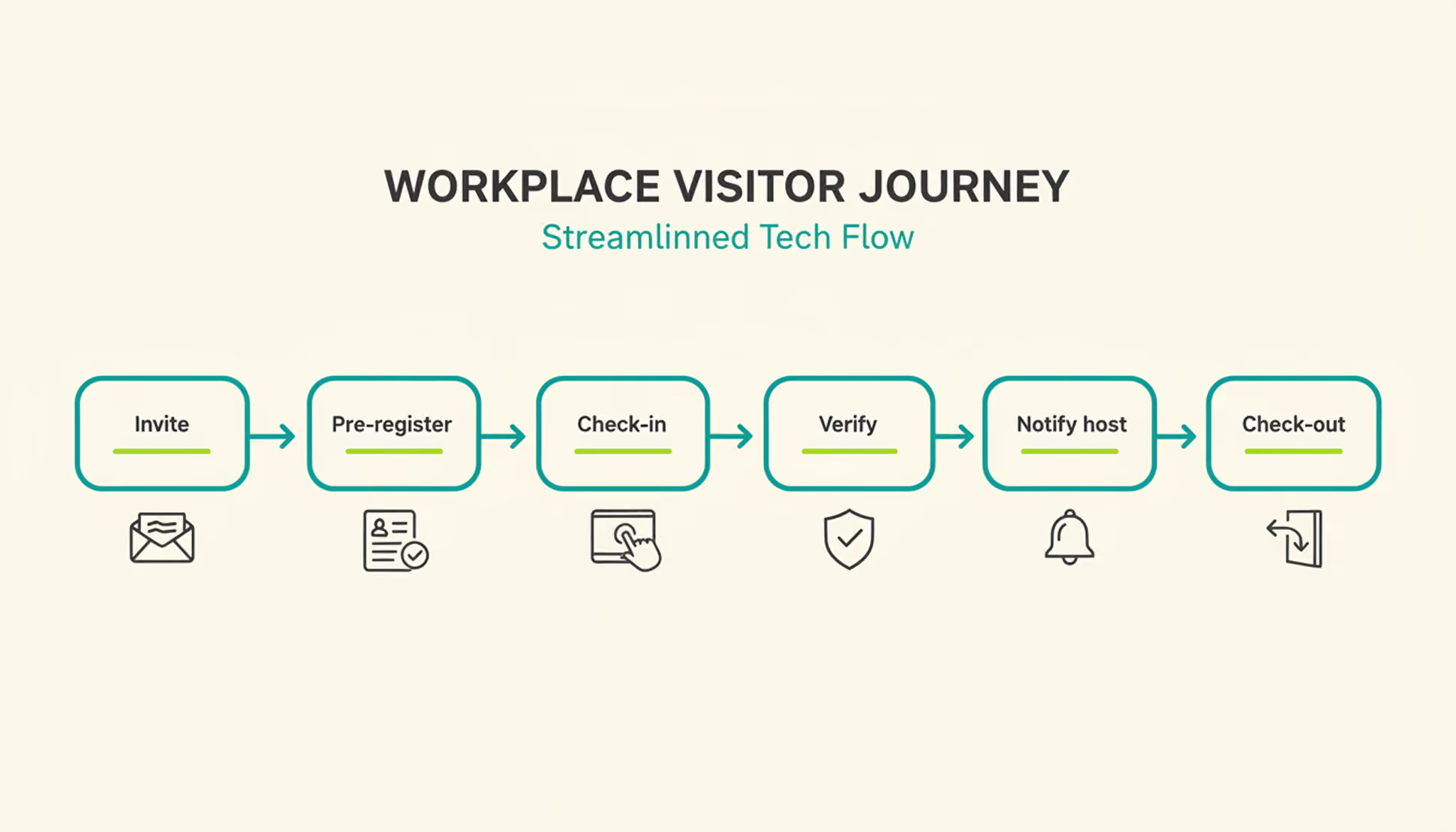
A typical visit runs through six steps. The host sends an invite, the visitor pre-registers, the visitor confirms their details on arrival, a badge can be issued, the host gets notified, and the system records check-out when the visitor leaves or at a configured time.

1

Pre-registration: the host schedules the visit and sends a link with arrival details, parking instructions, and building access notes.

2

Arrival and check-in: the visitor confirms their details at a kiosk or on a tablet or their own phone, usually in under a minute.

3

Optional identity and watchlist verification: depending on the platform and configuration, additional ID or security-list checks can be performed before building access is granted.

4

Badge issuance: a printed or digital badge identifies the visitor for the building and can be limited to that day's visit.

5

Host notification: the employee being visited receives an instant alert to come to reception, with the visitor's name and, if enabled, photo.

6

Check-out and logging: the visitor checks out on departure, or the system can close the visit automatically at a configured time, keeping the record administratively up to date.

What Are the Benefits of a Visitor Management System for the Office?

The clearest benefit is a complete, searchable record of who was on-site and when, something a paper log or verbal check-in can't provide.

Security and Compliance Benefits

A visitor management system can screen guests against a watchlist before they reach the office floor, depending on the platform and configuration. It can keep a timestamped log of visits for security and compliance reviews. Under GDPR, visitor data counts as personal data, so it needs a lawful basis for collection, an appropriate retention period or criteria for determining it, and safeguards against unauthorized access. A digital system can support these controls directly in the check-in process, reducing reliance on manual steps.

Visitor accountability also matters during an emergency. OSHA guidance notes that visitors need to be accounted for after an evacuation, and many employers use the sign-in list to run that headcount. A missing name on that list can delay an all-clear by several minutes, minutes that matter during a real evacuation.

Because PULT Presence tracks employees and visitors in one live view, a facilities team can pull an accurate roll call the moment an alarm sounds, not after searching through a paper binder.

Front-Desk Efficiency and Visitor Experience Benefits

Automated check-in cuts the time your team spends on manual sign-in, badge writing, and phone calls to announce a guest. A receptionist freed from clipboard duty can focus on greeting visitors and other front-desk work. Visitors move through reception faster, often in under a minute, and the first impression of your office improves the moment someone walks in the door. For client meetings or investor visits, that faster, more polished check-in becomes part of how your company presents itself.

How Do You Choose the Right Visitor Management Solution?

The right visitor management solution depends less on feature count and more on how well it fits your existing security setup, office size, and tool stack. A system built for a five-person startup office looks very different from one built for a 500-person campus with multiple buildings and a dedicated security team.

Criterion What to Check
Feature depth Pre-registration, watchlist screening, badge printing, reporting
Integrations Calendar, HR, and communication tools your team already uses
Security and compliance Data retention controls, audit logs, GDPR-aligned handling
Scalability Pricing and setup across multiple locations
Price Per-location vs. per-user pricing models
Ease of use Kiosk setup time and how quickly staff can learn the system

Is a Standalone Visitor Management Platform Enough for a Modern Office?

A standalone visitor management platform solves the front-desk problem, but most offices also run desk booking, room booking, and parking through separate tools. Connecting these systems into one platform gives security and facilities teams a single, live view of who is on-site, employees and visitors together.

That connection matters most during a security incident or an office move, when facilities teams need one current view of occupancy rather than four separate logins to check. PULT pairs visitor management with desk booking software, room booking, and presence data, so a single dashboard shows recorded on-site employees and visitors. Office managers evaluating a broader workplace management software setup typically start here, since visitor data becomes far more useful once it's connected to the rest of the office.

{{onpage-cta}}

Turn Visitor Check-In Into a Security Advantage

A visitor management system turns a vulnerable front desk into a controlled entry point, giving you a searchable record of who checked in and when. The real payoff comes when it connects to the rest of your office, from desk booking to real-time presence data, giving you one live picture of recorded on-site users. For growing offices, that visibility is worth seeing in action.

Visitor check-in, desk booking, room booking, and presence data live in one platform, so you manage all of it from a single login.

A real-time view shows who is on-site, employees and visitors together, for faster emergency roll calls.

Every visit is recorded in a searchable log, with records available for security and compliance reviews.

Microsoft Teams and Slack support visitor notifications, while Personio and HiBob connect employee data through built-in integrations.

{{onpage-cta-2}}

Envoy Alternatives: 7 Office Management Platforms Compared (2026)
Alternatives

Envoy Alternatives: 7 Office Management Platforms Compared (2026)

Envoy alternatives worth a closer look share one trait: they cover more of daily office management than a single visitor kiosk. If Envoy's per-location pricing or iPad-based visitor kiosk has you looking elsewhere, this comparison walks through seven platforms, including PULT, across visitor management, desk and room booking, parking, and office insights.

What Is Envoy? A Quick Overview

Envoy is a workplace platform originally built around visitor management and reception. Over time, the company expanded into desk booking, room booking, and parking under the Envoy Workplace product line, alongside its original visitor and delivery management tools.

Envoy's Core Features

Envoy's visitor check-in runs on iPad kiosks paired with a supported Brother printer for badges. The platform handles ID scanning, digital NDAs, health screenings, and delivery tracking, and it integrates with Slack, Microsoft Teams, Okta, and several badge-entry systems.

Envoy Pricing

Envoy recently moved away from per-active-user billing for new contracts and now prices in tiers by location and by workplace module, with Visitors, Response, Reservations, Screens, and Deliveries licensed and billed separately. For the Visitors product:

Basic: free, with limited features (100 entries per month).

Premium: $362 per location per month, billed annually.

Enterprise: custom pricing for organizations with more complex security and compliance needs.

What Makes a Good Envoy Alternative?

Core Selection Criteria

A genuine Envoy alternative covers more than one office function. Look for desk booking, room booking, and visitor management under a single login, transparent pricing that doesn't require a sales call for a ballpark number, and integrations with the calendar and chat tools your team already uses. Multi-location support matters once you operate more than one office, since per-location fees add up fast.

Quick Checklist: What to Look For

Visitor management available, with pricing clearly disclosed.

Published pricing (per user, per space, or per resource).

Native Microsoft Teams, Slack, or Google Workspace integration.

Office insights and occupancy analytics on standard plans.

Support for parking and multi-location rollouts.

7 Envoy Alternatives for Desk Booking, Visitor Management & More in 2026

Note: The features, prices, and capabilities shown in the following comparison are based on publicly available information from each provider (as of August 2026) and are intended solely for neutral orientation. Providers may change these details at any time, and no guarantee is given for their accuracy or completeness. All brand names belong to their respective owners and are used for comparison purposes only. PULT has no business relationship with the other brands listed. The order below does not represent a ranking.

#1 PULT

Origin & Concept: PULT is an all-in-one office management platform built for hybrid teams, combining desk, room, visitor, and parking management in a single system.

Technology: PULT runs as a cloud-based platform with native integrations into calendar, chat, and HR tools, and includes WiFi-based desk booking that detects desk usage automatically over the existing office network.

Target Audience: The platform is aimed at SMEs and enterprise companies with roughly 50 to 2,000 employees running a hybrid work model, often across more than one office location.

Strengths

Platform breadth: Desk, room, visitor, and parking management run in one system instead of separate tools for each function.

WiFi Desk Booking: Desk usage is detected automatically over the existing office WiFi without requiring employees to check in manually.

Integration depth: Native connections to Microsoft Teams, Slack, Personio, and HiBob.

Plans & Pricing

(as of August 2026, source: PULT):

PULT Workplace (desk booking, meeting rooms, parking, and analytics):

Starter: free, for up to 20 users and 1 location.

Growth: from $3.40 per user/month.

Business: from $4.60 per user/month.

Enterprise: custom pricing, with white labeling and API access.

Visitor Management is priced as a separate product:

Business: from $114 per location/month.

Enterprise: custom pricing.

Additional costs may apply, for example:

Presence AI: WiFi-based automatic attendance and desk-occupancy tracking is a separate product, starting at $119/month on the Business plan.

#2 Deskbird

Origin & Concept: Deskbird is a workplace app built around hybrid work scheduling, letting employees plan office days and book desks, rooms, and parking from one interface.

Technology: SaaS platform with web, mobile, Slack, and Microsoft Teams apps. Business, Professional, and Enterprise include unlimited desks, users, admins, locations, and parking spots; pricing is based on active users.

Target Audience: According to the provider, deskbird is used by hybrid companies of various sizes, from small teams to global enterprises.

Strengths

Published entry pricing: The Business tier price is listed publicly, unlike several competitors on this list that require a sales quote.

Unlimited scope on every tier: Users, admins, locations, desks, and parking spots are unlimited even on the entry plan.

Chat-tool integration: Desks, rooms, and parking can be booked directly from Microsoft Teams or Slack.

Plans & Pricing (as of August 2026, source: deskbird):

Business: €2.75 per active user/month; covers desk, room, and parking booking, native mobile apps, and MS Teams integration.

Professional: custom pricing; adds advanced booking rules, AI-powered floor plan design, automated check-in, workplace ticketing, and public API access.

Enterprise: custom pricing; adds workplace surveys, custom analytics and reporting, advanced SLAs, and a dedicated Senior CSM.

Additional costs may apply, for example:

Add-ons: Visitors Plus (reception kiosk and pre-visit registration), Rooms Plus (meeting-room signage and catering requests), and User & Data Management Plus (SAML, SCIM, HRIS sync) are priced separately from the core plan.

#3 Robin (Robin Powered)

Origin & Concept: Robin is a workplace management platform covering desk, room, parking, and locker booking, space management, meeting management, and visitor management, positioned as a single unified platform for larger organizations.

Technology: The platform syncs natively with Microsoft Outlook, Google Calendar, Microsoft Teams, Slack, Microsoft Entra, and Okta. According to the provider, point solutions such as standalone room-display software are a better fit for smaller, single-purpose needs.

Target Audience: According to the provider, Robin fits organizations with more than 150 hybrid employees using an office, and works best for companies managing multiple floors, offices, or buildings.

Strengths

Platform breadth: Resource booking, space management, meeting management, workplace analytics, visitor management, and employee experience tools sit under one platform.

Calendar depth: Native sync with Microsoft Outlook, Google Calendar, Teams, and Slack.

Multi-site design: Built for organizations coordinating several offices or buildings at once.

Plans & Pricing (as of August 2026, source: Robin): Robin does not publish per-user or per-resource pricing. According to the provider, pricing is tailored per organization and requires a call with the sales team, with all subscriptions billed annually. Room displays and other hardware may come at an extra cost.

#4 Skedda

Origin & Concept: Skedda is a space-booking platform for desks, rooms, and other bookable areas, built around a configurable rules engine and an Organization Hub for managing multiple offices from one dashboard.

Technology: The platform is priced per space rather than per user, includes native Microsoft Teams and Slack apps, mobile apps for iOS and Android, and supports SSO via SAML 2.0.

Target Audience: According to the provider, Skedda serves organizations of all sizes, including universities, coworking spaces, and corporations with strict compliance needs.

Strengths

Unlimited users and bookings: Every plan includes unlimited users and bookings because pricing scales with spaces, not headcount.

Visitor management available: Visitor management is available alongside the existing space-booking tools as a separate add-on.

Multi-office dashboard: The Organization Hub lets admins manage several offices from one place.

Plans & Pricing (as of August 2026, source: Skedda):

Starter: from $99/month, priced per space, includes 15 spaces, a basic rules and roles engine, and a limited insights dashboard.

Plus: from $149/month, priced per space, includes 20 spaces, a limited rules and roles engine, and a full insights dashboard.

Premier: from $199/month, priced per space, includes 25 spaces, a full rules and roles engine, and a full insights dashboard.

AllBooked (for sports, studios, coworking, and community booking): custom pricing.

An Administrators add-on is available on every plan for $99/month.

#5 Archie

Origin & Concept: Archie is a modular workspace platform covering desk booking, room scheduling, visitor management, and coworking software as separately priced products.

Technology: The platform requires no proprietary hardware and works with existing tablets and screens, with native integrations into Microsoft 365, Slack, and access-control systems such as Kisi and Brivo.

Target Audience: According to the provider, Archie is used by more than 1,000 organizations, spanning small and mid-sized businesses on the Starter plan to large, multi-location companies on Pro and Enterprise.

Strengths

No proprietary hardware: Existing tablets and screens can be used instead of a fixed device.

Transparent, published pricing: Rates per desk, room, and visitor product are listed publicly rather than hidden behind a sales call.

Free trial after demo: According to the provider, a 14-day test environment is available following a product demo.

Plans & Pricing (as of August 2026, source: Archie):

Desk Booking Starter: $2.80 per desk/month, minimum $159/month, covers 1 location with floor plans, QR check-ins, and occupancy analytics.

Desk Booking Pro: $3.50 per desk/month, minimum $249/month, adds multiple locations, booking from Teams and Outlook, Slack integration, SSO, and SCIM.

Desk Booking Enterprise: custom pricing, adds security and compliance support, custom data residency, and white-glove onboarding.

Room Booking: from approximately $8 to $12 per room/month.

Visitor Management: from approximately $109 per location/month, priced as a separate module.

Room displays and other add-on hardware may come at an extra cost.

#6 YAROOMS

Origin & Concept: YAROOMS is a workplace management platform combining hybrid work scheduling, desk and room booking, and visitor management under one system, with a dedicated Enterprise tier for large organizations.

Technology: The platform includes interactive office maps, an AI assistant called Yarvis, Microsoft Teams integration, and Single Sign-On on the Business tier, with API access and custom cloud deployment (Azure, AWS, or on-prem) available on Enterprise.

Target Audience: According to the provider, YAROOMS fits small offices on the Starter plan, growing businesses on the Business plan, and large, multi-location teams of up to 1,000+ users on Enterprise.

Strengths

Published tiered pricing: Plans and per-year rates are listed publicly rather than hidden behind a sales call.

AI assistant included: Yarvis is included from the Business plan rather than sold as a separate add-on.

Multi-location scaling: Higher tiers add more locations and unlimited workplace analytics.

Plans & Pricing (as of August 2026, source: YAROOMS):

Starter: from $99/month for 10 users, covers 1 location, 2 floors with an interactive office map, hybrid work scheduling, and desk and room booking.

Business: from $399/month for 50 users, covers 2 locations, 90 days of workplace analytics, the Microsoft Teams app, Yarvis AI, and Single Sign-On.

Enterprise: from $899/month for 300 users, covers 5 locations plus add-ons, unlimited analytics, API access, and custom integrations.

#7 Joan

Origin & Concept: Joan is an all-inclusive workplace platform covering meeting room booking, visitor management, desk and parking booking, digital signage, and analytics, with pricing based on active usage rather than which features are turned on.

Technology: The platform combines a base subscription with per-user and per-device add-on pricing, covering both the Joan app and registered screens or tablets.

Target Audience: According to the provider, Joan is used by organizations across tech, education, and hospitality, from small offices to global enterprises.

Strengths

Pay-for-what-you-use model: Solutions you don't activate don't add to the cost.

Free tier to start: A free plan is available before moving to a paid subscription.

Full feature access on every plan: According to the provider, all solutions are available from the start rather than gated behind higher tiers.

Plans & Pricing (as of August 2026, source: Joan): Plans start at €49 per month as a base subscription with included users and devices.

Additional users: €0.99 per user/month.

Additional device licenses: €9.99 per device/month.

Custom quotes are available for larger setups.

How to Choose Your Envoy Alternative

Once you've narrowed the list by features and price, three factors can help assess how well a platform holds up as your office grows.

Scalability & Multi-Location Support

If you operate more than one office, check whether pricing adds a flat fee per location or scales with total users or spaces across all sites. That difference determines whether a second or third office meaningfully changes your bill.

Flexibility & Integrations

Your team already works inside Microsoft Teams, Slack, or Google Workspace. A platform that books directly inside those tools sees far higher adoption than one that requires a separate app nobody opens.

Security & Data Privacy

Visitor and badge data may qualify as personal data when it relates to an identified or identifiable person. Confirm how long visitor logs are retained, whether data stays in your required region, and whether the vendor supports SSO for admin access.

{{onpage-cta}}

Muster Point: Definition, Location Rules, and How to Run a Headcount
Office Insights

Muster Point: Definition & Setup

A muster point is the designated spot where employees, visitors, and contractors gather after evacuating a building, so someone can confirm everyone made it out safely. Under OSHA 29 CFR 1910.38, covered emergency action plans need a procedure to account for employees after an evacuation, and a designated assembly area is one common way to do that in practice.

Muster Point: Key Takeaways

A muster point is a designated, safe location outside a building where employees, visitors, and contractors gather and get counted after an emergency evacuation.

Under OSHA regulation 29 CFR 1910.38, employers subject to the standard must include procedures for accounting for all employees after an evacuation.

A safe muster point stays clear of the building's hazard zone and emergency vehicle access routes, and remains visible to evacuees in smoke, rain, or darkness.

PULT is an office management platform whose Presence feature detects who is on-site through a company's existing WiFi network, giving office and security teams a live, automatic headcount during an emergency.

What Is a Muster Point?

A muster point is a fixed, pre-identified location outside a building where everyone gathers after an evacuation alarm. Its purpose goes beyond simply getting people outside: it gives a warden or safety officer a single place to run a headcount, confirm who made it out, and flag anyone still unaccounted for.

Muster Point vs. Assembly Point vs. Muster Station

Muster point and assembly point generally describe the same function, while muster station is a related term commonly used in maritime and offshore settings. Onshore offices and warehouses in the US typically say muster point or assembly point.

Maritime operations commonly use muster station, including in contexts covered by SOLAS muster and drill requirements. For offices and other onshore workplaces, the location and headcount process generally work the same way regardless of whether you use muster point or assembly point.

Where Should You Place a Muster Point?

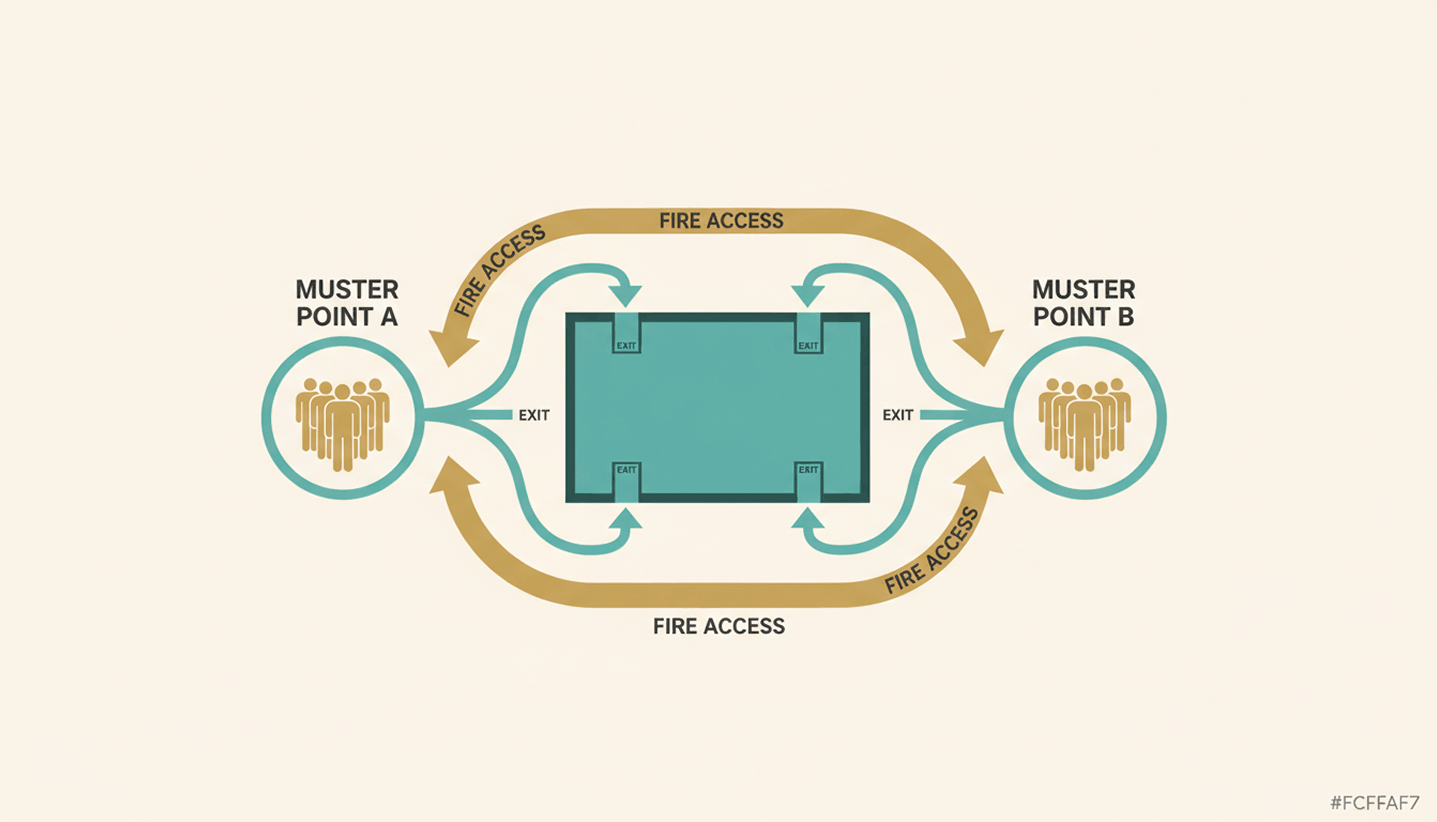
A good muster point sits far enough from the building to stay clear of smoke, debris, and structural risk, but close enough that people reach it within minutes. Beyond distance, a handful of practical criteria decide whether a location actually works during a real emergency.

Distance from hazards: Keep the point away from the building itself, parking structures, and anything storing flammable material.

Clear of emergency access: Don't block the routes fire trucks and ambulances need to reach the building.

Reachable from every exit: Every evacuation route on the floor plan should lead to a muster point without crossing back through the building.

Visible in poor conditions: Choose a spot that stays identifiable in smoke, rain, or after dark, and mark it with high-visibility signage.

If your evacuation plan needs a broader refresh beyond the muster point itself, our guide to office fire safety covers alarm systems and drill schedules in more detail.

How Do You Set Up and Mark an Emergency Muster Point at the Office?

Setting up an emergency muster point takes three things: clear signage, a person responsible for the headcount, and enough capacity for everyone who might be on site. Multi-floor or multi-tenant offices may need more than one muster point where building size, occupancy, or evacuation routes would otherwise create a bottleneck.

Mark it clearly: Use clear, high-visibility signage so the location remains easy to identify by day and in poor visibility.

Assign responsibility: Designate trained personnel to manage the headcount and report the result to the incident commander.

Plan for scale: Add a second or third muster point for large floors, multiple buildings, or shared office space, and split the roster accordingly.

Put it on the map: Add every muster point to your floor plan and walk new hires through it as part of onboarding.

How Do You Take a Headcount at the Muster Point?

Once people reach the muster point, the warden runs a headcount, sometimes called a fire roll call, and checks names against a roster before reporting the result to the incident commander. The harder part is making sure that roster actually reflects who was in the building, including people who don't show up on a payroll list.

Accounting for Visitors and Contractors

Employees usually appear on a standard roster, but visitors and contractors often don't. A guest who checked in an hour earlier or a contractor working on the third floor still needs a headcount at the muster point. A visitor log that isn't tied into the emergency plan leaves wardens guessing how many people are actually missing.

Manual Fire Roll Call vs. Real-Time Presence Data

A paper roll call at a mid-size office can take valuable time, and it only counts people already written down. PULT Presence uses office network data to show which employees are on site, while visitor and contractor records can supplement the on-site roster during an emergency.

{{onpage-cta}}

Give Every Muster Point a Fast, Accurate Headcount

A muster point only works if people know where it is and someone can confirm who made it there. Distance, signage, and a designated warden solve the location half of the problem. The headcount half comes down to whether your roster actually reflects everyone on site that day, employees, visitors, and contractors included. That's the gap most manual processes leave open.

You see live on-site presence data to support the muster point headcount instead of relying only on a manual roster.

Digitally checked-in visitors and contractors can be included without relying on a separate paper log.

Presence tracking runs through your existing WiFi network and takes under 30 minutes to set up.

Emergency Response activity can provide timestamped records of key actions for your safety files.

{{onpage-cta-2}}