Workforce Analytics: Definition, Key Metrics, and EU-Compliant Implementation by 2026

Workforce analytics refers to the analysis of personnel data to manage headcount, productivity, and workforce planning. HR teams use this method to support personnel decisions with data. Starting in August 2026, the EU AI Regulation will tighten requirements for AI-powered HR analytics and mandate specific structures.

Workforce Analytics: The Basics

  • Workforce analytics is the quantitative analysis of HR data—such as turnover, absenteeism, headcount, and office utilization—to derive actionable recommendations for workforce planning.
  • Key metrics for workforce planning analytics include turnover rate, time-to-hire, absenteeism rate, office attendance, and team-level productivity metrics.
  • The EU AI Regulation classifies many HR analytics systems as high-risk AI starting in August 2026, imposing obligations regarding disclosure, human oversight, and data protection impact assessments.
  • PULT provides the data foundation for workforce analytics in hybrid teams—including attendance, desk utilization, and room bookings—and thus complements traditional HRIS systems such as Personio or HiBob.

What is workforce analytics, and how does it differ from people analytics?

Workforce Analytics focuses on the quantitative aspects of the workforce. It centers on headcount, productivity, turnover, and workforce structure in medium-term planning. People Analytics takes this a step further and also examines behavior, engagement, and collaboration based on qualitative data. HR Reporting, on the other hand, provides only retrospective reports without a forecasting component.

workforce analytics

In day-to-day work, these two areas are closely intertwined. When you implement your own workforce analytics, you create the data foundation for people analytics and the overarching workplace management.

Which metrics are suitable for workforce analytics?

Workforce Analytics uses metrics such as turnover rate, time-to-hire, absenteeism rate, office utilization, headcount trends, and others, which are regularly collected and analyzed. Together, these metrics provide an overview of how the workforce is evolving and which areas of the company are over- or under-staffed.

What tools are suitable for workforce analytics?

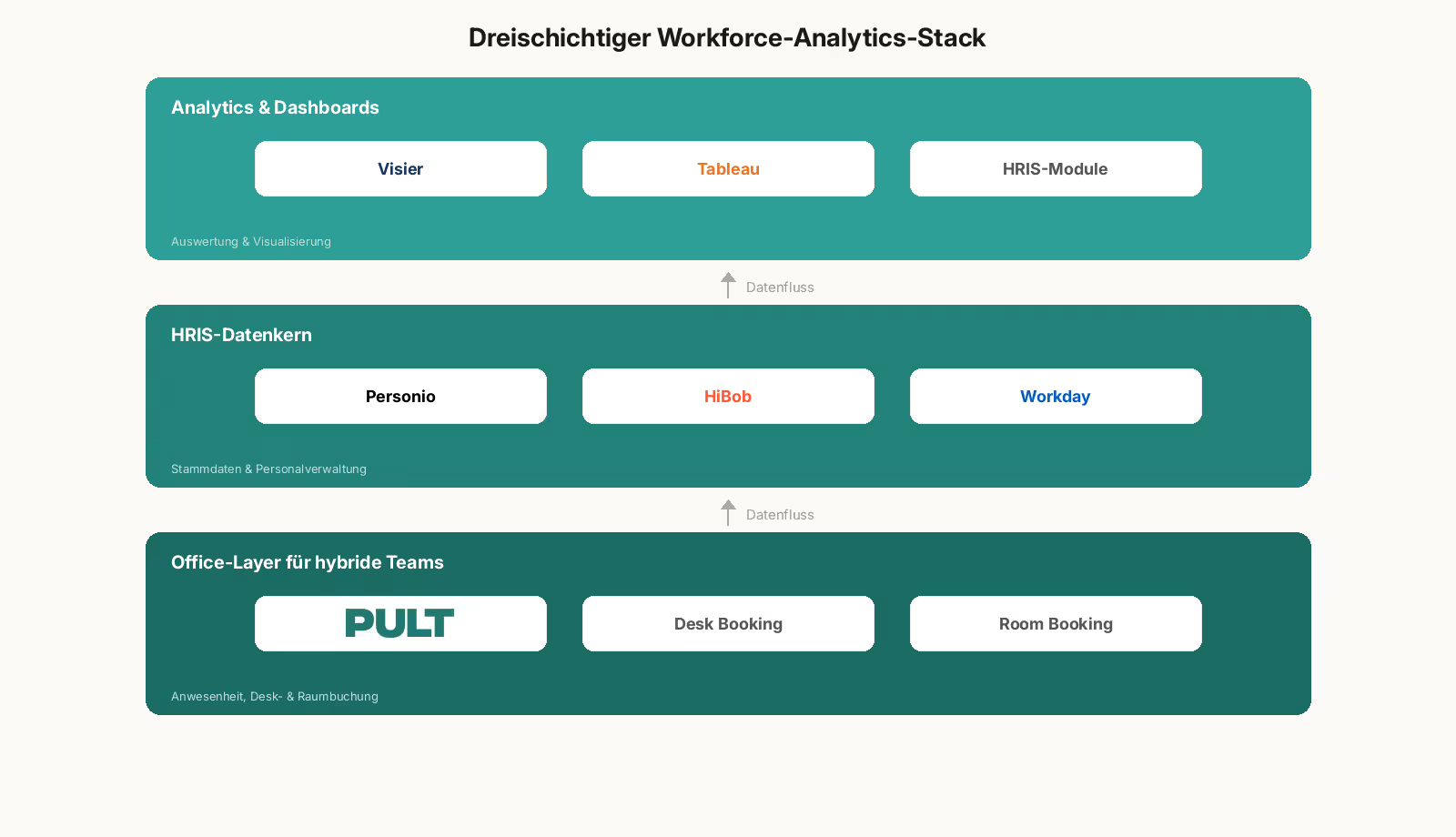
Workforce analytics tools can be divided into three layers. An HRIS layer as the data core (Personio, HiBob, Workday), an analytics layer for evaluation (Visier, Tableau, supplementary HRIS modules), and an office layer for attendance and space data in hybrid setups. The right combination depends on company size, data architecture, and EU compliance status.

When making your selection, consider the following five points:

  • Hosting region: EU hosting with a data center in Germany or elsewhere in Europe.
  • API Capability: Interfaces with HRIS, time tracking, and office management systems to eliminate data silos
  • EU AI Act Status: The provider documents whether and how its tool falls under the category of high-risk AI
  • Level of detail: Customizable KPIs and freely configurable dashboards
  • Office database: Attendance data, room and workstation reservations as well as visitor management
Tip: PULT Workplace Analytics includes this office layer and feeds attendance data, desk utilization, and room bookings into your workforce analytics pipeline, which can be combined with Personio or HiBob.

What does the EU AI Regulation 2026 require of HR analytics systems?

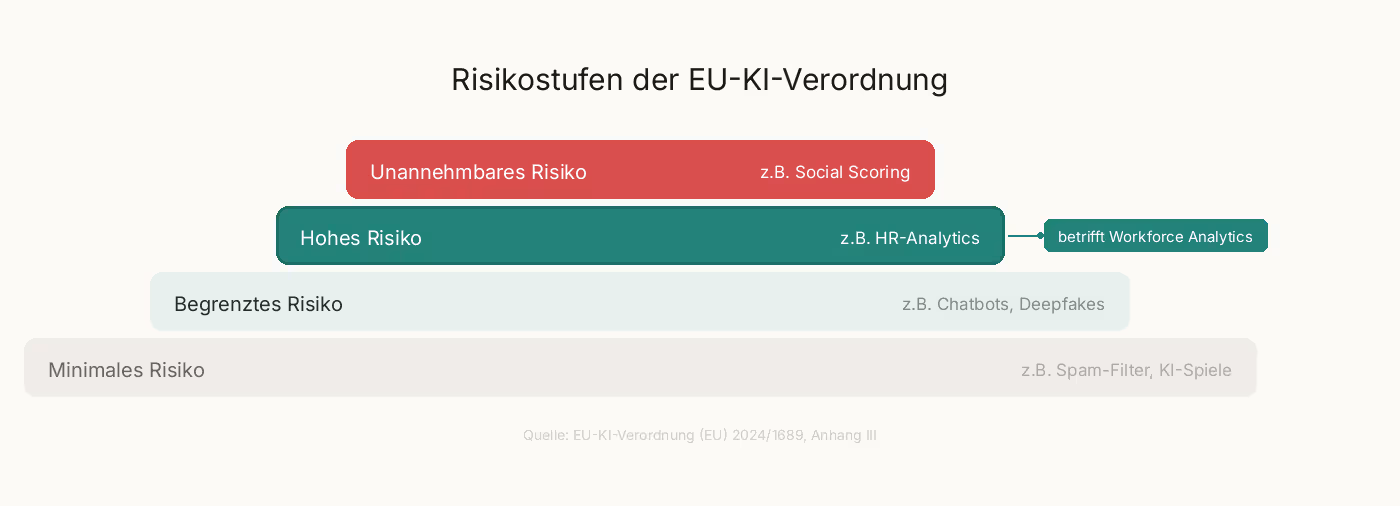
According to Annex III of the EU AI Regulation, an HR analytics system is considered high-risk AI as soon as it automatically supports personnel decisions. These include recruitment, promotion, termination, and performance evaluation. As a result, many workforce analytics functions are subject to strict requirements as soon as algorithms independently generate recommendations for or against individuals.

What requirements will apply to HR analytics systems as of August 2, 2026?

The high-risk classification gives rise to four key obligations for new systems:

  • Risk Management and Technical Documentation in accordance with Articles 9 through 11 of the EU AI Regulation
  • Human oversight for every decision involving personal data, not just at a later stage
  • Data Protection Impact Assessment pursuant to Article 35 of the GDPR, plus a Fundamental Rights Impact Assessment pursuant to Article 27 of the EU AI Act
  • Co-determination by the works council pursuant to § 87(1)(6) of the Works Constitution Act (BetrVG) in connection with any introduction or adjustment

How can I ensure that my workforce analytics setup remains compliant?

You can ensure compliance by clarifying your data architecture and processes before purchasing a tool. This involves five key points:

  • EU Hosting: Servers located in the EU, documented data processing.
  • Purpose limitation: You must document in writing which data you are analyzing and for what purpose.
  • Human final decision: No algorithm makes the final decision regarding hiring, termination, or promotion.
  • Disclosure: You proactively inform employees about what data is collected and how it is analyzed.
  • Involve the works council: A works council agreement fulfills the requirement for employee participation.

How to Build a Future-Proof Workforce Analytics System

Workforce Analytics provides you with a quantitative overview of your workforce, from headcount forecasts and turnover to office utilization.

Starting in the fall of 2026, the EU AI Regulation will require specific frameworks for high-risk AI, documentation, and human oversight. With PULT, you can meet these requirements while still gaining reliable data for your workforce planning and site strategy.

  • PULT Workplace Analytics provides real-time attendance, desk, and room data as a data source for workforce analytics.
  • Native integrations with Personio, HiBob, Microsoft Teams, and Slack, so all your HR data is centralized in one place.
  • EU hosting and ISO 27001 certification as the basis for your GDPR and EU AI Act documentation.

{{onpage-cta}}

Trusted by 1000+ innovative workplaces

Data and insights for your workforce analytics!

FAQ

Have questions?

What is the difference between workforce analytics and HR reporting?

HR reporting presents historical data, such as sick leave figures from the last quarter or employee turnover from the previous year. Workforce analytics uses this data, along with statistical methods, to generate forecasts and recommendations for action, such as headcount forecasts or bottleneck analyses for the next twelve months.

What data do I need for meaningful workforce planning analytics?

The foundation is made up of HRIS master data (headcount, contracts, department), time and absence data, recruiting metrics such as time-to-hire, and—for hybrid teams—attendance and space utilization data. Without data integration between these sources, analyses remain fragmented and their value decreases significantly.

Are all HR analytics tools subject to the EU AI Regulation?

Only tools that use AI components and automatically support personnel decisions fall under the high-risk classification set forth in Annex III. Pure reporting tools without algorithmic recommendations are not directly affected. However, the GDPR obligations regarding disclosure, purpose limitation, and data protection impact assessments continue to apply.

How does PULT provide data for workforce analytics in hybrid teams?

PULT tracks actual office attendance by day, location, and team through desk booking, room booking, and Wi-Fi-based check-in. You can export this data to your BI tool or integrate it with Personio, HiBob, MS Teams, and Slack via native interfaces. This closes the typical data gap between planned targets and actual reality in hybrid work.

Which workforce analytics tools are suitable for companies with 50 to 500 employees?

At this scale, a three-tiered stack consisting of an HRIS (such as Personio or HiBob), an analytics layer within the HRIS or via Tableau, and an office tool like PULT supports the hybrid data infrastructure.

About author

Isolde Van der Knaap

Hybrid Work Enthusiast and Account Executive

At PULT we're designing the future of the hybrid workplace for companies and their employees. Focused on SME and mid market customers in Eruope, I'm working on everything from Customer Discovery to Onboarding. I'm very passionate about new work and moved to Hamburg in 2024 even though I'm originally from France.

Resources

Learn how to run better workplace operations

Office Insights

Micromanagement: Consequences, Legal Risks, and the Path to Controlled Delegation

Micromanagement refers to a leadership style in which supervisors closely monitor their team’s tasks and constantly intervene. The consequences range from demotivation and resignations to legal risks arising from organizational negligence. However, by reducing micromanagement and delegating effectively, leaders can improve team performance while simultaneously reducing their own liability risk.

Micromanagement: The Basics

  • Micromanagement is a leadership style characterized by excessive attention to detail and constant interference in the team's tasks. Typical consequences include demotivation, a decline in personal responsibility, and above-average turnover rates.
  • Signs of a micromanaging boss include constant status updates, nitpicking over routine phrasing, requiring everyone to be CC'd on every email, and approval loops for trivial decisions.
  • Micromanagement carries legal risks because unclear responsibilities can lead to organizational negligence, and excessive monitoring of employees may violate § 26 of the Federal Data Protection Act (BDSG).

PULT is an all-in-one office management software solution that provides executives with a data-driven overview of hybrid teams through Office Insights, desk booking, and visitor management, without the need to micromanage operational details.

What is micromanagement, and how can you tell if you or your boss is doing it?

Micromanagement is a leadership style in which supervisors constantly monitor their employees’ performance and constantly interfere in their decision-making. Engaged leadership is clearly different, as it sets clear expectations for the outcome but leaves the path to achieving it open.

From an employee's perspective, the following patterns become particularly evident when a supervisor engages in micromanagement:

  • Routine work is proofread and the wording is fine-tuned—something that should have been done long ago
  • You'll be copied on every email
  • Independent decisions are subsequently called into question
  • We receive several status requests every week, even though clear deliverables have been agreed upon

If you are a manager yourself, ask yourself whether the following statements apply to you:

  • You systematically proofread your team's documents before they leave the office
  • You have routine decisions notified to you before they are implemented
  • You step in whenever tasks aren't handled the way you would handle them yourself
  • You ask for status updates more often than your team can deliver results

If you answer "yes" to several of these questions, it's a clear sign that your leadership style has slipped into micromanagement.

{{hint-box}}

What are the consequences of micromanagement for the team and the company?

The consequences of micromanagement affect both the team and the company:

  • Increased willingness to resign and rising turnover
  • Declining personal responsibility and innovative spirit within the team
  • The risk of burnout among employees is constantly monitored
  • Poorer strategic decisions because managers are bogged down in operational details
  • High follow-up costs due to recruiting, onboarding, and knowledge loss

Studies on willingness to quit, such as the Gallup Engagement Index, consistently show that micromanagement is one of the most common reasons for changing jobs. In addition to the human and economic consequences, the legal risks carry particularly serious weight for German companies.

What legal risks does micromanagement pose for managers?

The legal risks associated with micromanagement are rarely mentioned in HR practice, but they are substantial and affect three areas.

Organizational failure resulting from micromanagement

When a manager makes all decisions on their own, lines of responsibility become blurred. If damage occurs, it is difficult to determine clearly who failed to fulfill which duty. The case law of the Federal Court of Justice requires that tasks, authority, and responsibility be clearly assigned. Micromanagement undermines precisely this requirement.

Employee Data Protection under Section 26 of the Federal Data Protection Act (BDSG)

Close monitoring of employees, such as continuous screen monitoring or constant activity tracking, may violate employee data protection laws. Monitoring measures must be proportionate and based on a specific reason.

Delegation as a form of liability protection

A properly documented delegation of authority protects the manager in the event of a claim. Three steps ensure its legal validity:

  • Assign the written assignment , including specific expectations regarding the outcome.
  • Specify the person’s authority explicitly—that is, which decisions they are authorized to make on their own.
  • Agree on reporting milestones at which interim results will be reviewed.

What is the opposite of micromanagement?

The opposite of micromanagement is controlled delegation, often referred to as empowerment or trust-based leadership. In this approach, the manager transfers responsibility for results to employees and no longer controls the process, but rather the agreed-upon output.

  • Clear agreement on objectives with measurable results
  • A defined scope of decision-making within which employees are allowed to act independently
  • Agreed reporting points instead of constant monitoring

This approach is an absolute must, especially in hybrid teams. When managing remotely, you must shift your focus from presence to results, because you no longer have the ability to visually monitor your team.

Moving Away from Micromanagement: What Should a Manager Do?

Overcoming micromanagement is a process that starts with the leader. If you decide to break this habit, these five steps will guide you toward lasting change:

  1. Conduct a self-assessment: Identify your personal triggers. Do you step in because you’re afraid of making mistakes, because you need to be in control, or because you don’t trust the team’s technical expertise?
  2. Categorize tasks: Sort by importance and urgency. Keep broad, strategic issues on your plate; assign all operational tasks clearly.
  3. Define expectations in writing: Describe the desired outcome, but not the path to get there. This will prevent your team from having to be corrected later on for deviating from the plan.
  4. Establish a reporting schedule: Agree on regular check-ins instead of ad hoc inquiries. Weekly or biweekly meetings replace the constant back-and-forth about status updates.
  5. Use tools to stay organized: Software that shows you at a glance who is working where, when office hours are scheduled, and when teams are meeting eliminates the need to constantly ask around.

How to Lead Your Hybrid Team with PULT Without Micromanaging

Micromanagement is a leadership style that comes at a high cost. It drives good employees to quit, undermines the quality of decision-making within the team, and creates legal risks related to organizational negligence and data protection.

The solution lies in controlled delegation. Clear goal agreements, defined decision-making authority, and agreed-upon reporting points replace constant micromanagement. In hybrid teams, the right tools help ensure that you maintain an overview without micromanagement. With PULT, you can keep track of everything without micromanagement:

  • Real-time overview without having to ask: With PULT Presence, you can see on a digital office map who is currently on-site and who is working remotely. Check-in happens automatically via the company Wi-Fi, so you don't have to ask anyone.
  • Weekly planning right in your calendar: Scheduled days in the office and working from home appear in Outlook and Google Calendar, so you don't have to track status emails. Team days can be scheduled fairly and proactively based on this information.
  • Answers at the touch of a button instead of endless back-and-forth: The AI assistant instantly answers questions like “Who’s in the office tomorrow?” via a simple chat interface. No group emails, no follow-ups, no micromanagement.

Automatic synchronization with your HR system: Vacation and absence data from Personio or HiBob is automatically imported into PULT. You can plan team events based on up-to-date information, rather than manually collecting availability data from team members.

{{onpage-cta}}

Office Insights

Macro Management: Definition, Benefits, and Guide for 2026

Macro-management is a leadership style in which managers set overarching goals and guidelines rather than micromanaging day-to-day details. This approach is gaining importance as hybrid teams, new compliance requirements, and increasing reporting pressures push traditional micromanagement to its limits.

Macro Management: The Basics

  • Macro-management is a leadership style in which managers set strategic goals, a vision, and resources, and delegate the operational implementation to teams.
  • Unlike micromanagement, macromanagement relies on personal responsibility and focuses on results rather than individual tasks.
  • Macro-management is a preferred leadership practice in larger companies that face increasing reporting pressures due to hybrid teams and compliance requirements such as CSRD or NIS-2.
  • PULT handles day-to-day office management—including desk and room booking and workplace insights—so that executives have more time to focus on strategic management.

What is macro-management? 

Macro-management refers to a leadership style in which managers steer the company through vision, overarching goals, and resource allocation. They delegate day-to-day operational tasks to teams that make independent decisions within a defined framework. The focus of leadership is on the outcome rather than on individual steps.

At the management level, macro-management is part of strategic leadership—that is, the highest level of corporate management. Below that are tactical management (division management, quarterly planning) and operational management (day-to-day business, process control). Under the macro-management approach, you largely stay out of the lower two levels.

Unlike laissez-faire (French for “let it be”), macro-management requires established guidelines, sets clear expectations, and schedules regular reviews. Within this structure, however, the team makes its own decisions. If you mix the two, you could slip into micromanagement or cause confusion within the team.

What is the difference between macro-management and micro-management?

The biggest difference between macro-management and micro-management lies in whether, as a manager, you control your employees’ results or their work processes. Micro-management focuses on the how, while macro-management focuses on the what and why.

Micromanagement isn't inherently wrong. In crisis situations, when onboarding new team members, or when dealing with highly regulated processes, close oversight makes sense.

What are the benefits of macro-management for hybrid teams?

Macro-management works for distributed teams because the underlying focus on results is not tied to a specific location. Work outcomes can be measured equally well regardless of whether employees work in the office, remotely, or prefer a hybrid approach. Micromanagement, on the other hand, fails due to the sheer logistics of hybrid setups.

A second benefit is that it takes the pressure off managers. Instead of checking daily office routines and individual tasks, they have time to focus on strategic issues. These include, above all, CSRD reporting, AI governance in accordance with the EU AI Act, and cyber compliance under NIS-2.

Third, macro-management reduces bottlenecks. When every decision has to go through a manager’s desk, it can bring an organization of a certain size to a standstill. Delegating decision-making authority, on the other hand, spreads the load.

Where does macro-management reach its limits?

Macro-management reaches its limits in situations where your team needs clear instructions rather than being left to take initiative on their own: during the onboarding phase for new employees, in acute crisis situations such as cyberattacks, and in highly regulated processes with audit requirements. In these three scenarios, close supervision is the appropriate leadership approach.

  • New team members with no experience need clear instructions and closer guidance. Anyone who assigns full responsibility to someone without proper training risks overwhelming them and leading to poor decisions. In this case, a hybrid approach combining coaching and selective micromanagement is more appropriate.
  • In acute crises, such as security incidents or cyberattacks, quick and clear leadership is essential. Consensus-based decisions take time, which is simply not available in such moments. Macro-management is counterproductive in this context.
  • Highly regulated processes such as compliance audits, data protection approvals, or financial approval processes require micromanagement in accordance with established guidelines. Deviations made on one’s own initiative tend to pose a risk in these cases. In such situations, macromanagement can serve as the default approach, while micromanagement can be used as a deliberate exception.

Guide: How Do I Implement Macro Management?

Implementing macro-management means first setting overarching goals, then delegating decision-making authority, automating routines where possible, establishing review cycles, and finally building a robust database. Each of these five steps is a prerequisite for the next:

  • Step 1: Define strategic goals and guidelines. Set clear OKRs or KPIs for quarters and years. The team needs to understand what their work contributes to. Without this focus, macro-management quickly devolves into laissez-faire.
  • Step 2: Explicitly delegate decision-making authority. Document which decisions the team makes on its own and which ones are escalated to management. A RACI matrix or a simple list of responsibilities works well for this.
  • Step 3: Automate operational routines. Desk booking, room reservations, and visitor management don’t belong on a manager’s desk. Your focus should be on numbers and analytics.
  • Step 4: Establish review cycles. Regular one-on-one meetings, monthly team reviews, and quarterly strategy reviews form your framework.
  • Step 5: Build a data foundation. Far-reaching decisions become sound when real data is available. Office utilization, attendance patterns, compliance reports, and ESG metrics provide the foundation for senior management.
Tip: With PULT Presence, you can track your teams' attendance automatically without needing their help. Get occupancy data and analyze the utilization of your workspaces.

How does macro-management work with remote work and hybrid teams?

The ability to manage the big picture in a hybrid office environment depends on what data is available to senior management for making decisions about space, teams, and compliance.

In a hybrid work environment, office occupancy fluctuates from day to day, as there are almost always some colleagues working remotely. Some popular areas of the office remain consistently overcrowded, while others are nearly empty. Without concrete data on this, your planning will be based more on daily impressions than on actual evidence.

Attendance data, room booking patterns, and visitor traffic are therefore essential to your management.

This is particularly evident in ESG reporting. The CSRD (Corporate Sustainability Reporting Directive) requires companies above a certain size to report data on, among other things, office occupancy and energy consumption. If you already track these metrics automatically in your office management system, you can easily transfer them directly into your reports.

For office managers and workplace coordinators, this means that hybrid work and macro-management work best together when you collect data at the grassroots level—and do so as automatically as possible.

Here's how to automate macro management with PULT

Macro-management requires data. After all, unless you know how spaces are being used, who is on-site and when, and which areas are chronically empty or constantly overcrowded, you’ll be making decisions based mainly on guesswork or, at best, half-hearted headcounts. PULT collects all this data automatically and in compliance with GDPR.

PULT Presence serves as the foundation for this: The system automatically detects which employees are actually in the office via the Wi-Fi connection of their laptop or smartphone. No check-in, no manually maintained list, no required responses.

This data is fed directly into PULT Workplace Analytics. The result is reliable reports on the actual utilization of spaces, rooms, and zones. You and your managers can see which areas are consistently underutilized, which bookings are regularly left unused, and how utilization patterns evolve over months and quarters.

You can request reports from the AI assistant by saying: “Give me the occupancy report for Building A from last week.”

  • Automatic presence detection: The Wi-Fi signal detects who is in the office without the need for check-ins or manual lists within the team
  • Workplace Analytics: Occupancy reports for spaces, rooms, and zones as a basis for real estate and ESG decisions.
  • AI Scenario Planning: Simulate how staff growth or new hybrid models will affect your space requirements.

AI Assistant: Generate reports on command via chat, without having to search through the dashboard or the data yourself.

Real data and analytics for your macro management!

  • ✓ Get real-time data on attendance and utilization in PULT. Make informed decisions that you can back up with evidence.
Start free trial
Desk Booking

Desk Sharing and Personal Belongings: Rules, Storage, and Compensation

How to handle personal belongings in a desk-sharing environment is one of the most emotionally charged issues when introducing flexible workspaces. A clean desk policy requires employees to completely clear their desks every day, including photos and favorite mugs. True acceptance only emerges when legal frameworks, storage solutions, and cultural considerations work in harmony.

Desk Sharing and Personal Belongings: The Basics

  • With desk sharing, personal items must be cleared from the desk at the end of each workday because the Clean Desk Policy requires that the desk be cleared for the next person.
  • An employer may implement a clean desk policy as a directive, but may not impose a blanket ban on personal items that fall under the general right to privacy, and the works council has a right of co-determination under Section 87 of the Works Constitution Act (BetrVG).
  • The three established storage solutions are lockable lockers for personal items, mobile rolling containers used as desk-sharing organizers for work supplies, and daily customization followed by storage.
  • PULT is an all-in-one office management software solution that allows companies to book and manage desks, lockers, parking spaces, and catering centrally within a single application.

What rules can be established regarding personal belongings in a desk-sharing arrangement?

In a desk-sharing arrangement, the employer may issue instructions requiring employees to clear their desks daily, lock away all documents, and store personal belongings in designated lockers. However, the employer may not dictate which personal items are generally permitted. Personal rights and the works council’s right to co-determination set clear limits.

What regulations regarding personal belongings are legally permissible?

The Clean Desk Policy constitutes a directive under labor law pursuant to § 106 of the Trade Regulation Act (GewO). The employer establishes rules regarding order and hygiene in the office because the shared resource desk is available to multiple employees in a desk-sharing arrangement.

Guidelines regarding the proper disposal of documents, notes containing personal data, and security-related information are permitted. Article 32 of the GDPR requires this anyway. If someone on your team leaves job applications, contracts, or health data lying around, that person is violating the obligation to ensure technical and organizational security.

A blanket ban on personal items during working hours is not permitted. Photos, plants, and mugs are protected under general privacy rights. The rules should therefore be included in a desk-sharing company agreement with the works council.

When must the works council give its approval?

The works council must always approve desk sharing because Section 87(1)(1) of the Works Constitution Act (BetrVG) provides for mandatory co-determination regarding workplace regulations and employee conduct. This includes the clean desk policy, booking rules, and locker allocation.

Without a works council agreement, the clean desk policy cannot be enforced; unilateral directives are subject to challenge and often fail in conciliation proceedings.

Therefore, involve the works council during the planning phase, before ordering any furniture. Involving them early on is more likely to result in practical, workable policies, especially if you want to introduce desk sharing.

What storage options work best for personal belongings when sharing a desk?

Three storage solutions have proven effective for personal items in desk-sharing environments: lockable lockers for personal belongings, mobile rolling carts to organize work supplies, and the option to personalize your workspace for the day and then pack everything away into a backpack or bag.

How can I make up for the loss of my own desk when sharing a workspace?

The most effective way to compensate for the loss of a personal desk is to offer alternatives that match or exceed the comfort of having one’s own desk. A high-quality, well-equipped office kitchen, a lounge area that’s pleasant to spend time in, and complimentary perks like snacks and drinks shift the focus from personal desk space to a positive workplace experience.

Employees who have had to give up their personal coffee makers or kettles as part of the desk-sharing initiative are more likely to accept this if the new kitchen is better equipped and the office is properly designed. High-quality coffee stations, ample refrigeration options, and a varied selection of snacks make the transition easier.

Since desk sharing reduces the space required for individual workstations, it creates room for these upgrades. Companies typically reduce their desk space by 30 to 45 percent and invest the freed-up square footage in lounges and break areas, among other things. The goal may be to create a clubhouse-like atmosphere, which is significantly shaped by the right desk-sharing equipment in the workplace.

4 Steps to Mastering Desk Sharing and Personal Belongings

The practical implementation is carried out in four sequential steps: first, the infrastructure; then, legal coordination; followed by internal communication; and finally, the booking system.

  • Step 1: Storage infrastructure should be set up before the transition. Lockers, mobile rolling cabinets for desk sharing, and kitchen equipment should be available.
  • Step 2: Establish rules in a company agreement with the works council. The agreement covers the clean desk policy, booking windows, locker allocation, and procedures for violations.
  • Step 3: Actively inform employees about what they stand to gain. Let your team know what benefits will replace the fixed desk.
  • Step 4: Implement a booking system that consolidates desks, lockers, and resources.

Here's how to offer desk sharing and all your office services in a single software platform

If you provide lockers, rolling cabinets, kitchens, and relaxation areas , it will be easier for your staff to transition to desk sharing. The most important thing is to ensure fairness in the allocation of all new office resources: Every employee must be able to rely on the fact that the desk they booked is actually free when they arrive. The same applies to meeting rooms and reserved zones. You can achieve this fairness with PULT.

  • Planning certainty before heading to the office: Desks, rooms, zones, and parking spaces can be reserved in advance to avoid any conflicts.
  • Automated No-Show Management: PULT Presence uses the office Wi-Fi to determine whether a reservation has actually been honored. If someone does not show up after the grace period, the space is automatically released, making ghost bookings and holding spaces unnecessarily a thing of the past.
  • Set booking rules: You set rules for zone access, booking priorities and maximum advance booking periods, so that no team permanently monopolizes capacity.

Real-time office layouts: The digital floor plan shows who has booked which space and where everyone is seated. This makes it easy to sit next to your teammates.

{{onpage-cta}}