
Pult MCP: Your people and office data,
right inside your AI tools
Ask your AI who was in the office, when and how often. Get people, office and team reports
in seconds, in the tools your team already uses.


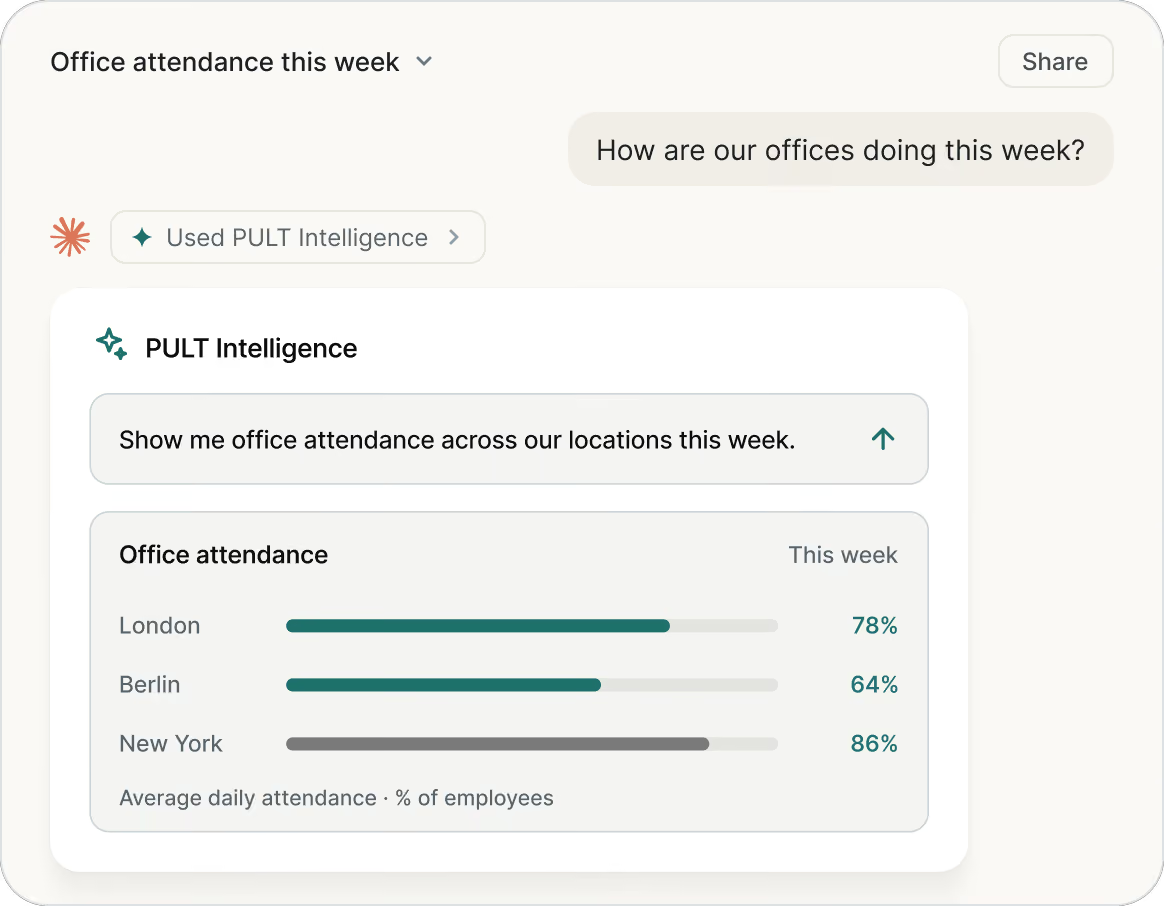

Your AI can write your strategy. But it has no idea who's in the office today
Your office attendance data is stuck in spreadsheets and access control dashboards, invisible to the AI tool you already work in every day.

Pult MCP connects people attendance data with the AI tools you already use.
Connect Claude, ChatGPT or any AI tool to PULT over MCP. It reads live office presence data (who’s in, which person and teams, which days) and acts on it, straight from the interface you already use. Always within the privacy settings your organisation already chose. Only with PULT.
Works with the tools your team already runs on
PULT MCP works with all common AI tools.





AI assistants and agents
Ask workplace questions in plain language, build your own agents on Pult data
BI and data
Live office data in dashboards and the data warehouse, next to HR, real estate and finance data
Automation
Weekly reports, syncs and triggers that run on Pult data
Engineering
A clean, documented feed instead of manual exports
That's what makes these reports possible.
Four ways to put who was there, when and how often to work.
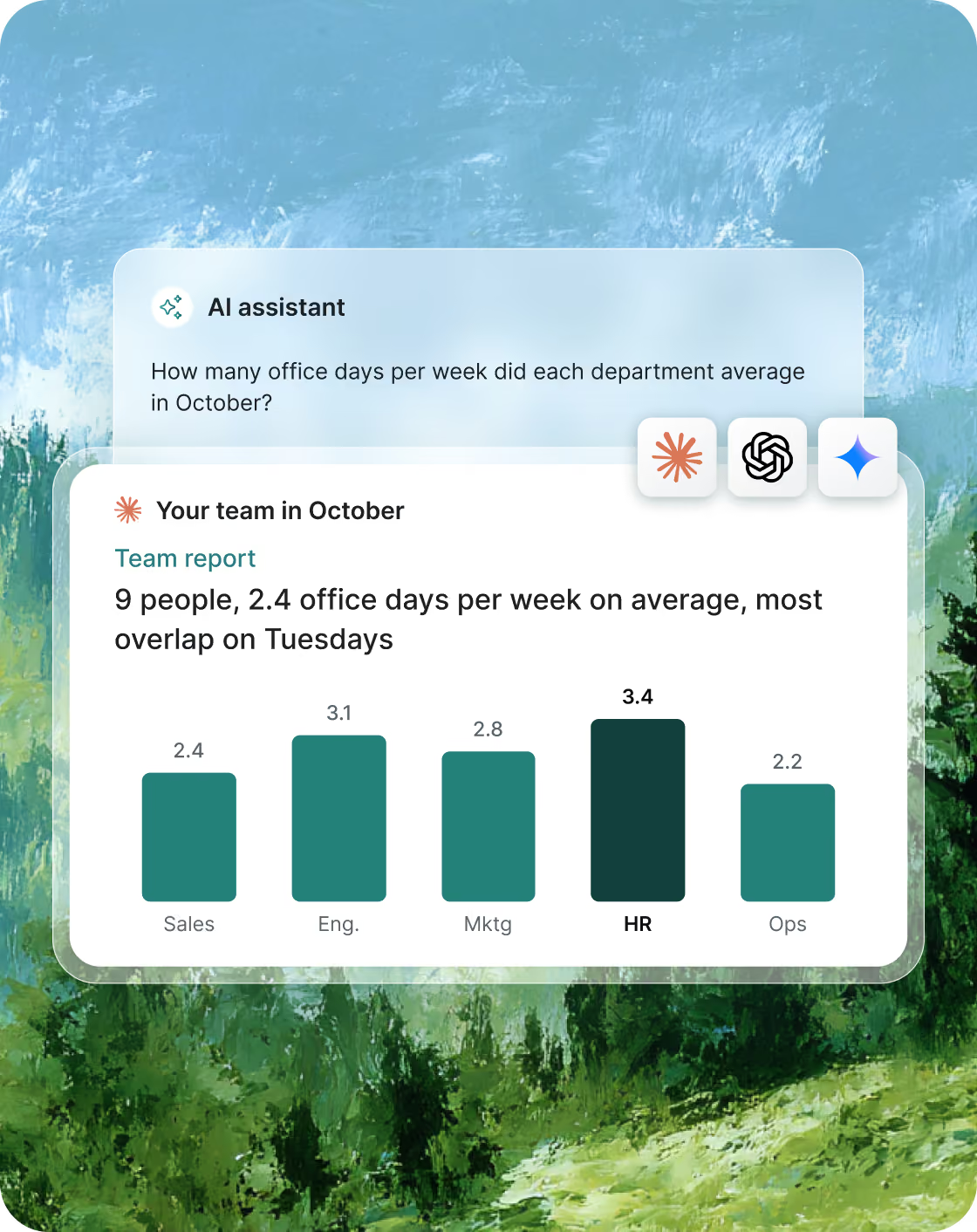
Know how your people and teams really use the office
Detailed attendance and team reports for HR and managers, no exports needed. Pult knows who was in which office, on which day and for how long.

“How many days a week was the Sales team in the office on average in October, compared to September?”
“Create a monthly report for every team lead: their team's office days and the days most of the team overlapped.”
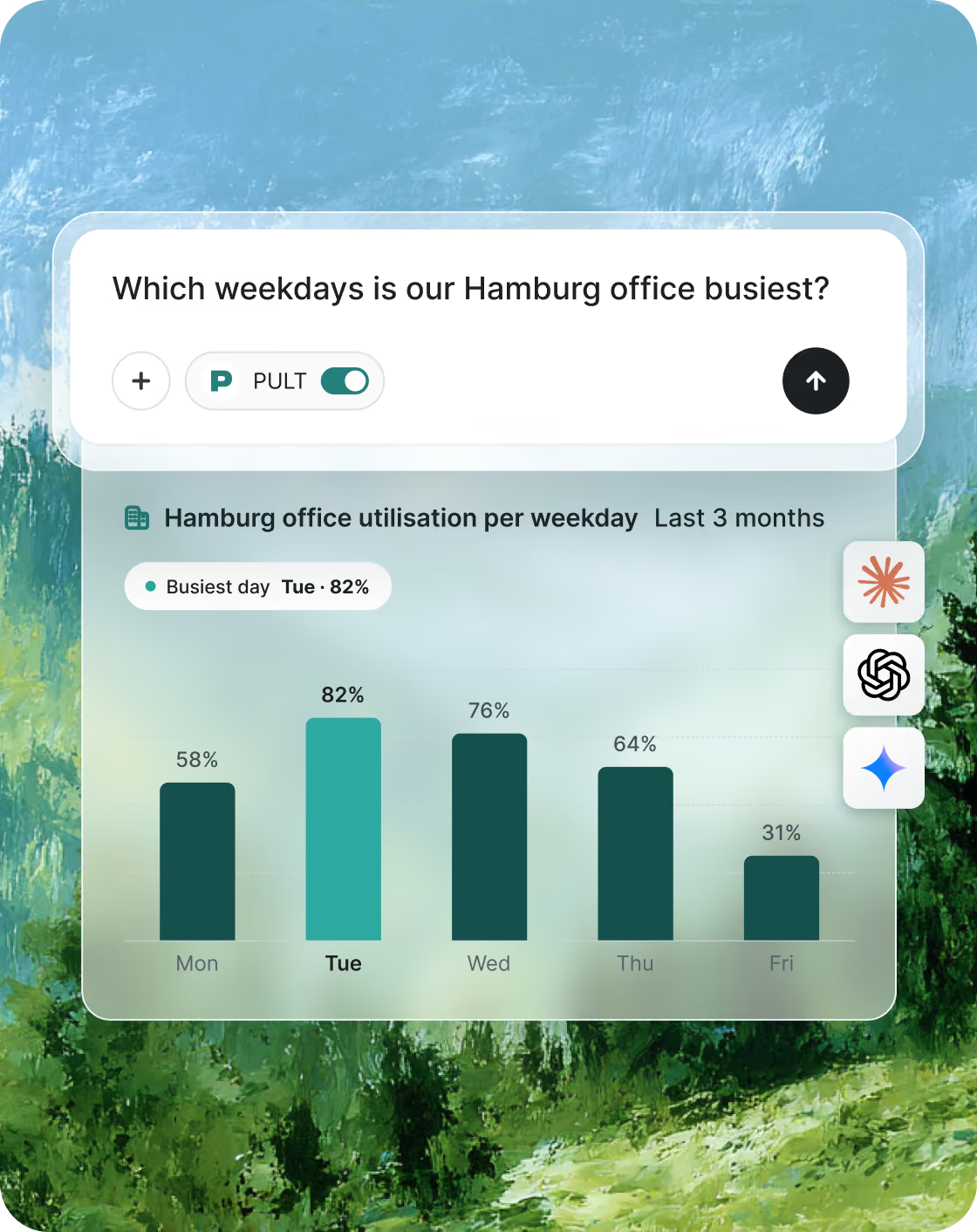
Plan your space on how people actually book and show up
See how your space is really used: office utilisation, booking behaviour and hybrid work patterns at a glance. The foundation for every space decision.
“Which weekdays is our Hamburg office busiest, and how many booked office days were actually used in October?”
“How has Friday attendance changed since the summer?”
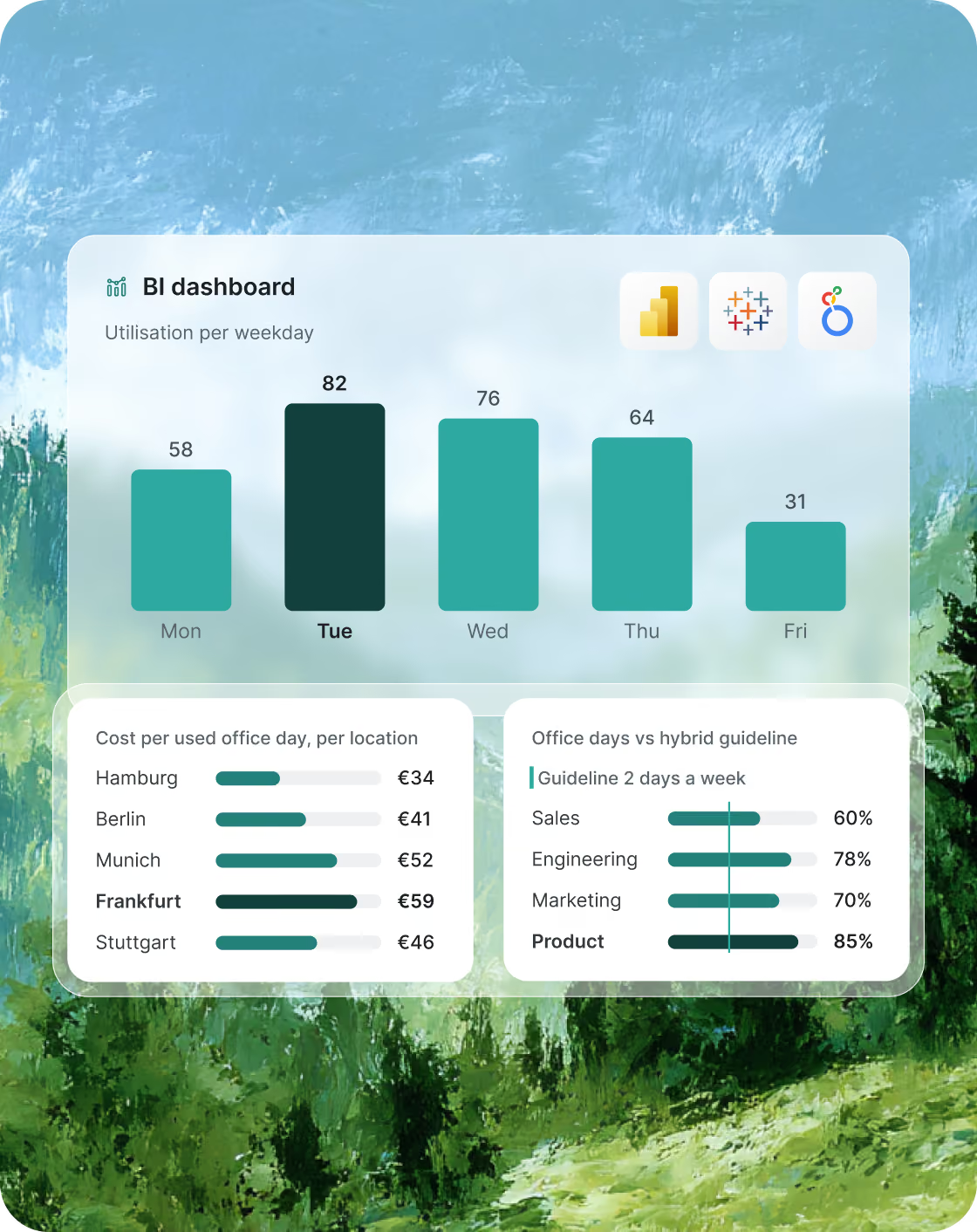
Your Pult data, in your own dashboards
Bring Pult data wherever you need it: into custom dashboards and your existing BI tools, alongside the rest of your company data.
“What does a used office day cost us at each location?”
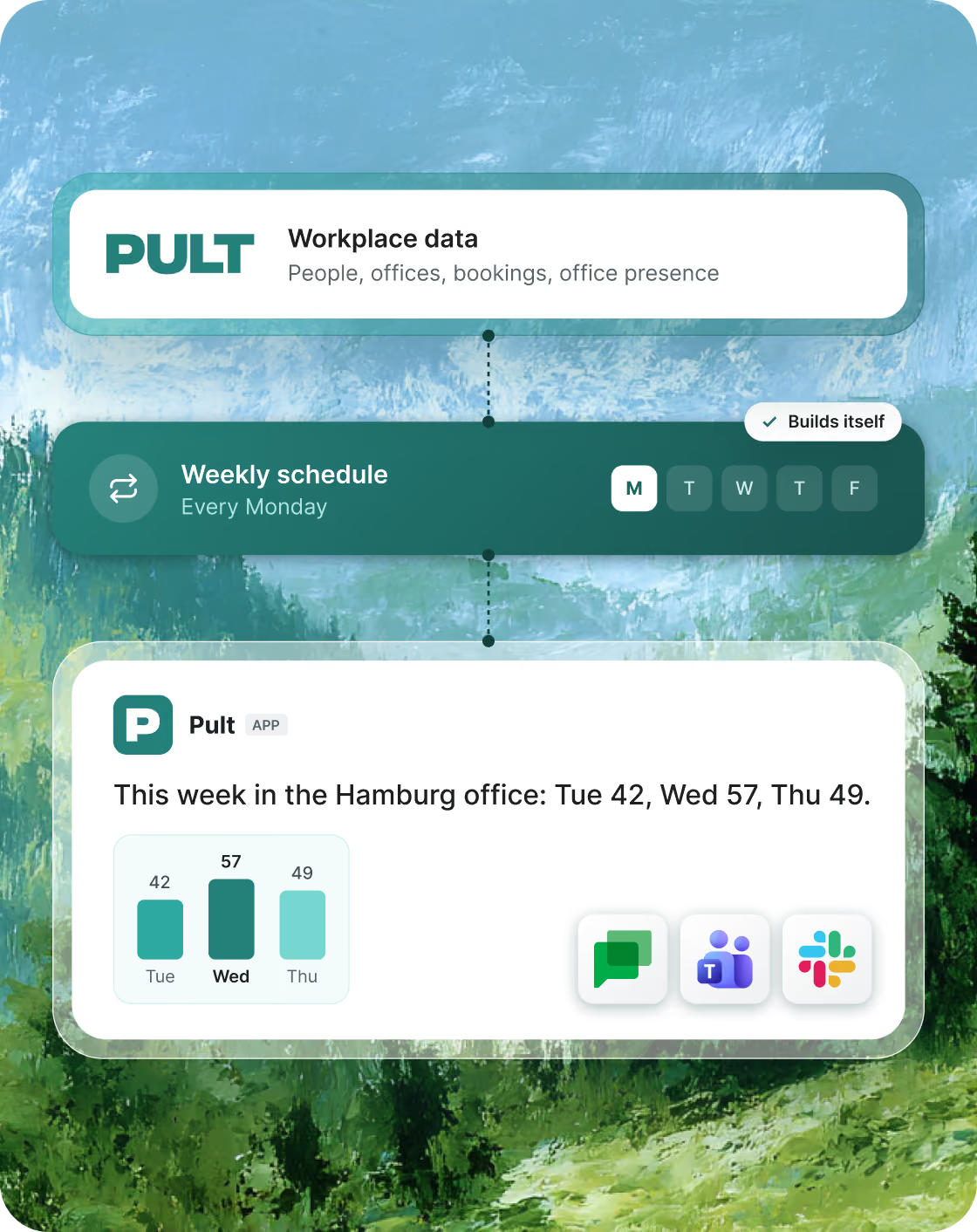
Reports and workflows that run themselves
Automate internal workflows and reports: the weekly attendance report for leadership or the monthly update for facility management builds itself.
“Send me a summary of last week's office usage every Monday.”
Built for every role

HR, managers and team leads
Detailed attendance and team reports, down to person and team level

Workplace and office management
Utilisation, booking behaviour and hybrid work patterns per location

Data and BI teams
Pult data in their own dashboards, next to HR, real estate and finance data

IT and engineering
Internal workflows and reports that run on live Pult data, without CSV exports

Your data. Your rules.

Admin-controlled keys
API keys are created by your admins. They can expire, be renamed, rotated and revoked at any time.

Your privacy settings apply
Your privacy settings always apply: masked sick and vacation days stay masked, and employees in incognito mode are never identified.

Read-only
Connected tools can read Pult data, but can't change anything.

Tied to a key, kept separate
Every request is tied to a specific key, and each customer's data is strictly separated.
Questions, answered
What is MCP?
The Model Context Protocol is an open standard that lets AI assistants connect to other software. With Pult MCP, your AI assistant can read your Pult workplace data and answer questions about it.
Which tools can I connect?
All common AI tools, like Claude, ChatGPT, Gemini, Cursor and Langdock, plus BI and workflow tools that support MCP.
Do I have to build anything?
No. To ask questions in your AI assistant, you only add the Pult MCP server with an API key. The same connection works for dashboards and automations in tools that support MCP.
Can connected tools change my data?
No. Pult MCP is read-only. Tools can read data from Pult, but can't book, edit or delete anything.
Is my data secure?
API keys are created and managed by your admins and can be revoked at any time. Every request is tied to a key, and each organisation's data is strictly separated.
Do our privacy settings still apply?
Yes, always. Masked sick and vacation days stay masked, and employees in incognito mode are never identified.
Where does the data come from, and is it current?
Straight from Pult. It's the same data you see in your Pult dashboard.
Who can use Pult MCP?
Pult MCP is available on Pro and Business plans. Log in to Pult to connect it, or book a demo if you're new to Pult.
What makes Pult data different?
Most workplace tools know how full an office was. Pult knows who was there, when and how often. That's what makes people, team and real estate reports possible that other tools can't deliver.