Guide: Understanding and implementing desk sharing rules
In order to realise the benefits of a desk sharing concept, rules are needed: for the introduction of desk sharing in the company, for the technical equipment and performance, and last but not least, for daily collaboration.
Desk sharing: Rules for introduction and daily collaboration
The most important points about desk sharing rules in brief:
Desk sharing requires clear rules for behaviour, organisation and technology.
The earlier all colleagues are involved, the more successful the acceptance of desk sharing rules and the cooperation of the team will be.
The desk sharing rules should be written down, communicated and easily accessible (e.g. on the intranet).
With PULT, desk sharing rules can be easily implemented thanks to desk bookings, automatic check-ins and utilisation analysis.
The rules are most effective when there is an open feedback culture and the guidelines are continuously developed.
What types of rules are needed for desk sharing?
In desk sharing, fixed desks give way to a system in which employees decide and book where they work on a daily basis. This requires a certain degree of coordination and rules.
Desk sharing affects various levels of everyday working life, each of which has its own requirements. The types of rules also differ accordingly:
Rules of conduct (etiquette): These concern immediate interaction in the workplace. They are about respect, consideration and adherence to common standards. Examples: do not leave rubbish or food leftovers behind, keep noise levels down, tidy away personal belongings at the end of the day.
Organisational rules: Who can work where and when? How are bookings made? Are there any restrictions? These questions need to be addressed in the form of guidelines and internal FAQs, or the answers should be stored in the booking system itself. Responsibilities such as technical problems also fall into this area.
Technical rules: Organised desk sharing is managed via software: booking tools, room occupancy displays or calendar integration. The systems themselves define rules about who has access, how far in advance bookings can be made, and whether a space is released again if the person does not show up.
Formal vs. informal rules: Some rules are not written down and develop over time as part of the culture or through habits within the team. Others, however, should be documented in order to create commitment and benefit the well-being of all.
The 9 most important rules for desk sharing
The following rules are suitable for posting in your office. They define the basic behaviour for using the workspaces.
1. Reservations only via the booking system Desks, rooms and zones can only be reserved via our booking system. Bookings can be made in advance, even days or weeks beforehand. Blocking spaces with bags or jackets is not permitted.
2. Leave your workspace as you would like to find it Clear your space after work. Only leave the fixed equipment on the table. Remove any food leftovers, wipe down the desk if necessary and make sure that the next person can start without any hassle.
3. Take your personal belongings with you every day Do not leave personal items behind permanently, even if you have already booked the same space for the next day. Use our lockers and storage compartments for storage. Find out more under Clean Desk.
4. Only occupy what you really need Adjust your booking to your usage and reserve exactly what you need for your work. However, avoid using larger desks or meeting rooms on your own. Others may need these spaces later. Use the space as efficiently as possible.
5. Do not hold meetings at the shared desk Telephone calls, video calls and group meetings should be held in designated rooms whenever possible. If you have no alternative, use headphones or keep your conversation brief. The open workspace is intended for concentrated work.
6. Respect the peace and quiet of others Do not talk across several desks, avoid loud noises or long phone calls. If you want to discuss something with your team, change location or speak quietly.
7. Hygiene is everyone's responsibility Use our hygiene stations, where you will find disinfectant spray and wipes. Wipe down your desk and chair armrests as needed.
8. Stay at home if you are ill If you feel ill, work from home or call in sick. We respect the health of our colleagues and want to avoid infection as much as possible.
9. Address rule violations fairly If you notice that colleagues are repeatedly ignoring the rules, address it. If this is not possible or is met with resistance, bring it up in the team meeting, talk to us or send us an anonymous message.
What needs to be regulated before introducing desk sharing?
Desk sharing changes daily routines, the functions and use of rooms, and the understanding of roles within the team. Therefore, it is important to introduce the concept in a well-thought-out manner. This begins with clear rules and responsibilities.
Communicating the introduction of desk sharing
Before you introduce desk sharing, your team should understand why the concept is being introduced and what benefits it promises. Communicate openly and objectively to manage expectations and address any uncertainties that arise immediately.
Involve your team in the rules for the new working model at a very early stage. Use question and answer sessions and provide opportunities for feedback. You should signal that you are open to concerns and reservations at any time and that you take them seriously.
Create the right conditions
How many places are available?
Are there any restrictions, such as fixed team zones?
Will work be done with or without booking?
Are there special arrangements for certain roles or on certain days?
Document these points and make them available internally. This can be done on the intranet, in the onboarding area or as a notice in the office.
Assign responsibilities
Determine who is responsible for the booking system and who can be contacted if rules are not followed. Also determine who is responsible for ensuring compliance with the rules and who should check compliance regularly.
Unspoken desk sharing rules: etiquette
Interpersonal etiquette complements the formal rules with what is often tacitly expected in everyday working life: consideration, attentiveness and a feel for the situation. This is particularly important in desk sharing because personal routines and working methods take place in shared spaces. Minor tensions can disrupt the flow of work.
Etiquette refers to polite, functional behaviour in a shared space. In other words, behaviour that is in line with the desk sharing concept and the working methods of colleagues.
Ask questions instead of interpreting If you want to use a space that may already look occupied, for example by a jacket or a notebook, talk to the person instead of simply moving things aside. Especially in open-plan workspaces, communication is often a better solution than interpretation.
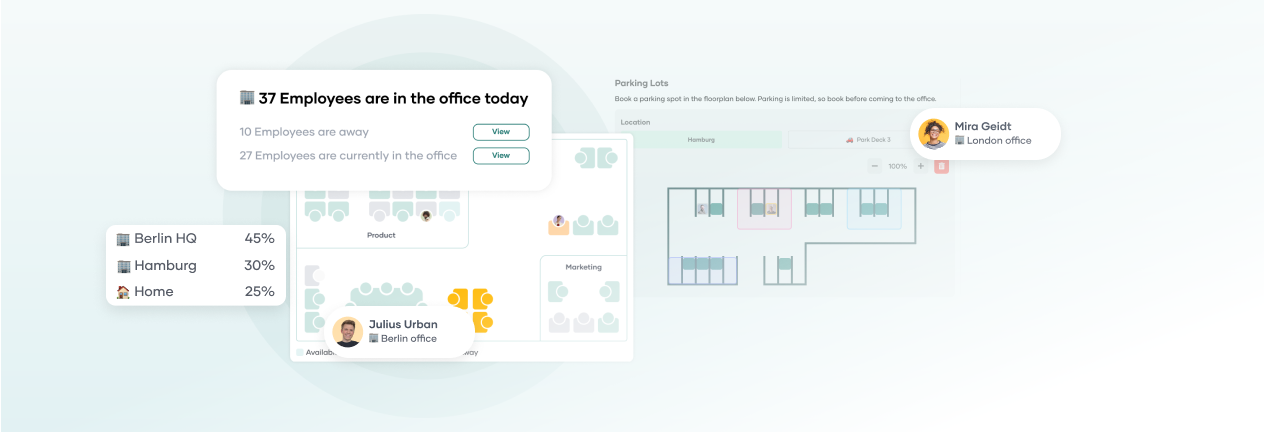
Tip: In PULT, the reservation status and usage of all workspaces are immediately visible. A glance at the office plan makes it immediately clear which spaces are actually occupied or free.
Avoid territorial behaviour Desk pads, lamps or personal coffee cups almost act as a territorial claim. If desk sharing is really a consistent concept in your workplace, then the rule is: everyone adheres to the posted rules and stores personal items in a locker at the end of the working day.
Be considerate with noise You cannot and should not avoid all noise, but you can be considerate. Only listen to music and voice messages through headphones. Limit the length of phone calls or move to other areas for longer conversations.
Do not reconfigure devices and technology After you have finished work, your workspace should be returned to its neutral state. This applies, for example, to the position of the monitor and chair.
Reduce sources of scent and noise Strong perfume, loud chewing gum or opening food with a strong smell can disturb others. However, many people are too polite to mention it. Therefore, be sensitive about this yourself.
Respect silent signals If someone is sitting with noise-cancelling headphones, has their screen tilted significantly to the side, is wearing a hood or is otherwise visibly isolating themselves, this is a silent but clear signal. You should only approach these colleagues with matters that cannot wait.
Desk sharing rules for booking software
Booking systems for desk sharing set rules that are not always documented separately but directly influence everyday office life. They determine when a workspace can be reserved, how long a booking is valid, what happens in case of no-shows, and who has which rights in the system.
If these rules for desk sharing software have consequences for employees or collaboration, you should disclose them to your team.
Booking requirements and deadlines In some booking systems, you have to book your space in advance, while in others you can check in spontaneously. It is important that everyone knows when bookings can be made, how far in advance reservations are possible, and whether certain days or times are blocked. Cancellation deadlines also play a role: if you cancel too late, you may be blocking a space that others could have used.
Tip: In PULT, you can book your workspace in advance or check in when you enter the office. With PULT Presence, this is even done completely automatically.
No-show rules Automatic release is a useful feature in the software: if someone does not take their booked space within a specified time window, the space is released again for all colleagues.
Rights and roles In good booking software, booking rights can be distributed differently. Some users are only allowed to make reservations for themselves, while others, such as team leaders or assistants, can also book spaces for colleagues. Workspaces or zones can also be reserved for specific groups. You should communicate these role and access structures openly to your team.
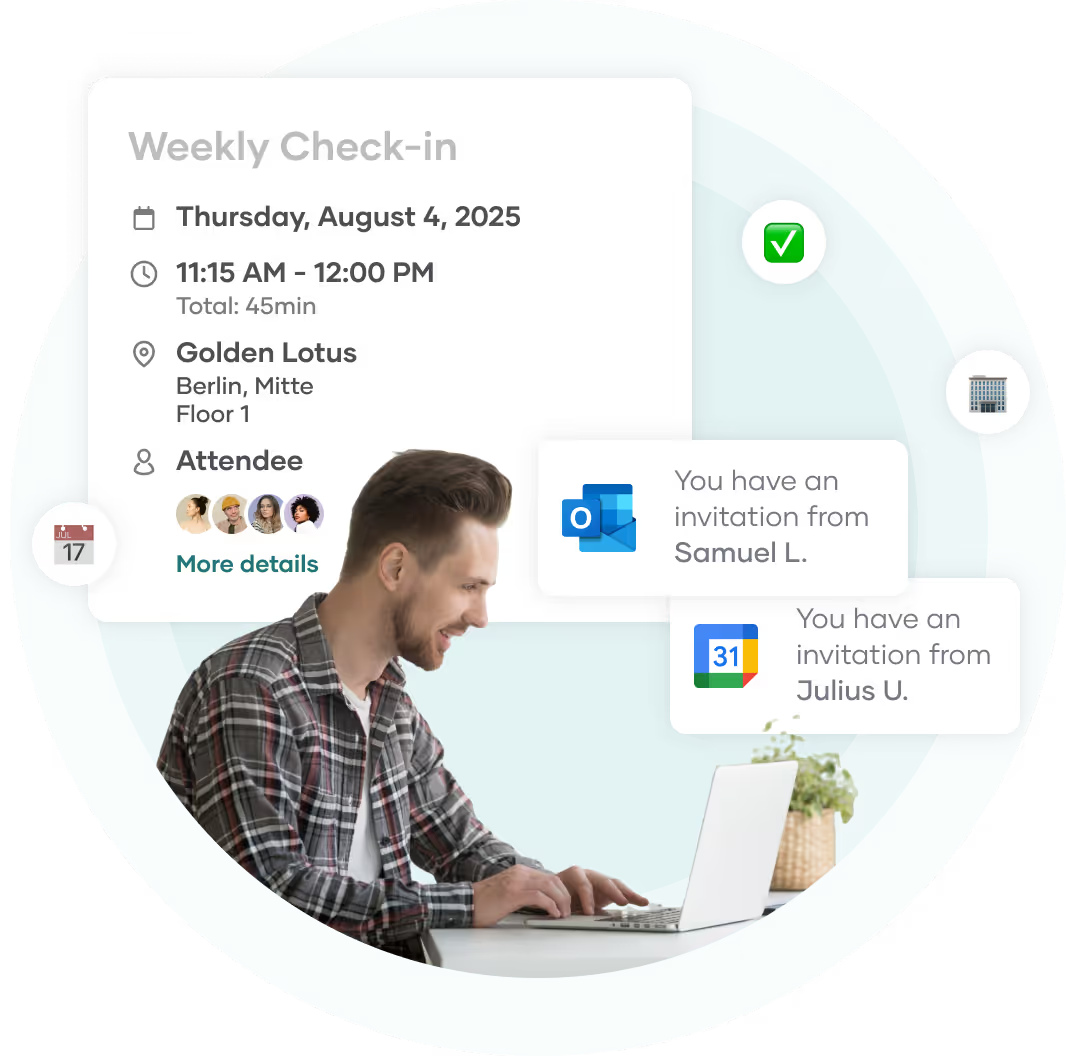
Integration into calendar and communication PULT can be linked to Outlook, Google Calendar or MS Teams. This means that desk bookings are displayed directly in the calendar or can be adjusted with a single click.
Data protection and tracking The PULT booking software allows you to evaluate office usage and utilisation and shows permanently booked and rarely used workspaces. However, in order to remain GDPR-compliant, no conclusions about the booking behaviour and attendance of individual employees may be drawn from this data.
Put desk sharing rules in writing: template for your company
If you introduce desk sharing in your company, you should put the most important rules in writing. This gives your team the necessary guidance and helps them to use the system reliably in everyday life.
Above all, rules on booking, use, consideration in everyday life, technology, check-ins and exceptions should be recorded, i.e. all points that could lead to misunderstandings in everyday working life. Depending on your organisation, you can design the rules as a short overview on the intranet, as a notice or as part of an internal desk sharing policy.
Booking: Workspaces must be booked in advance via PULT. Last-minute changes are possible as long as spaces are available.
Use: Workstations must be completely cleared after use. Personal belongings may not be left behind permanently.
Conduct: Conversations should be held at a normal volume; no phone calls without a headset. Please be considerate of colleagues who are concentrating on their work.
Technology: Monitors, docking stations and accessories may be shared, but must not be permanently moved.
Check-in: The workstation is considered occupied once you have checked in. Unused reservations will be released after 20 minutes.
Absence: In the event of illness, holiday or remote working days, the booking should be cancelled in good time.
Support: For technical questions or booking problems, please contact [name or function]. Feedback on usage is welcome.
{{cta}}
What typical problems can be solved by desk sharing rules?
Clear desk sharing rules prevent the typical problems that repeatedly arise with desk sharing: blocked spaces, disruptive noise in the workplace or misunderstandings when booking.
If you identify common problems early on and address them in a targeted manner, you will create the conditions for desk sharing to work in everyday working life. The following examples show which situations are particularly likely to cause dissatisfaction and how you can counteract them with simple rules.
Problem 1: Spaces are kept occupied without anyone being there Solution 1: Introduce binding bookings with clear check-in times. If you use a system with automatic release in case of no-shows (e.g. after 20 minutes), make this explicit. This will prevent seats from being blocked but left unoccupied.
Problem 2: Personal belongings are left at the workplace permanently Solution 2: Specify that all workspaces must be cleared at the end of the day and provide personal storage facilities (lockers, boxes) at the same time.
Problem 3: Disturbances caused by phone calls or conversations Solution 3: Make it clear that shared desks are primarily intended for quiet work. For longer phone calls or consultations, quiet rooms or other areas should be provided and used.
Problem 4: Frustration over workstations that cannot be found Solution 4: Clarify how many spaces are available and how they can be booked. Use the real-time display in PULT and define responsibilities for questions or problems.
Problem 5: Unequal treatment or informal special rules Solution 5: Ensure that all rules apply equally to everyone, regardless of position or team affiliation. If there are exceptions, for example for graphic designers or video editors with specific hardware requirements, document them in a comprehensible manner.
How do I enforce desk sharing rules?
Desk sharing rules are best established through role modelling, open communication in both directions and comprehensible processes for the entire team. If your team understands why certain rules apply and how they can be applied in everyday life, commitment will develop without the need for constant monitoring.
Orientation: Give your team clear guidance on what is expected, what rules apply and what behaviour is desired.
Address violations: Address any violations immediately. Remain direct and objective. Explain the behaviour and point out the applicable rules.
Feedback and further development: The rules must fit in with everyday life. Therefore, regularly seek feedback from the team and adjust the rules where something proves to be impractical or ambiguous.
Distribute responsibility: If desk sharing is organised in larger teams or across multiple locations, appoint designated contact persons. They can clarify questions, point out rule violations or collect feedback.
Compliance with desk sharing rules with PULT
PULT is a desk booking software that helps you implement your desk sharing rules. You and your team can use the software to book your desks, meeting rooms and zones. At the same time, you have access to the following functions:
Define booking rights & restrictions With PULT, you can specify exactly who is allowed to book what: you can make certain desks or areas, such as team zones, available only to specific users or teams. This can be done on a daily basis and apply to departments or roles that you specify.
Booking duration & advance booking PULT allows you to define booking periods in advance, for example, how far in advance reservations can be made. Resources (seats, rooms, zones) can also be blocked for a period of time, for example, if renovation or cleaning work is scheduled.
Clear rules for the team The dashboard shows your colleagues which rules apply: who is allowed to book, which spaces are blocked and after how long approvals are granted.
Automatic check-in & no-show rule The automatic check-in function via your existing Wi-Fi using PULT Presence ensures that booked spaces are automatically occupied or released again after a defined period of time if users do not show up.
Feedback & usage evaluation With PULT Office Insights, you can analyse the usage of your office, sorted by team, area and time slot. There is also the option of collecting feedback from the team to gauge the effectiveness of the rules or satisfaction with desk sharing.
What should you do if someone constantly blocks a desk sharing space without showing up?
Speak to the person directly and objectively or forward the case to the responsible contact person. In such cases, PULT automatically releases the space. You can set the waiting period after which this happens yourself.
How strictly should desk sharing rules be enforced?
The desk sharing rules should be displayed in a visible place in everyday life. It is important that they are understood, accepted and supported by role models in the team.
What do I do if all spaces are permanently booked out?
Check whether spaces remain unused because booked tables are not being used. Automatic releases for no-shows and clear booking periods in PULT help you to manage capacity utilisation fairly. To ensure that your office does not reach its capacity limits in the first place, you can analyse capacity utilisation in Office Insights.
How do I formulate desk sharing rules without making them seem like regulations?
Reflect on the common goal: functional working for everyone and free spaces when they are needed. Formulate the rules in a positive, understandable way and always in relation to the benefits they bring to everyone.
At PULT we're designing the future of the hybrid workplace for companies and their employees. Focused on SME and mid market customers in Eruope, I'm working on everything from Customer Discovery to Onboarding. I'm very passionate about new work and moved to Hamburg in 2024 even though I'm originally from France.
Resources
Learn how to run better workplace operations
Visitor Management
Visitor Management System: What It Is and How It Works
A visitor management system replaces the paper sign-in sheet with a digital process that screens, logs, and tracks every guest who enters your office. It captures who's on-site, notifies the host, and creates a searchable record for security and compliance reviews. For growing offices, this single change closes a security gap most reception desks still carry today.
A visitor management system digitizes guest check-in, replacing paper logs with pre-registration, badge printing, host notifications, and a searchable visitor record.
✓
Visitor management software reduces front-desk workload while creating the audit trail organizations need for security screening and regulatory compliance.
✓
A standalone visitor tracking system solves check-in but leaves desk booking, room booking, and office data in separate tools, creating gaps in a company's overall presence picture.
✓
PULT combines visitor management with real-time presence, desk and room booking, and emergency response in one platform, so security teams see who's on-site, employees and visitors alike, from a single source of data.
What Is a Visitor Management System?
A visitor management system is software that replaces the manual guest sign-in process with a digital, trackable one. It records a visitor's details, their arrival and departure, and notifies the employee they're there to see, all without a paper logbook at the front desk.
Companies adopt one for three reasons: security, compliance with regulations like GDPR, and a faster, more professional check-in experience for guests.
Standalone check-in tools handle the front desk in isolation. Platform-based visitor management, like PULT's, feeds that same data into a company's broader presence and office management system, so security teams see visitors and employees in one place.
What Does a Visitor Management System Do?
A visitor management system replaces manual sign-in with a digital workflow that handles the entire guest experience, from pre-registration to check-out. It records a visitor's details, notifies the right host, can issue a badge, and stores visits in a searchable log. Visitor management software runs this process on a tablet, kiosk, or mobile phone instead of a clipboard.
Core Features of a Modern Visitor Management System
✓
Pre-registration and invites: hosts send a visitor a link before arrival, with the visit details and parking or building information included.
✓
Self-service check-in: guests confirm their name, host, and purpose at a kiosk or tablet in under a minute.
✓
Optional ID and watchlist screening: depending on the platform, the system can check visitor IDs or flag names against a security or denied-entry list before a badge is issued.
✓
Badge printing and QR codes: guests can receive a visible, time-stamped credential that identifies them for that day's visit.
✓
Host notifications: the employee being visited gets an instant alert by email, Slack, or Teams, with the guest's details and, if enabled, a photo.
✓
NDA and agreement signing: legal documents are signed digitally during check-in, with a copy stored automatically for compliance records.
✓
Visitor logs and reporting: every visit is timestamped, searchable, and exportable, so front-desk trends are easy to review monthly.
✓
Emergency roll-call export: the current visitor list can be pulled during an evacuation, showing who is recorded as still in the building.
Visitor Management Software vs. a Paper Logbook
Criterion
Paper Logbook
Visitor Management Software
Data accuracy
Illegible entries, missing fields
Structured, mandatory fields
Security screening
None
Watchlist and ID checks
Emergency roll call
Manual count from paper
Instant, exportable list
Compliance records
Hard to search or retire
Searchable, with retention rules
How Does the Visitor Journey Work, From Invite to Check-Out?
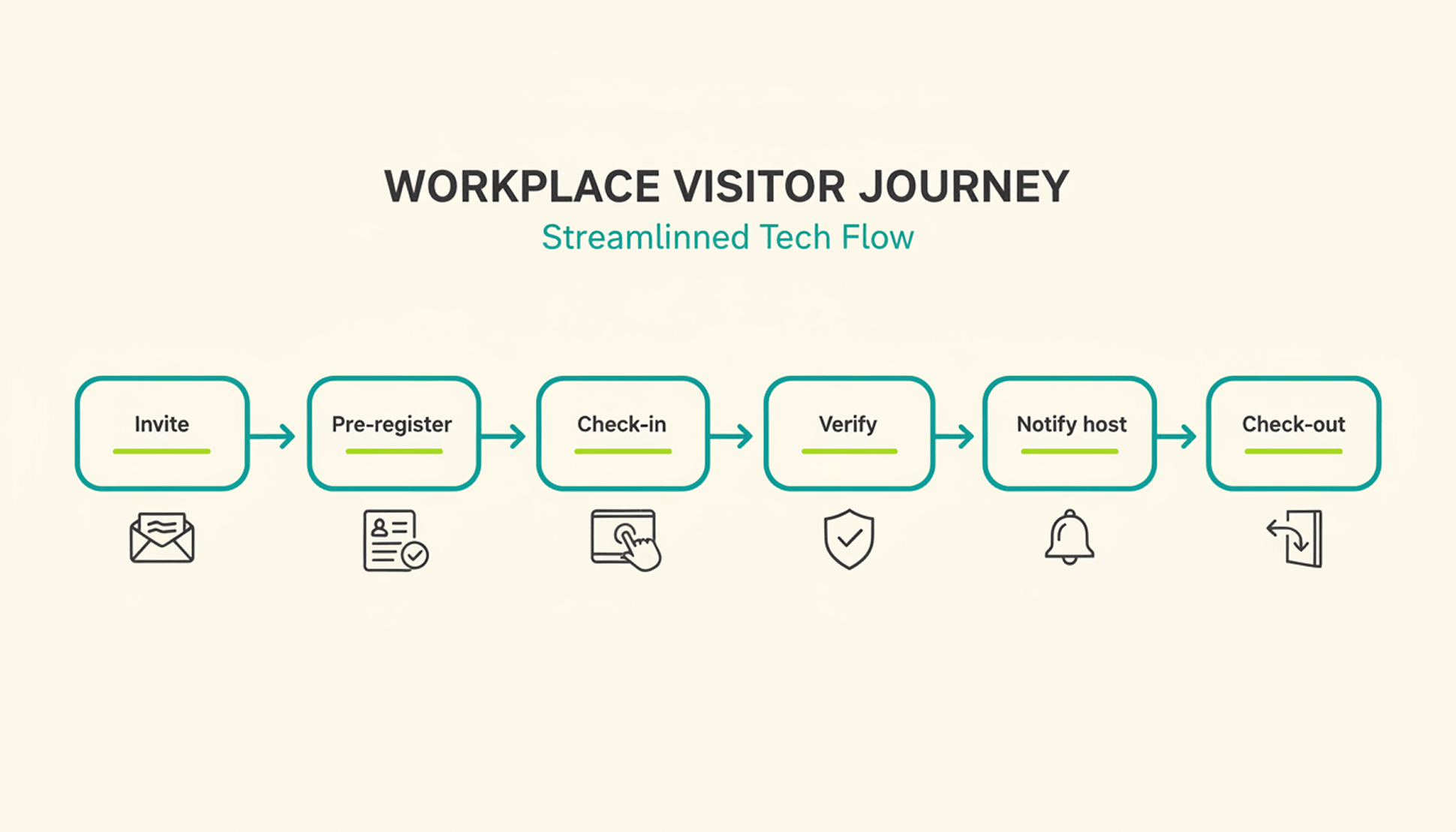
A typical visit runs through six steps. The host sends an invite, the visitor pre-registers, the visitor confirms their details on arrival, a badge can be issued, the host gets notified, and the system records check-out when the visitor leaves or at a configured time.
1
Pre-registration: the host schedules the visit and sends a link with arrival details, parking instructions, and building access notes.
2
Arrival and check-in: the visitor confirms their details at a kiosk or on a tablet or their own phone, usually in under a minute.
3
Optional identity and watchlist verification: depending on the platform and configuration, additional ID or security-list checks can be performed before building access is granted.
4
Badge issuance: a printed or digital badge identifies the visitor for the building and can be limited to that day's visit.
5
Host notification: the employee being visited receives an instant alert to come to reception, with the visitor's name and, if enabled, photo.
6
Check-out and logging: the visitor checks out on departure, or the system can close the visit automatically at a configured time, keeping the record administratively up to date.
What Are the Benefits of a Visitor Management System for the Office?
The clearest benefit is a complete, searchable record of who was on-site and when, something a paper log or verbal check-in can't provide.
Security and Compliance Benefits
A visitor management system can screen guests against a watchlist before they reach the office floor, depending on the platform and configuration. It can keep a timestamped log of visits for security and compliance reviews. Under GDPR, visitor data counts as personal data, so it needs a lawful basis for collection, an appropriate retention period or criteria for determining it, and safeguards against unauthorized access. A digital system can support these controls directly in the check-in process, reducing reliance on manual steps.
Visitor accountability also matters during an emergency. OSHA guidance notes that visitors need to be accounted for after an evacuation, and many employers use the sign-in list to run that headcount. A missing name on that list can delay an all-clear by several minutes, minutes that matter during a real evacuation.
Because PULT Presence tracks employees and visitors in one live view, a facilities team can pull an accurate roll call the moment an alarm sounds, not after searching through a paper binder.
Front-Desk Efficiency and Visitor Experience Benefits
Automated check-in cuts the time your team spends on manual sign-in, badge writing, and phone calls to announce a guest. A receptionist freed from clipboard duty can focus on greeting visitors and other front-desk work. Visitors move through reception faster, often in under a minute, and the first impression of your office improves the moment someone walks in the door. For client meetings or investor visits, that faster, more polished check-in becomes part of how your company presents itself.
How Do You Choose the Right Visitor Management Solution?
The right visitor management solution depends less on feature count and more on how well it fits your existing security setup, office size, and tool stack. A system built for a five-person startup office looks very different from one built for a 500-person campus with multiple buildings and a dedicated security team.
Calendar, HR, and communication tools your team already uses
Security and compliance
Data retention controls, audit logs, GDPR-aligned handling
Scalability
Pricing and setup across multiple locations
Price
Per-location vs. per-user pricing models
Ease of use
Kiosk setup time and how quickly staff can learn the system
Is a Standalone Visitor Management Platform Enough for a Modern Office?
A standalone visitor management platform solves the front-desk problem, but most offices also run desk booking, room booking, and parking through separate tools. Connecting these systems into one platform gives security and facilities teams a single, live view of who is on-site, employees and visitors together.
That connection matters most during a security incident or an office move, when facilities teams need one current view of occupancy rather than four separate logins to check. PULT pairs visitor management with desk booking software, room booking, and presence data, so a single dashboard shows recorded on-site employees and visitors. Office managers evaluating a broader workplace management software setup typically start here, since visitor data becomes far more useful once it's connected to the rest of the office.
{{onpage-cta}}
Turn Visitor Check-In Into a Security Advantage
A visitor management system turns a vulnerable front desk into a controlled entry point, giving you a searchable record of who checked in and when. The real payoff comes when it connects to the rest of your office, from desk booking to real-time presence data, giving you one live picture of recorded on-site users. For growing offices, that visibility is worth seeing in action.
✓
Visitor check-in, desk booking, room booking, and presence data live in one platform, so you manage all of it from a single login.
✓
A real-time view shows who is on-site, employees and visitors together, for faster emergency roll calls.
✓
Every visit is recorded in a searchable log, with records available for security and compliance reviews.
✓
Microsoft Teams and Slack support visitor notifications, while Personio and HiBob connect employee data through built-in integrations.
Envoy alternatives worth a closer look share one trait: they cover more of daily office management than a single visitor kiosk. If Envoy's per-location pricing or iPad-based visitor kiosk has you looking elsewhere, this comparison walks through seven platforms, including PULT, across visitor management, desk and room booking, parking, and office insights.
Envoy is a workplace platform originally built around visitor management and reception. Over time, the company expanded into desk booking, room booking, and parking under the Envoy Workplace product line, alongside its original visitor and delivery management tools.
Envoy's Core Features
Envoy's visitor check-in runs on iPad kiosks paired with a supported Brother printer for badges. The platform handles ID scanning, digital NDAs, health screenings, and delivery tracking, and it integrates with Slack, Microsoft Teams, Okta, and several badge-entry systems.
Envoy Pricing
Envoy recently moved away from per-active-user billing for new contracts and now prices in tiers by location and by workplace module, with Visitors, Response, Reservations, Screens, and Deliveries licensed and billed separately. For the Visitors product:
✓
Basic: free, with limited features (100 entries per month).
✓
Premium: $362 per location per month, billed annually.
✓
Enterprise: custom pricing for organizations with more complex security and compliance needs.
What Makes a Good Envoy Alternative?
Core Selection Criteria
A genuine Envoy alternative covers more than one office function. Look for desk booking, room booking, and visitor management under a single login, transparent pricing that doesn't require a sales call for a ballpark number, and integrations with the calendar and chat tools your team already uses. Multi-location support matters once you operate more than one office, since per-location fees add up fast.
Quick Checklist: What to Look For
✓
Visitor management available, with pricing clearly disclosed.
✓
Published pricing (per user, per space, or per resource).
✓
Native Microsoft Teams, Slack, or Google Workspace integration.
✓
Office insights and occupancy analytics on standard plans.
✓
Support for parking and multi-location rollouts.
7 Envoy Alternatives for Desk Booking, Visitor Management & More in 2026
Note: The features, prices, and capabilities shown in the following comparison are based on publicly available information from each provider (as of August 2026) and are intended solely for neutral orientation. Providers may change these details at any time, and no guarantee is given for their accuracy or completeness. All brand names belong to their respective owners and are used for comparison purposes only. PULT has no business relationship with the other brands listed. The order below does not represent a ranking.
#1 PULT
Origin & Concept: PULT is an all-in-one office management platform built for hybrid teams, combining desk, room, visitor, and parking management in a single system.
Technology: PULT runs as a cloud-based platform with native integrations into calendar, chat, and HR tools, and includes WiFi-based desk booking that detects desk usage automatically over the existing office network.
Target Audience: The platform is aimed at SMEs and enterprise companies with roughly 50 to 2,000 employees running a hybrid work model, often across more than one office location.
Strengths
✓
Platform breadth: Desk, room, visitor, and parking management run in one system instead of separate tools for each function.
✓
WiFi Desk Booking: Desk usage is detected automatically over the existing office WiFi without requiring employees to check in manually.
✓
Integration depth: Native connections to Microsoft Teams, Slack, Personio, and HiBob.
Plans & Pricing
(as of August 2026, source: PULT):
PULT Workplace (desk booking, meeting rooms, parking, and analytics):
✓
Starter: free, for up to 20 users and 1 location.
✓
Growth: from $3.40 per user/month.
✓
Business: from $4.60 per user/month.
✓
Enterprise: custom pricing, with white labeling and API access.
Visitor Management is priced as a separate product:
✓
Business: from $114 per location/month.
✓
Enterprise: custom pricing.
Additional costs may apply, for example:
✓
Presence AI: WiFi-based automatic attendance and desk-occupancy tracking is a separate product, starting at $119/month on the Business plan.
Origin & Concept: Deskbird is a workplace app built around hybrid work scheduling, letting employees plan office days and book desks, rooms, and parking from one interface.
Technology: SaaS platform with web, mobile, Slack, and Microsoft Teams apps. Business, Professional, and Enterprise include unlimited desks, users, admins, locations, and parking spots; pricing is based on active users.
Target Audience: According to the provider, deskbird is used by hybrid companies of various sizes, from small teams to global enterprises.
Strengths
✓
Published entry pricing: The Business tier price is listed publicly, unlike several competitors on this list that require a sales quote.
✓
Unlimited scope on every tier: Users, admins, locations, desks, and parking spots are unlimited even on the entry plan.
✓
Chat-tool integration: Desks, rooms, and parking can be booked directly from Microsoft Teams or Slack.
Plans & Pricing (as of August 2026, source: deskbird):
✓
Business: €2.75 per active user/month; covers desk, room, and parking booking, native mobile apps, and MS Teams integration.
✓
Professional: custom pricing; adds advanced booking rules, AI-powered floor plan design, automated check-in, workplace ticketing, and public API access.
✓
Enterprise: custom pricing; adds workplace surveys, custom analytics and reporting, advanced SLAs, and a dedicated Senior CSM.
Additional costs may apply, for example:
✓
Add-ons: Visitors Plus (reception kiosk and pre-visit registration), Rooms Plus (meeting-room signage and catering requests), and User & Data Management Plus (SAML, SCIM, HRIS sync) are priced separately from the core plan.
#3 Robin (Robin Powered)
Origin & Concept: Robin is a workplace management platform covering desk, room, parking, and locker booking, space management, meeting management, and visitor management, positioned as a single unified platform for larger organizations.
Technology: The platform syncs natively with Microsoft Outlook, Google Calendar, Microsoft Teams, Slack, Microsoft Entra, and Okta. According to the provider, point solutions such as standalone room-display software are a better fit for smaller, single-purpose needs.
Target Audience: According to the provider, Robin fits organizations with more than 150 hybrid employees using an office, and works best for companies managing multiple floors, offices, or buildings.
Strengths
✓
Platform breadth: Resource booking, space management, meeting management, workplace analytics, visitor management, and employee experience tools sit under one platform.
✓
Calendar depth: Native sync with Microsoft Outlook, Google Calendar, Teams, and Slack.
✓
Multi-site design: Built for organizations coordinating several offices or buildings at once.
Plans & Pricing (as of August 2026, source: Robin): Robin does not publish per-user or per-resource pricing. According to the provider, pricing is tailored per organization and requires a call with the sales team, with all subscriptions billed annually. Room displays and other hardware may come at an extra cost.
#4 Skedda
Origin & Concept: Skedda is a space-booking platform for desks, rooms, and other bookable areas, built around a configurable rules engine and an Organization Hub for managing multiple offices from one dashboard.
Technology: The platform is priced per space rather than per user, includes native Microsoft Teams and Slack apps, mobile apps for iOS and Android, and supports SSO via SAML 2.0.
Target Audience: According to the provider, Skedda serves organizations of all sizes, including universities, coworking spaces, and corporations with strict compliance needs.
Strengths
✓
Unlimited users and bookings: Every plan includes unlimited users and bookings because pricing scales with spaces, not headcount.
✓
Visitor management available: Visitor management is available alongside the existing space-booking tools as a separate add-on.
✓
Multi-office dashboard: The Organization Hub lets admins manage several offices from one place.
Plans & Pricing (as of August 2026, source: Skedda):
✓
Starter: from $99/month, priced per space, includes 15 spaces, a basic rules and roles engine, and a limited insights dashboard.
✓
Plus: from $149/month, priced per space, includes 20 spaces, a limited rules and roles engine, and a full insights dashboard.
✓
Premier: from $199/month, priced per space, includes 25 spaces, a full rules and roles engine, and a full insights dashboard.
✓
AllBooked (for sports, studios, coworking, and community booking): custom pricing.
An Administrators add-on is available on every plan for $99/month.
#5 Archie
Origin & Concept: Archie is a modular workspace platform covering desk booking, room scheduling, visitor management, and coworking software as separately priced products.
Technology: The platform requires no proprietary hardware and works with existing tablets and screens, with native integrations into Microsoft 365, Slack, and access-control systems such as Kisi and Brivo.
Target Audience: According to the provider, Archie is used by more than 1,000 organizations, spanning small and mid-sized businesses on the Starter plan to large, multi-location companies on Pro and Enterprise.
Strengths
✓
No proprietary hardware: Existing tablets and screens can be used instead of a fixed device.
✓
Transparent, published pricing: Rates per desk, room, and visitor product are listed publicly rather than hidden behind a sales call.
✓
Free trial after demo: According to the provider, a 14-day test environment is available following a product demo.
Plans & Pricing (as of August 2026, source: Archie):
✓
Desk Booking Starter: $2.80 per desk/month, minimum $159/month, covers 1 location with floor plans, QR check-ins, and occupancy analytics.
✓
Desk Booking Pro: $3.50 per desk/month, minimum $249/month, adds multiple locations, booking from Teams and Outlook, Slack integration, SSO, and SCIM.
✓
Desk Booking Enterprise: custom pricing, adds security and compliance support, custom data residency, and white-glove onboarding.
✓
Room Booking: from approximately $8 to $12 per room/month.
✓
Visitor Management: from approximately $109 per location/month, priced as a separate module.
Room displays and other add-on hardware may come at an extra cost.
#6 YAROOMS
Origin & Concept: YAROOMS is a workplace management platform combining hybrid work scheduling, desk and room booking, and visitor management under one system, with a dedicated Enterprise tier for large organizations.
Technology: The platform includes interactive office maps, an AI assistant called Yarvis, Microsoft Teams integration, and Single Sign-On on the Business tier, with API access and custom cloud deployment (Azure, AWS, or on-prem) available on Enterprise.
Target Audience: According to the provider, YAROOMS fits small offices on the Starter plan, growing businesses on the Business plan, and large, multi-location teams of up to 1,000+ users on Enterprise.
Strengths
✓
Published tiered pricing: Plans and per-year rates are listed publicly rather than hidden behind a sales call.
✓
AI assistant included: Yarvis is included from the Business plan rather than sold as a separate add-on.
✓
Multi-location scaling: Higher tiers add more locations and unlimited workplace analytics.
Plans & Pricing (as of August 2026, source: YAROOMS):
✓
Starter: from $99/month for 10 users, covers 1 location, 2 floors with an interactive office map, hybrid work scheduling, and desk and room booking.
✓
Business: from $399/month for 50 users, covers 2 locations, 90 days of workplace analytics, the Microsoft Teams app, Yarvis AI, and Single Sign-On.
✓
Enterprise: from $899/month for 300 users, covers 5 locations plus add-ons, unlimited analytics, API access, and custom integrations.
#7 Joan
Origin & Concept: Joan is an all-inclusive workplace platform covering meeting room booking, visitor management, desk and parking booking, digital signage, and analytics, with pricing based on active usage rather than which features are turned on.
Technology: The platform combines a base subscription with per-user and per-device add-on pricing, covering both the Joan app and registered screens or tablets.
Target Audience: According to the provider, Joan is used by organizations across tech, education, and hospitality, from small offices to global enterprises.
Strengths
✓
Pay-for-what-you-use model: Solutions you don't activate don't add to the cost.
✓
Free tier to start: A free plan is available before moving to a paid subscription.
✓
Full feature access on every plan: According to the provider, all solutions are available from the start rather than gated behind higher tiers.
Plans & Pricing (as of August 2026, source: Joan): Plans start at €49 per month as a base subscription with included users and devices.
✓
Additional users: €0.99 per user/month.
✓
Additional device licenses: €9.99 per device/month.
Custom quotes are available for larger setups.
How to Choose Your Envoy Alternative
Once you've narrowed the list by features and price, three factors can help assess how well a platform holds up as your office grows.
Scalability & Multi-Location Support
If you operate more than one office, check whether pricing adds a flat fee per location or scales with total users or spaces across all sites. That difference determines whether a second or third office meaningfully changes your bill.
Flexibility & Integrations
Your team already works inside Microsoft Teams, Slack, or Google Workspace. A platform that books directly inside those tools sees far higher adoption than one that requires a separate app nobody opens.
Security & Data Privacy
Visitor and badge data may qualify as personal data when it relates to an identified or identifiable person. Confirm how long visitor logs are retained, whether data stays in your required region, and whether the vendor supports SSO for admin access.
{{onpage-cta}}
Office Insights
Muster Point: Definition & Setup
A muster point is the designated spot where employees, visitors, and contractors gather after evacuating a building, so someone can confirm everyone made it out safely. Under OSHA 29 CFR 1910.38, covered emergency action plans need a procedure to account for employees after an evacuation, and a designated assembly area is one common way to do that in practice.
A muster point is a designated, safe location outside a building where employees, visitors, and contractors gather and get counted after an emergency evacuation.
✓
Under OSHA regulation 29 CFR 1910.38, employers subject to the standard must include procedures for accounting for all employees after an evacuation.
✓
A safe muster point stays clear of the building's hazard zone and emergency vehicle access routes, and remains visible to evacuees in smoke, rain, or darkness.
✓
PULT is an office management platform whose Presence feature detects who is on-site through a company's existing WiFi network, giving office and security teams a live, automatic headcount during an emergency.
What Is a Muster Point?
A muster point is a fixed, pre-identified location outside a building where everyone gathers after an evacuation alarm. Its purpose goes beyond simply getting people outside: it gives a warden or safety officer a single place to run a headcount, confirm who made it out, and flag anyone still unaccounted for.
Muster Point vs. Assembly Point vs. Muster Station
Muster point and assembly point generally describe the same function, while muster station is a related term commonly used in maritime and offshore settings. Onshore offices and warehouses in the US typically say muster point or assembly point.
Maritime operations commonly use muster station, including in contexts covered by SOLAS muster and drill requirements. For offices and other onshore workplaces, the location and headcount process generally work the same way regardless of whether you use muster point or assembly point.
Where Should You Place a Muster Point?
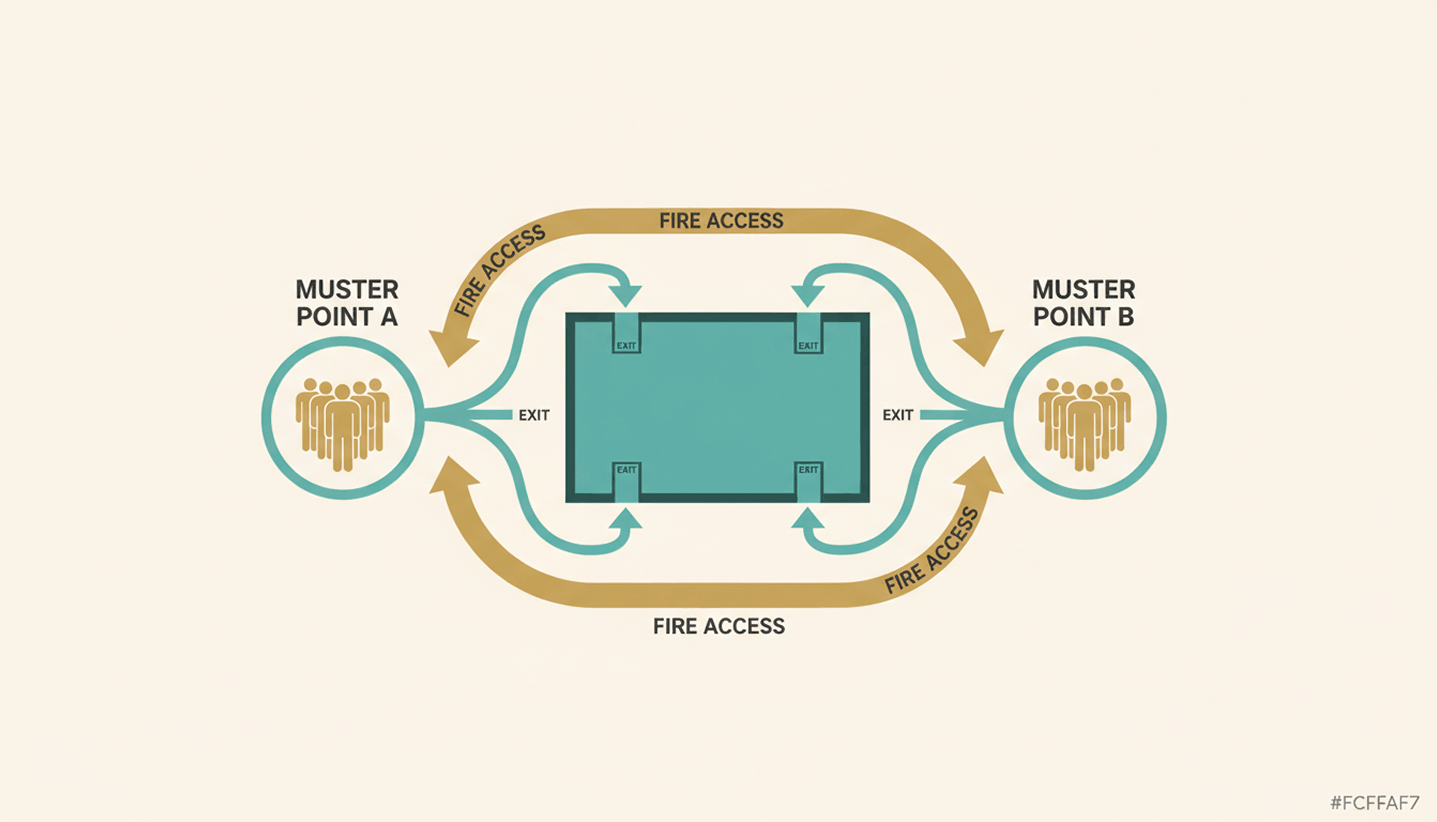
A good muster point sits far enough from the building to stay clear of smoke, debris, and structural risk, but close enough that people reach it within minutes. Beyond distance, a handful of practical criteria decide whether a location actually works during a real emergency.
✓
Distance from hazards: Keep the point away from the building itself, parking structures, and anything storing flammable material.
✓
Clear of emergency access: Don't block the routes fire trucks and ambulances need to reach the building.
✓
Reachable from every exit: Every evacuation route on the floor plan should lead to a muster point without crossing back through the building.
✓
Visible in poor conditions: Choose a spot that stays identifiable in smoke, rain, or after dark, and mark it with high-visibility signage.
If your evacuation plan needs a broader refresh beyond the muster point itself, our guide to office fire safety covers alarm systems and drill schedules in more detail.
How Do You Set Up and Mark an Emergency Muster Point at the Office?
Setting up an emergency muster point takes three things: clear signage, a person responsible for the headcount, and enough capacity for everyone who might be on site. Multi-floor or multi-tenant offices may need more than one muster point where building size, occupancy, or evacuation routes would otherwise create a bottleneck.
✓
Mark it clearly: Use clear, high-visibility signage so the location remains easy to identify by day and in poor visibility.
✓
Assign responsibility: Designate trained personnel to manage the headcount and report the result to the incident commander.
✓
Plan for scale: Add a second or third muster point for large floors, multiple buildings, or shared office space, and split the roster accordingly.
✓
Put it on the map: Add every muster point to your floor plan and walk new hires through it as part of onboarding.
How Do You Take a Headcount at the Muster Point?
Once people reach the muster point, the warden runs a headcount, sometimes called a fire roll call, and checks names against a roster before reporting the result to the incident commander. The harder part is making sure that roster actually reflects who was in the building, including people who don't show up on a payroll list.
Accounting for Visitors and Contractors
Employees usually appear on a standard roster, but visitors and contractors often don't. A guest who checked in an hour earlier or a contractor working on the third floor still needs a headcount at the muster point. A visitor log that isn't tied into the emergency plan leaves wardens guessing how many people are actually missing.
Manual Fire Roll Call vs. Real-Time Presence Data
A paper roll call at a mid-size office can take valuable time, and it only counts people already written down. PULT Presence uses office network data to show which employees are on site, while visitor and contractor records can supplement the on-site roster during an emergency.
{{onpage-cta}}
Give Every Muster Point a Fast, Accurate Headcount
A muster point only works if people know where it is and someone can confirm who made it there. Distance, signage, and a designated warden solve the location half of the problem. The headcount half comes down to whether your roster actually reflects everyone on site that day, employees, visitors, and contractors included. That's the gap most manual processes leave open.
✓
You see live on-site presence data to support the muster point headcount instead of relying only on a manual roster.
✓
Digitally checked-in visitors and contractors can be included without relying on a separate paper log.
✓
Presence tracking runs through your existing WiFi network and takes under 30 minutes to set up.
✓
Emergency Response activity can provide timestamped records of key actions for your safety files.

.jpeg)


















.png)
.png)
.png)
.png)
.png)